
Streaming SQL
Streaming SQL is a new SQL scheduling mode introduced by the Singdata Lakehouse platform. It uses a micro-batch processing mechanism that supports second-level data refresh intervals, similar to Spark Streaming's micro-batch execution model. Compared to traditional scheduled tasks, Streaming SQL significantly reduces the overhead of SQL submission and compilation by converting the submitted SQL into a persistent process that automatically triggers data execution and processing each time the configured interval elapses. Streaming SQL is designed for scenarios that require higher data freshness, and currently supports dt refresh and SQL processing that includes a table stream.
To better understand the advantages of Streaming SQL, here is a comparison with the regular SQL execution process:
Regular SQL Execution Process
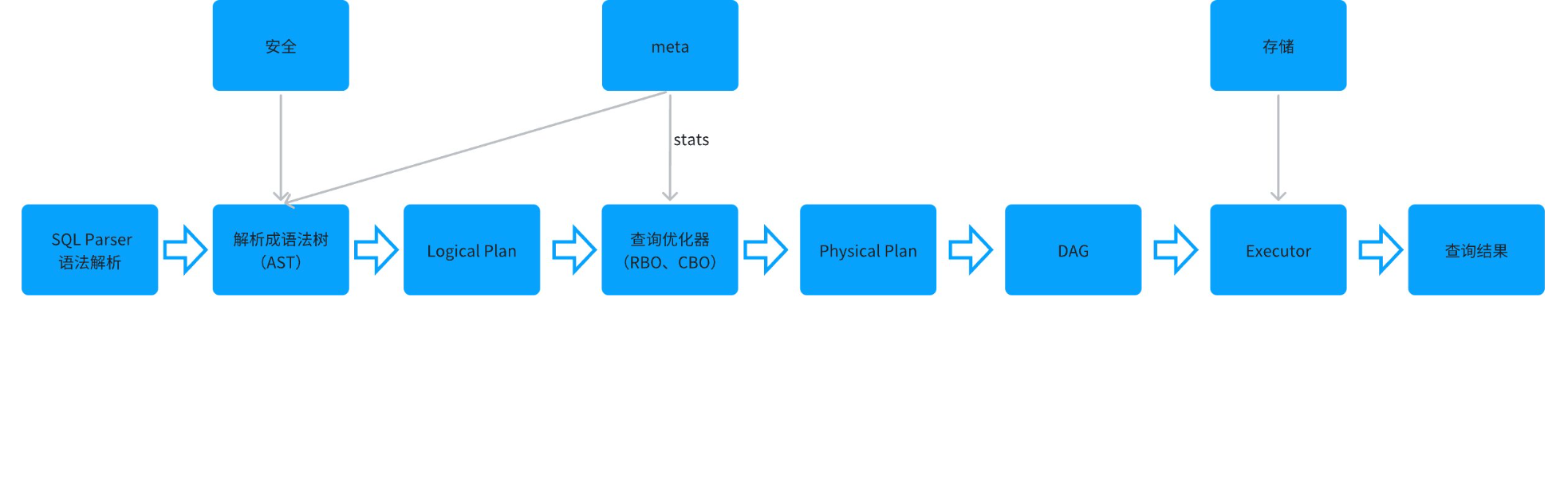
-
Syntax Parser: Performs lexical analysis, syntax analysis, and parses the SQL text into an abstract syntax tree (AST), followed by semantic analysis and type inference. Produces a Logical Plan.
-
Query Optimizer: Transforms the plan through rules and finds the best plan based on a cost model.
- RBO: Rule-Based Optimizer. Optimizes based on the SQL statements submitted by the user, primarily by rewriting SQL — for example, adjusting the execution order of SQL clauses. Common optimizations include predicate pushdown, field filter pushdown, constant folding, index selection, and join optimization.
- CBO: Cost-Based Optimizer. Calculates the cost of each execution method based on collected statistics and selects the optimal execution method.
- HBO: History-Based Optimizer. Optimizes based on historical execution data.
-
Generate DAG: The DAG describes how the execution plan maps to the physical distributed cluster. It reflects the materialization of the execution plan onto the distributed system, capturing properties such as concurrency and data transfer methods, while ensuring ordering and reliability.
-
Executor reads data and performs computation.
Streaming SQL Execution Process
-
First Submission and Physical Execution Plan Generation:
- On the first submission of a Streaming SQL job, the system performs a full compilation process, including syntax parsing, query optimization, and physical execution plan generation.
- The physical execution plan (DAG) generated at this stage is persisted and reused for subsequent execution cycles.
-
Optimized Subsequent Executions:
- Once the physical execution plan is generated and persisted, subsequent execution cycles use it directly in most cases, without recompilation.
- This means that each time data arrives, Streaming SQL can skip the time-consuming parsing and optimization steps and go straight to execution.
- During execution, the optimizer also monitors the volume of data to be processed each cycle. If the data volume changes significantly enough to make the current plan suboptimal, the optimizer regenerates and persists a new physical execution plan.
Scheduled Tasks vs. Streaming SQL
-
Regular Scheduled Tasks:
- Each execution requires re-parsing and re-optimizing the SQL, adding overhead.
- The scheduling interval typically needs to be set relatively large to reduce scheduling frequency and resource consumption.
-
Streaming SQL:
- By eliminating repeated compilation, Streaming SQL supports much smaller intervals, enabling higher-frequency data updates and processing.
- This mode is particularly well-suited for applications that require real-time or near-real-time data processing.
When to Use Streaming SQL
Streaming SQL brings greater flexibility and real-time capability to data processing. In the DDL definition of a dynamic table, the scheduling interval typically has a minimum value — for example, one minute — meaning data updates and processing have at least a one-minute delay. Streaming SQL's micro-batch mechanism allows this interval to be reduced to seconds, enabling faster data response and processing.
- Real-time data processing: Streaming SQL can respond quickly to data changes, making it suitable for applications that require real-time data processing and analysis.
- High-frequency data updates: For systems that need to update data frequently, Streaming SQL reduces the latency of each update and improves data freshness.
Limitations
- The job must use a dynamic table or include a table stream in the SQL processing. Regular SQL is not supported at this time.
- Jobs must run on an Analytics (AP) cluster.
- Streaming SQL can currently only be developed through the Lakehouse UI. Only one DML SQL statement is allowed per SQL file.
How to Use Streaming SQL
Developing a Streaming SQL Task
-
Create a new Streaming SQL node in Data Development.
-
Write the SQL task.
The submitted SQL task can contain only one DML SQL statement. During development, you can write any SQL without restrictions. However, when the job is started, the system validates whether the SQL conforms to Streaming SQL requirements.
Streaming SQL requirements:
- The job must use a dynamic table or include a table stream in the SQL processing.
- Jobs must run on an Analytics (AP) cluster.
- Only one SQL statement is allowed per SQL file.
Configure the Processing Interval
Click the configuration button to set the refresh interval — how often the data is processed. The minimum interval is currently 1 second.
Running a Streaming SQL Task
- Click the Submit button to submit the Streaming SQL job to the Operations Center.
- Start the Streaming SQL job. Go to the Operations Center and click the Start button. The Streaming SQL job will begin running.
Operations
-
In the Operations Center, you can see a list of all Streaming SQL jobs in the current workspace.
-
You can monitor the running status of a Streaming SQL job using its job ID.
Monitoring and Alerts
Monitoring and alerts support failure alerts for Streaming SQL task execution.
Use Cases
Using Streaming SQL with TABLE STREAM
This example uses TABLE STREAM to implement Slowly Changing Dimension Type 1 (overwrite update), and uses Streaming SQL's micro-batch processing to ensure data freshness.
Slowly Changing Dimension (SCD) is a technique for handling data changes in a data warehouse. As data sources evolve over time — through updates, additions, or deletions — SCD provides a structured way to track and apply those changes. Common types include SCD1 (overwrite update) and SCD2 (historical records).
This example simulates a scenario where changes to the source table are automatically reflected in the SCD table via Streaming SQL processing.
- Create a regular SQL node and execute the following SQL to create the source table, insert test data, and enable table stream to capture changes.
- Create the SCD target table to keep in sync with the source table.
- Create a new Streaming SQL node and paste the following SQL into it. Set the processing interval to 20 seconds.
- Submit the Streaming SQL job and click Start in the Operations Center.
- After updating the source table data and waiting for the Streaming SQL job to complete, the SCD table will reflect the same changes.
- Execute the following SQL in a regular SQL node:
- Clean up the environment.
-
Stop the Streaming SQL job in the Operations Center.
-
Drop the schema.
Using Streaming SQL with a Dynamic Table
This example uses a dynamic table to aggregate data by time, and uses Streaming SQL's micro-batch scheduling to improve data freshness.
- Create an ODS table.
- Use a dynamic table for aggregation. Create the dynamic table in a regular SQL node. Do not set a scheduling period in the DDL.
- Create a new Streaming SQL node, paste the following SQL into it, and configure it to run every 10 seconds.
-
Start the Streaming SQL job to begin refreshing the dynamic table.
-
Create a new regular SQL node, insert some data into the source table, and verify that the dynamic table is refreshed successfully.