
Question Asking Guide
This document is intended for business users and explains how to ask Analytics Agent questions that are more likely to produce accurate answers.
Analytics Agent supports data analysis using natural language. Business users do not need to write SQL first, nor do they need to know the underlying table names, field names, or system configuration. In most cases, simply expressing in everyday business language "what you want to see, within what scope, and how you want it presented" is enough — the system will use the semantic configuration, metrics, and knowledge in the analytics domain to understand automatically.
Intended Audience
- Business leaders: quickly view core operational metrics, trends, and anomalies.
- Operations, sales, finance, HR, and other business staff: ask questions specific to their own business domain.
- Business analysts: convert ad hoc questions into reusable question templates or dashboard materials.
If you are responsible for building tables, configuring field semantics, metrics, knowledge, or answer builders, also read the semantic configuration and Q&A accuracy troubleshooting documentation.
Confirm the Analytics Domain Before Asking
After entering the analytics page, the current analytics domain name is shown at the top of the page. The analytics domain determines which tables, fields, metrics, knowledge, and permission boundaries Analytics Agent can use.
If you find that a question is clearly business-related but the system answers "no data" or the answer is obviously outside the business scope, first confirm whether you selected the wrong analytics domain.
If you are not sure what can be asked in the current analytics domain, open the "Data" tab on the page. It shows the available data objects and fields in the current analytics domain. Regular business users don't need to memorize field names — just use it to gauge roughly what business data the current domain covers. Business analysts can also reference field names to design more stable questions.
Common situations:
- Asking about financial payment details in a Sales Analytics domain may not match the correct data.
- Asking about formal operational data in a test domain may only return results from test tables.
- If you don't have access to a specific analytics domain, you cannot bypass permission boundaries through Q&A to obtain data.
Basic Structure of a Good Question
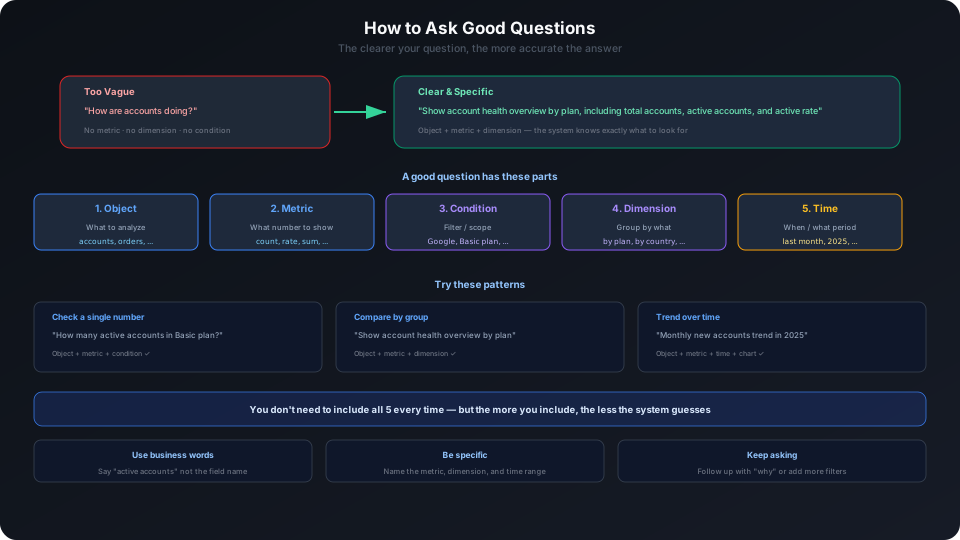
Business users do not need to follow a fixed template. Start with a natural language sentence describing your business question:
This question is already fairly clear because it states:
- Business object: accounts
- What you care about: health overview
- Grouping method: compare by plan
- Desired results: account count, active account count, active rate, seats, etc.
If you are not sure which metrics to look at, you can ask more broadly first:
Then follow up based on what the system returns:
Questions are not a test. Business users can start with a natural question, then narrow down through follow-up questions.
If you already know the object, scope, or time period you want to see, including that information usually produces more stable answers.
Common Question Formats
Looking Up a Number
Suitable for confirming a single metric.
This question is already clear enough for business users because it specifies the business object and condition.
If your organization has multiple similar expressions — for example, "active accounts", "current active accounts", and "active subscription accounts" have different meanings — you can add a definition note:
Business users don't need to know whether this definition comes from knowledge, metrics, or field configuration. The definition should be pre-configured by the analytics domain maintainer through field semantics, metrics, knowledge, or answer builders.
Making Group Comparisons
Suitable for comparing different departments, regions, products, channels, and customer types.
Viewing Trends
Suitable for viewing changes by day, week, month, or quarter.
If you care about a specific time range, add the time:
Viewing Rankings
Suitable for finding Top N or Bottom N.
Viewing Proportions
Suitable for viewing structure and composition.
Querying Details
Suitable for retrieving specific records.
Detail queries can include "what information you want to see", such as account name, country, and source. Business users don't need to know the underlying field names — just describe the business information needed.
Asking with Business Context
If administrators or analysts have maintained business documentation, definition explanations, or reference materials, Analytics Agent can reference this content in answers.
How to Reduce Ambiguity
Clarify the Business Definition
If a term has only one common meaning in your company, you can ask directly:
If there are multiple similar definitions in the company, add a clarification in business language:
If you are not sure about the definition, you can ask:
Do not require business users to write field conditions like active_subscription = TRUE. Field conditions should be configured by the semantic layer maintainer; business users only need to state business concepts.
Clarify Filter Conditions
If you only care about a specific scope, state it directly:
If you know what you want to see, add it:
Clarify Dimensions
If you want to do a breakdown comparison, use phrases like "break it down by":
You can also specify which results to compare:
Clarify the Time Range
If the question relates to trends, growth, or changes, use time expressions familiar in your business to clarify the scope.
If no time range is specified, the system may use a default range. The default may not match your business expectations, so for trend questions it is best to include natural language time expressions like "last 30 days", "since the start of this year", "this month and last month".
When to Specify Output Format
Analytics Agent automatically selects text, tables, or charts based on the question, but you can also specify the output format directly.
Suitable for tables:
Suitable for bar chart:
Suitable for line chart:
Suitable for pie or donut chart:
You Can Continue Follow-Up Questions
After one answer, you can continue to ask about the results.
For example, first ask:
Then follow up:
Follow-up questions don't always need to repeat the full context, but if the question spans multiple business objects, it is recommended to restate the conditions.
Model Selection
The model selection entry is visible on the left side of the input box. The model capabilities and the list of models connected to the product change quickly — the available models on the page change with product versions, AI Gateway connections, administrator configuration, and current account permissions.
Regular business users are recommended to use the default recommended model. Only switch models when administrators or analysts explicitly ask to test different model performance.
If the model list you see differs from documentation screenshots or other users' pages, this is usually not a question-asking issue. It may be that the current gateway has not connected to that model, the administrator has not enabled it, or the current account does not have permission to use it. Business users should not troubleshoot model configuration themselves — contact the administrator to confirm.
Pre-Submission Checklist
Before submitting a question, quickly check:
- Is the correct analytics domain selected?
- Is it clear which business object you want to see, e.g., account, order, customer, product?
- Is it clear what you want to know, e.g., count, trend, ranking, proportion, reason?
- Is there a clear scope, e.g., Basic plan, a specific region, a specific channel?
- For trend questions, is a natural language time range included?
- For detail questions, have you specified what business information you want to see?
- When a business definition is prone to confusion, can you add a clarification in business language; if unsure about the definition, ask about the definition in the current analytics domain directly.
Common Issues
The question is too short — how will the system handle it?
The system will infer your intent based on the semantic configuration, metrics, knowledge, and context in the analytics domain. The shorter the question, the more the system needs to infer, and the higher the chance of misunderstanding. Business users can start with a simple question and then add conditions through follow-up questions.
What if I don't know the field name?
Just ask in business language. For example, "active accounts", "cancellation rate", "trial conversion rate". Field names are something configurators need to care about — not a prerequisite for business users to ask questions.
If the system consistently misunderstands a term, report the problem to the analytics domain maintainer so they can supplement field semantics, metrics, or knowledge.
Why does the same question sometimes give different answers?
Possible reasons include:
- Data has changed.
- Analytics domain configuration has changed.
- Permission scope has changed.
- Question context is different.
- Different model used.
When judging whether an answer is trustworthy, check the SQL Statement and Logs below the answer.
Related Documentation
- Reading Analysis Results — How to determine whether an answer is trustworthy
- Analysis Patterns Guide — Common analysis patterns: trends, comparisons, rankings, proportions
- Using Data & Exploration — Viewing analytics domain data scope and structured exploration
- Handling Feedback — Submit feedback to help the system improve
- Troubleshooting Q&A Accuracy Issues — Diagnostic methods when answers are inaccurate