
Dynamic Table Overview
What is a Dynamic Table
A Dynamic Table is a data object in Singdata Lakehouse. Unlike a regular table, it dynamically generates data through a defined query statement. During refresh, it automatically retrieves incremental data from the base table and uses incremental algorithms for computation. This approach significantly improves data processing efficiency, making it especially well-suited for large-scale data workloads.
How Timely Dynamic Table Captures Source Table Changes
Dynamic Table detects changed data based on the metadata commit time of the source table. Changes that have been committed to the source table's metadata can be captured. The following scenarios may affect the timeliness of change data visibility:
- DML data modification: After a DML operation on the source table completes successfully, the changed data becomes accessible to Dynamic Table.
- Bulk import (Bulkload): After a bulk import task on the source table completes successfully, the changed data becomes accessible to Dynamic Table.
- Streaming ingestion: For data written to the source table via the Ingestion Service streaming API, changes are committed by default every 1 minute. Once committed, the changed data becomes accessible to Dynamic Table. Note: SQL queries directly on the source table are real-time; this constraint only applies to the timeliness of incremental changes being visible to Dynamic Table.
Dynamic Table Use Cases
Not Suitable for Incremental Scenarios
- Queries with heavy data sorting requirements, such as those using an ORDER BY clause.
- Window functions that require data sorting (except when RowNumber=1), where the incremental data contains multiple very large partitions.
- Data that lacks good clustering characteristics and cannot clearly separate cold and hot data via join key, aggregate key, or window partition key.
- The supported types for aggregate keys are currently: CHAR, VARCHAR, STRING, TINYINT, SMALLINT, INT, BIGINT, DECIMAL, BOOLEAN, DATE. Other types are not supported.
Real-time Processing Scenarios
In real-time data processing scenarios, data flows into the system continuously and rapidly. Traditional processing methods such as Full Reload or Full Refresh can be inefficient in terms of performance and resource consumption, especially when handling large-scale data streams. Dynamic Tables use incremental computation, processing only the data that has changed since the last update, which significantly reduces computing resource consumption.
Advantages of Dynamic Table:
- Real-time: Quickly reflects new data changes in the data warehouse, maintaining high data freshness.
- Cost-effective: By setting a reasonable refresh interval, you can balance performance and cost for optimal resource utilization.
- Resource elasticity: Lakehouse resources can be easily scaled elastically, which is especially advantageous when handling peak data inflows.
- On-demand computation: In the future, Lakehouse will support on-demand activation of computing resources — starting resources only when there is data to compute — further improving efficiency and reducing costs.
Application Example:
Background: An e-commerce company wants to analyze its sales data in real time to make quick inventory and pricing decisions. Data flows into the system at a high rate, requiring an efficient data processing approach.
Challenges:
- Traditional full-data processing methods are inefficient in terms of performance and resource consumption, especially during peak periods.
- A processing mechanism is needed that can quickly respond to data changes and keep data fresh.
Solution:
- Introduce Dynamic Tables, using incremental computation to process only the data that has changed since the last update.
Advantages of Dynamic Table:
-
Real-time: Dynamic Tables quickly capture and reflect data changes, ensuring decisions are based on the latest sales data.
-
Cost-effective: With Dynamic Tables, the company can set reasonable data refresh intervals based on actual needs, avoiding unnecessary waste of computing resources.
-
Resource elasticity: During promotional events or holidays when traffic peaks, Lakehouse resources can be scaled on-demand to handle peak data inflows without maintaining high resource configurations long-term.
-
On-demand computation: In the future, Lakehouse's on-demand computation feature will further improve efficiency by activating resources only when there is data to compute, thereby reducing costs.
Fixed Dimension Analysis Queries with High Data Freshness Requirements
In fixed dimension analysis query scenarios, the goal is to provide near-real-time analysis results. Traditional view queries can achieve this, but if large amounts of data transformation are involved, query speed may suffer. To address this, you can materialize the transformed results so that queries return pre-computed data directly, improving query speed. Materialized results can use either traditional tables or dynamic tables.
Traditional tables offer the highest performance because they return pre-transformed data at query time. However, the downside is that you need to periodically schedule full recomputation, which typically takes a long time.
Dynamic Tables combine the advantages of incremental computation. By updating only the records that have changed since the last load, Dynamic Tables reduce per-build time and maintain data freshness by shortening the refresh interval.
Notes
- When processing large volumes of source data changes, the computation task may approach the load of a full refresh. Although incremental computation has clear efficiency advantages, setting the refresh interval too short may cause task backlog. This is because each refresh operation takes a certain amount of time to complete; if that time exceeds the configured refresh interval, subsequent refresh tasks will queue up.
- Recommendations:
- Set a reasonable refresh interval: Based on the frequency of data changes and the time each refresh takes, set a refresh interval that avoids backlog.
- Monitor and adjust: Continuously monitor data change patterns and system performance, and adjust the refresh interval based on actual conditions to optimize efficiency and resource utilization.
- Recommendations:
- When writing operators, refer to the notes on how operators perform incremental refresh to optimize incremental refresh tasks.
Unsuitable Scenarios
- Queries involving a large number of Outer Join operations where the right table in the Outer Join changes frequently.
- Queries with heavy data sorting operations (such as ORDER BY).
- Window operations that require data sorting (except when RowNumber=1), where the incremental data contains multiple extremely large partitions.
- Data that lacks good clustering characteristics — for example, where cold and hot data cannot be clearly distinguished via join key, aggregate key, or window partition key.
Overview of Dynamic Table Working Principle
How to Obtain Changed Data
- MetaService (the metadata service, a component of Lakehouse) records every historical data version of each table in Lakehouse.
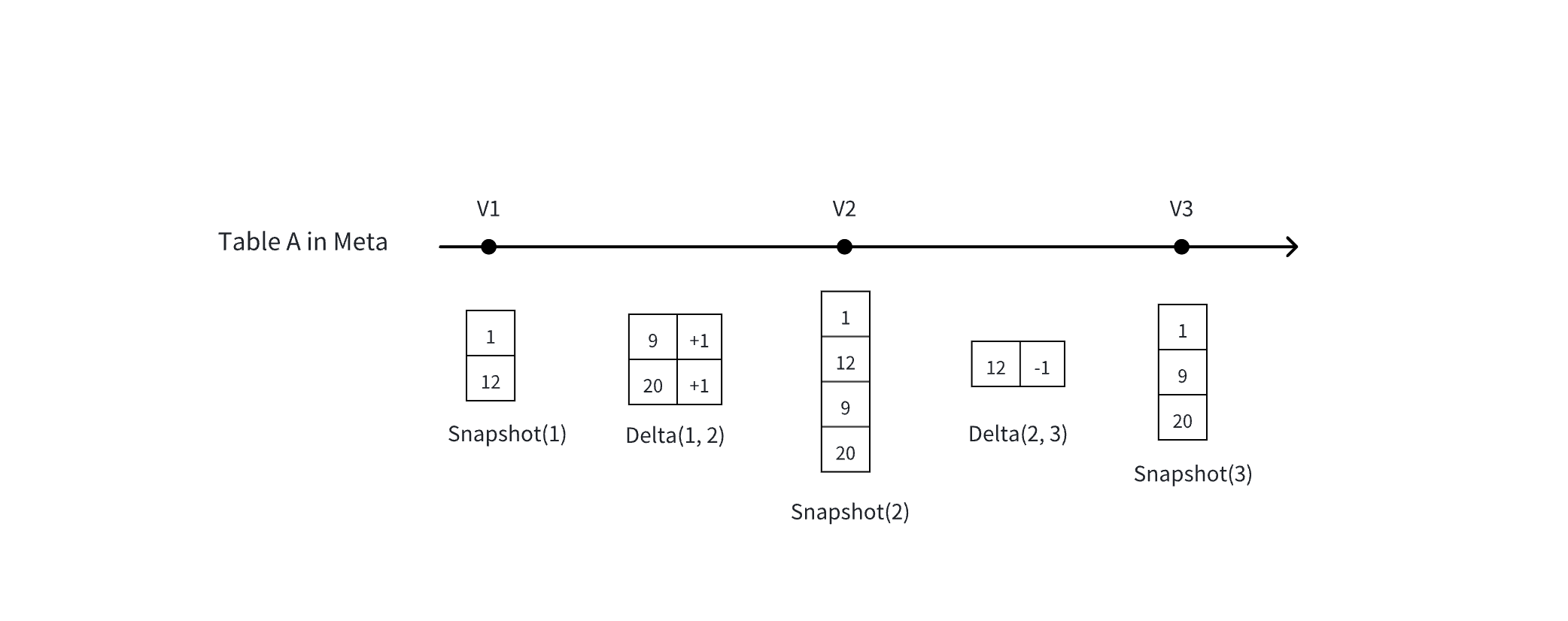
- Basic concept: A table's Snapshot (full) vs. Delta (changes)
Lakehouse Dynamic Table Refresh Mechanism
Lakehouse currently uses a scheduling mechanism to update Dynamic Tables. The following scheduling modes are supported:
- Define scheduling properties in the DDL statement
- Define scheduling in Lakehouse Studio
- Submit Refresh jobs using a third-party scheduling engine
| Usage | Advantages | Disadvantages | |
|---|---|---|---|
| Define scheduling properties in DDL | Define the refresh interval in refreshOption. See the Dynamic Table creation documentation for details. The minimum refresh interval is currently 1 minute. | Simple and easy to use; quickly sets refresh options. No dependency on third-party tools. | Lakehouse does not currently support defining strict upstream/downstream dependencies on Dynamic Tables in DDL. Relies on time-based scheduling in DDL definitions. You can use time intervals to ensure upstream refresh completes before scheduling downstream. |
| Define scheduling in Lakehouse Studio | Configure scheduling through the visual interface in Lakehouse Studio. See the task development and scheduling documentation for details. The minimum refresh interval is currently 1 minute. | Visual configuration, user-friendly. Supports scheduling dependency configuration to ensure upstream refresh completes before refreshing downstream. Supports single-node run monitoring such as failure alerts and timeout alerts. | |
| Submit Refresh jobs using a third-party scheduling engine | Download the Lakehouse client and use cron expressions to schedule Refresh tasks, or use the Java JDBC interface to submit Refresh commands programmatically. | More flexible control over job submission and scheduling configuration; no restriction on time intervals. | Requires a third-party scheduling system. |
Comparison of Dynamic Tables, Materialized Views, and Regular Views
From the Lakehouse implementation perspective, Dynamic Tables evolved from traditional materialized views. Although they share some commonalities, their intended use cases differ significantly.
| Materialized View | Dynamic Table | Regular View | |
|---|---|---|---|
| Definition | A special view that pre-computes and stores query results | A high-efficiency tool focused on data processing | A virtual table that stores no data, only the query definition |
| Performance optimization | Significantly improves query efficiency by reducing redundant computation through pre-stored results. Other SQL can leverage the materialized result for query rewriting. | Can also improve query efficiency, but the query optimizer does not perform query rewriting. | Performance depends on the underlying data table's query efficiency; the query logic is recomputed each time. |
| Data freshness | Requires immediate data updates to ensure query rewriting accuracy. | Focuses on data processing flexibility; data latency is adjustable. | Data is always the latest each time. |
| Update mechanism | Uses a scheduled refresh mechanism to keep data current. | Adjusted according to business definitions; real-time updates are not enforced. | Stores no data; no updates needed. |
| Query optimization | Optimizer automatically identifies and uses pre-stored results. | Does not rely on automatic query rewriting by the optimizer. | |
| Use case | Suitable for pre-computing and reusing query results. | Suitable for data processing pipelines where data may not be the absolute latest. | Suitable for low-complexity queries without heavy processing. Queries involving large data volumes and complex operators will be slow because they are recomputed each time. |
| Operations | No complex maintenance scenarios. | Dynamic Tables also support advanced operations such as adding columns and version rollback. | No complex maintenance scenarios. |
Dynamic Table Refresh Monitoring
View Refresh History via SQL Commands
You can use SQL commands to monitor the refresh history of Dynamic Tables. To get an overview of the refresh status of all Dynamic Tables, use the following SQL statement:
Filter refresh history
You can use the WHERE clause to filter by specific fields. For example, to view the refresh history of a Dynamic Table named my_dy:
| Field Name | Description |
|---|---|
| workspace_name | Workspace name |
| schema_name | Schema name |
| name | Dynamic table name |
| virtual_cluster | Computing cluster used |
| start_time | Refresh start time |
| end_time | Refresh end time |
| duration | Refresh duration |
| state | Job status: SETUP | RESUMING_CLUSTER | QUEUED | RUNNING | SUCCEED | FAILED |
| refresh_trigger | MANUAL (manually triggered by user, including Studio scheduled refresh) | LH_SCHEDULED (scheduled by Lakehouse) |
| suspended_reason | Reason for scheduling suspension |
| refresh_mode | NO_DATA | FULL | INCREMENTAL |
| error_message | Failure message, if the refresh failed |
| source_tables | Names of tables used by the Dynamic Table |
| stats | Information such as incremental refresh row counts |
| job_id | Job ID; click to view the job profile |
View Single Job Refresh Details via Job Profile
In addition to SQL commands, you can view the refresh details of a single job through Job Profile. Navigate to Compute → Job History, find the refresh job, and click into it to open the profile. The profile shows execution time, input/output row counts, and the incremental SQL execution plan.
- Use the input records shown in the job profile to confirm whether data was read incrementally.
Cost of Dynamic Tables
Computing Cost
Dynamic Table refresh operations rely on computing resources (Virtual Cluster), including:
- Scheduled refresh: Automatically executes refresh based on the configured interval.
- Manual refresh: Triggered by the user as needed.
Both types of refresh operations consume computing resources.
Storage Cost
Dynamic Tables also require storage space to save their materialized results. Like regular tables, Dynamic Tables support:
- Time Travel: Allows you to access data from any point within the past 7 days.
- Time Travel retention period: Defaults to 7 days. After this period, data is no longer accessible via Time Travel and will be physically deleted.
Refresh Schedule Settings
Factors affecting refresh speed
The speed of incremental refresh mainly depends on two factors:
- Volume of source data changes: The more data the refresh operation needs to process, the longer it takes.
- Fixed overhead: Some baseline overhead is incurred with each refresh regardless of the volume of changes.
Business value and refresh frequency
- If data freshness is not critical to your business, consider reducing the refresh frequency. This reduces the computational overhead from frequent refreshes.
- Using incremental computation mode improves single-refresh speed because it only processes data that has changed since the last refresh.
Balancing refresh cost and frequency
- Refresh costs increase with refresh frequency. You need to balance the business value of data freshness against the resulting computational costs.
- High-frequency refreshes keep data up-to-date in real time, but accumulated computational costs will also increase.
Recommendations
- Evaluate your business needs to determine the specific value of data freshness to your operations.
- Set a reasonable refresh frequency based on business value to optimize cost-effectiveness.
- Use incremental computation mode to improve refresh efficiency and reduce unnecessary computational overhead.
Dynamic Table Limitations
- Incremental refresh limitations: Non-deterministic functions such as
random,current_timestamp,current_date, etc., are not supported. - Direct modification of Dynamic Table data is not supported — for example, executing
UPDATE,DELETE, orTRUNCATEon a Dynamic Table.
Use Cases for Processing with Dynamic Tables
Processing Lakehouse Sample Data with Dynamic Tables
Lakehouse provides a dynamic public dataset named ecommerce_events_multicategorystore_live, located at clickzetta_sample_data.clickzetta_sample_data.ecommerce_events_history. This dataset is updated in real time and can be queried directly.
Real-time dataset availability: Currently, the ecommerce_events_multicategorystore_live real-time public dataset is only available in the Shanghai region of Alibaba Cloud. If your account or service is not in that region, you will not be able to query this public dataset.
- Write a SQL script to define scheduling and process data using DDL
- View Dynamic Table refresh
Use a command to view Dynamic Table refresh
View Dynamic Table refresh history in job history
Go to Compute → Job History and filter by the Dynamic Table name or the job tag. Click into any job to view input records and confirm how many incremental rows were retrieved. In the diagnostics section, you can view the execution plan of the incremental SQL.
- After seeing incremental refresh data in the job history, you can view the data changes
Using Studio to Schedule Dynamic Table Refresh Tasks
In this demonstration, we simulate incremental data insertion and show the effects of incremental computation through the following steps:
- Simulate incremental data insertion: Use
INSERT INTOstatements to insert simulated data into the specified table, mimicking incremental data updates in a real business scenario. - Use Studio scheduling for refresh: Use the scheduling feature of Lakehouse Studio to trigger and execute incremental data refresh tasks.
- Demonstrate incremental computation effects: Show how incremental computation efficiently processes newly inserted data and reflects the updates in the final query results.
- Data preparation
- Data processing
- Create a new SQL script named "1. Time Processing dt" in the Development module to process the prepared data and create a dynamic table:
-
Create a new SQL script "2. Aggregate dy" to perform aggregation on the data processed in the previous step
-
- Build dependencies and scheduling relationships
-
Task one "1. Time Processing dy" — in the task scheduling settings, set the refresh interval to 1 minute.
-
Task two "2. Aggregate dy" — set the refresh interval to 1 minute, then add a dependency on task one "1. Time Processing dy" in the scheduling dependencies to ensure upstream data is ready before the aggregation runs.
-
In the Development interface, click Submit on each task to activate the schedule.
- Verify incremental refresh
Using Dynamic Table Task Nodes for Data Processing
For usage instructions, see Dynamic Table Tasks.
Constraints and Limitations
- Apart from
current_date, other non-deterministic functions are not supported. Creating a Dynamic Table using non-deterministic functions will result in an error. - It is recommended to use GP-type clusters to refresh Dynamic Tables. Reason: During the refresh process, Dynamic Tables automatically perform small file compaction based on built-in policies, and AP-type clusters do not support this operation.