
Multi-Table Real-Time Sync Task
Through the multi-table real-time sync task, you can sync an entire database to the Lakehouse — including a full sync of historical data and real-time incremental sync of change data. Multi-table real-time sync achieves second-level end-to-end data freshness.
This document provides a concise overview of the multi-table sync task's features and configuration. For a more detailed usage guide, see Multi-Table Real-Time Sync Complete Guide.
Supported Data Source Types and Versions
| Type | Incremental Read Mode | Database Version |
|---|---|---|
| MySQL | Binlog | 5.6 and above, 8.x |
| PostgreSQL | WAL logs | 14 and above |
Source Database Preparation
Database Parameter Configuration
PostgreSQL
Note: Modifying the following parameters requires restarting the PostgreSQL server to take effect.
| Configuration | Description | Default Value (Unit) |
|---|---|---|
| wal_level | WAL level — determines how much information is written to the WAL. replica: writes enough data for WAL archiving and replication, including read-only queries on standby servers. minimal: records only what is needed to recover from a crash. logical: adds information needed for logical decoding. Real-time sync requires logical. | replica |
| max_replication_slots | Maximum number of replication slots allowed on the server. | 10 |
| max_wal_senders | Maximum number of WAL sender processes that can run simultaneously, which determines how many real-time sync tasks can run at the same time. | 10 |
| max_slot_wal_keep_size | Size of WAL retained per slot. -1 means unlimited. | -1 (MB) |
| wal_sender_timeout | Replication connections idle longer than this value will be terminated. | 60000 (ms) |
MySQL
| Attribute | Description | Required Setting | Query Method |
|---|---|---|---|
| log_bin | Whether binlog is enabled. | ON | SHOW GLOBAL VARIABLES LIKE 'log_bin' |
| binlog_format | Binlog format. Three options: statement records SQL statements (compact but can cause inaccurate replication when non-deterministic functions are used); row records full before/after row images (accurate but higher volume); mixed lets MySQL choose automatically. | ROW | SHOW GLOBAL VARIABLES LIKE 'binlog_format' |
| binlog_row_image | Controls whether full before/after row images are recorded in binlog. | FULL (record all fields in both images) | SHOW GLOBAL VARIABLES LIKE 'binlog_row_image' |
| binlog_expire_logs_seconds | Binlog automatic cleanup interval. | Configure based on business needs; 86400 seconds (1 day) or more recommended. |
Database Permission Configuration
When syncing change events from different data sources, appropriate permissions must be configured on each source database server to ensure data can be accessed normally. While granting administrator or superuser permissions is sufficient, it is generally preferable to grant only the minimum necessary permissions. The specific permissions required for each scenario are described below.
PostgreSQL
When executing grant SQL statements, ensure the executing account itself has the ability to grant those permissions — using an administrator account is recommended. To ensure the task runs smoothly, execute the grants for all scenarios listed below.
Scenario: Task configuration (fetching metadata: schema list, table list, field list)
Required permissions:
Grant statements:
-
Grant a role permission to read
information_schema: -
Grant a role permission to read a specific table:
Scenario: Sync WAL logs
Required permissions:
Grant statement:
Scenario: Sync historical full data (optional)
Required permissions:
Grant statements:
-
Grant a role permission to read a specific table:
-
Grant a role permission to read all tables in a schema:
Scenario: Change data sync — create publication
Required permissions:
Grant statement:
- Grant CREATE permission:
MySQL
When executing grant SQL statements, ensure the executing account has the GRANT OPTION privilege — using a superuser account such as root is recommended. To ensure the task runs smoothly, execute the grants for all scenarios listed below.
Scenario: Task configuration (fetching metadata: database list, table list, field list)
Required permissions:
Grant statements:
-
Grant permission to query the database list:
-
Grant permission to query the table list and table details (SELECT includes SHOW TABLES):
Scenario: Sync change data from binlog
Required permissions:
Grant statement:
Scenario: Sync historical full data
Required permissions:
Grant statement:
- Grant permission to query a table:
Task Creation
Entry Point
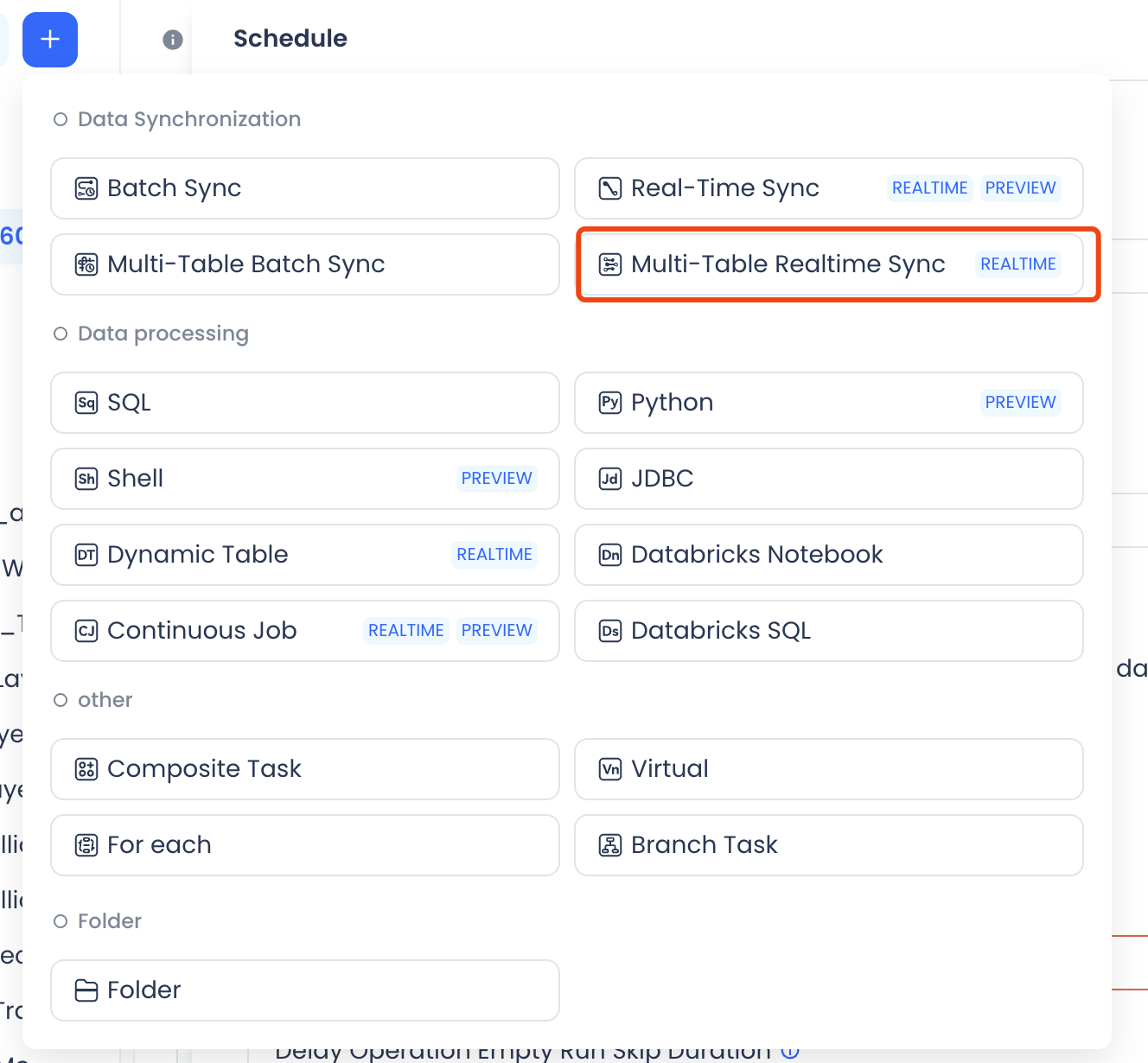
In the task development interface, click New and select the Multi-table Real-time Sync task type.
Main Steps
Creating a multi-table real-time sync task involves four main steps:
- Configure the data types — select the source and target data sources.
- Configure the sync task type — choose from full-database mirror, multi-table mirror, or multi-table merge.
- Configure the sync object scope, including source and target.
- Configure advanced sync rules, such as how to handle newly added tables and field changes.
Configure Data Types
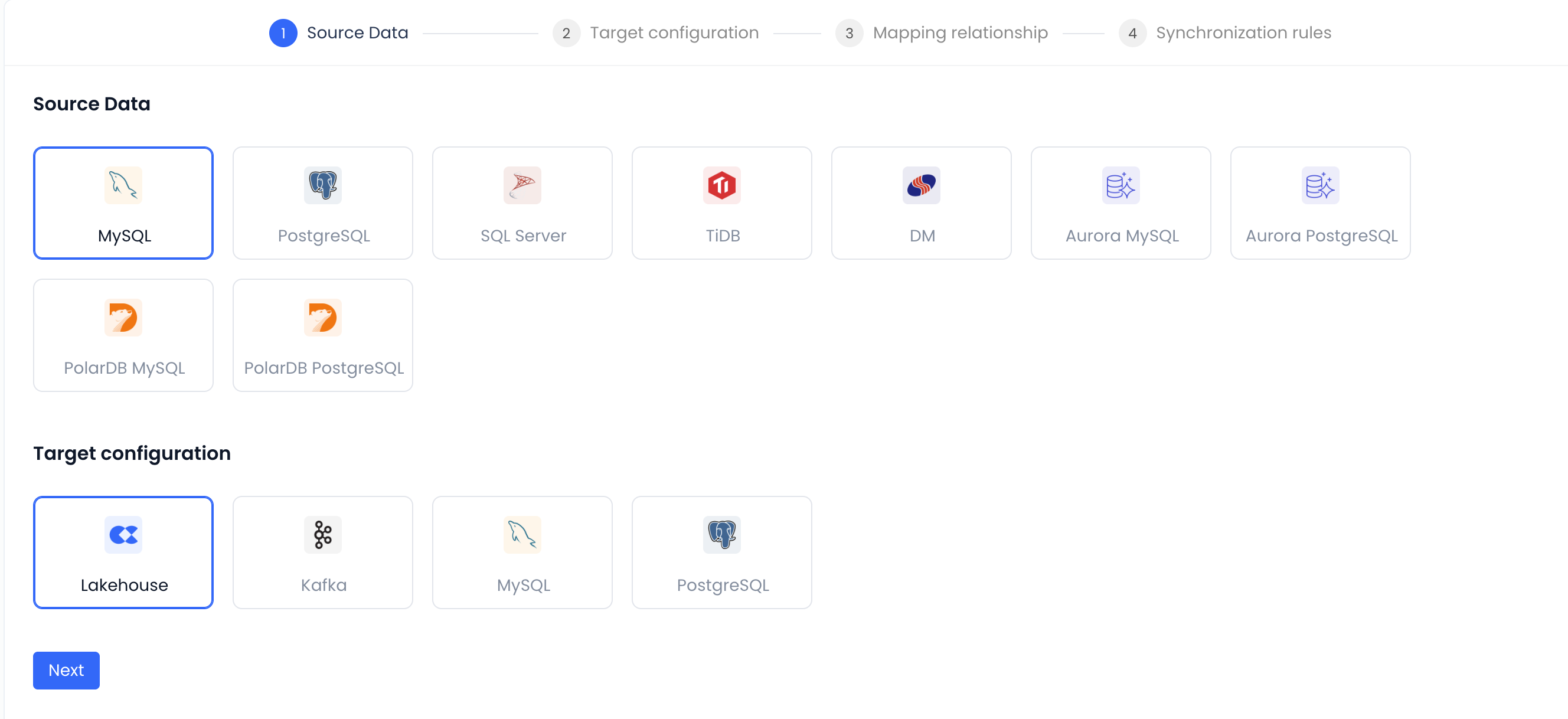
First, select the source and target data source types. Currently supported source types are shown below:
Select Sync Mode
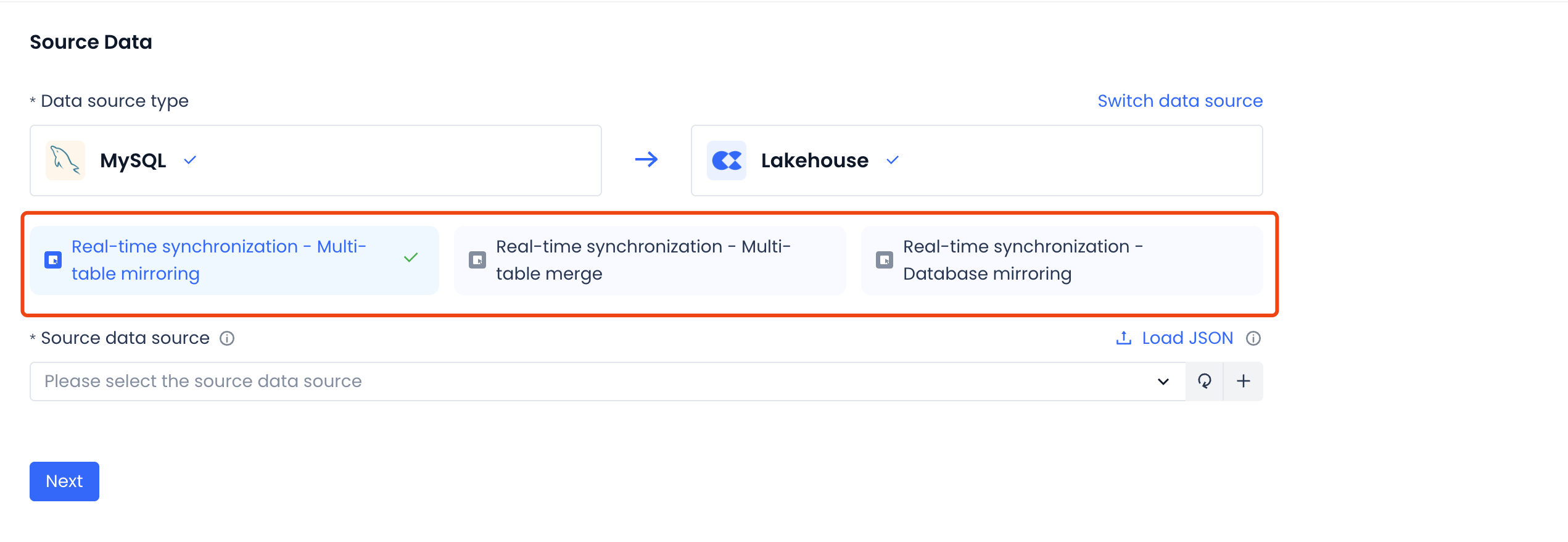
Three sync modes are available — choose based on your scenario:
-
Full-database mirror: Mirrors all tables from all databases on the source to the target. Configuration is at the database level; new tables added to the source are automatically picked up.
-
Multi-table mirror: Mirrors selected source tables to the target. Configuration is at the table level; supports automatic detection of added and removed fields.
-
Multi-table merge: Merges data from sharded databases and tables into a single target table.
Multi-table Mirror
Source configuration
-
Select a data source.
- For multi-table mirror sync, select one data source. If none is listed, create one first — see Data Source Configuration.
- Make sure the account in the data source has sufficient permissions (see the permission section above).
-
Configure read mode.
- MySQL currently only supports BINLOG mode.
- PostgreSQL currently only supports WAL mode.
-
Select sync objects.
- First select the databases to sync, then select the tables.
- The page provides a batch configuration feature. Fill in the configuration template, upload the file, and the page will select the objects listed in the file. You can then make further adjustments. Remember to remove the comments from the template before uploading.
-
Configure a replication slot (PostgreSQL only).
- A replication slot is a PostgreSQL construct — see the PostgreSQL documentation.
- Each database requires its own slot. The
decoderbufsandpgoutputplugin types are supported. - You can use an existing slot or create a new one on the page. Review the creation statement in the dialog and modify it as needed before clicking OK. The account in the data source must have permission to create slots.
- Important: do not share a slot between different tasks. If the slot is already in use by a running task, the new task will fail to start. If the slot is shared with a stopped task, the two tasks will share the same consumption position, which may result in incomplete incremental data for the new task.
Target configuration
The target currently only supports writing to Lakehouse.
- Target data source: defaults to the Lakehouse data source for the current workspace — no change needed.
- Namespace rule: currently only a specific namespace can be selected. Support for mirroring the source name or custom naming will be added later. Select the appropriate namespace (workspace) as needed.
- Target table naming rule: currently only mirrors the source table name. Support for prefix and custom naming will be added later.
- Compute cluster: select an available cluster in the workspace. AP-type clusters are recommended.
Preview configuration
After completing the source and target configuration, you can preview the table and field mapping. If adjustments are needed, go back to the previous step.
Sync rules
In the sync rules section, configure Schema Evolution rules to define how the task responds to source table and field changes, as well as which source change event types to process.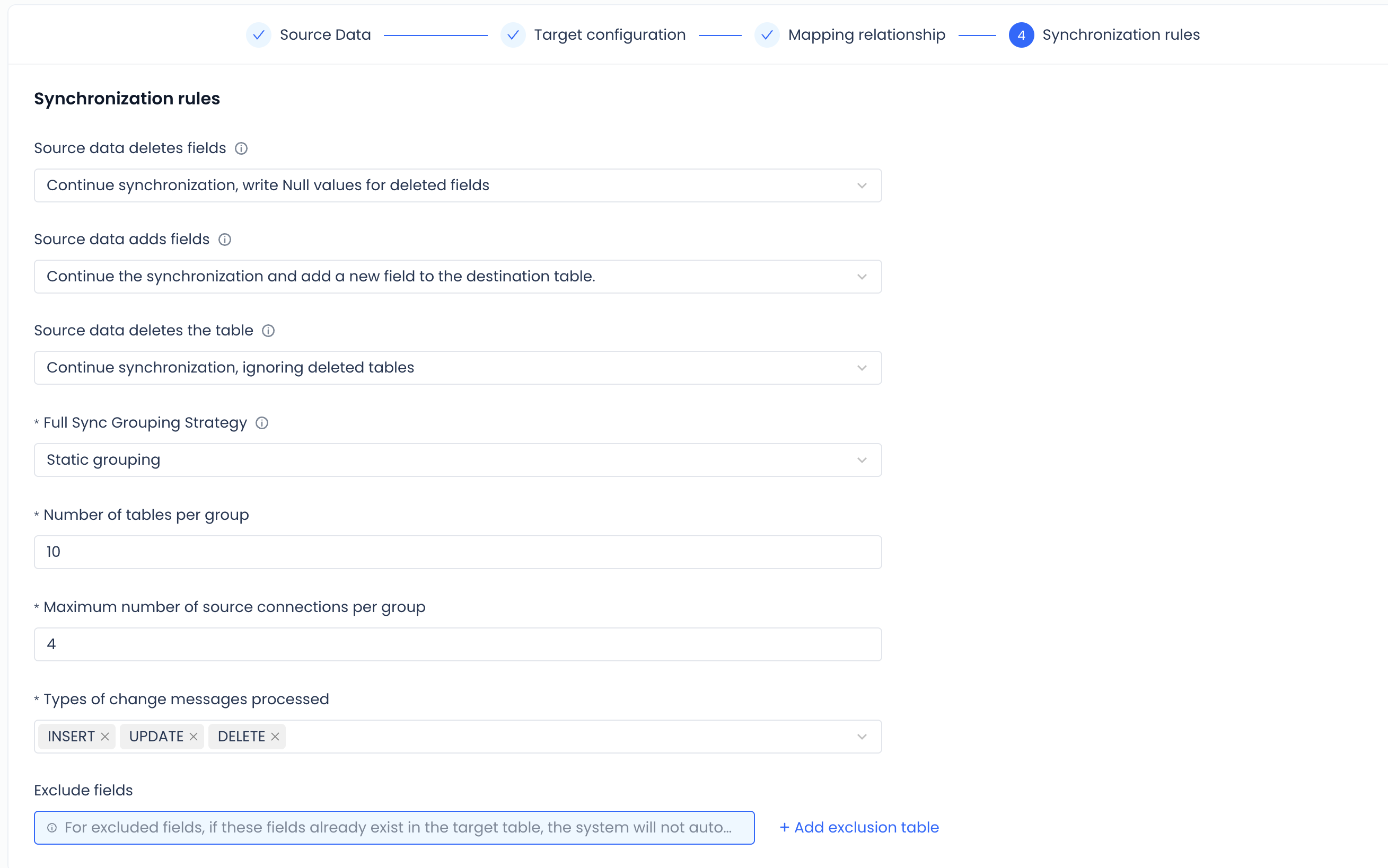
Full-database Mirror
The configuration is largely the same as multi-table mirror. The key difference is that when selecting source objects, you can only select databases — individual tables cannot be selected.
Multi-table Merge
Source configuration
- Select a data source — same as multi-table mirror.
- Configure read mode — same as multi-table mirror.
- Select sync objects.
Multi-table merge uses "virtual tables" as an intermediate abstraction. When configuring, specify which virtual table should receive data from which source objects. Two configuration methods are supported:
- Method 1: Rule-based — use regular expressions to filter tables. For example, to select all tables whose names start with
abc, enterabc. - Method 2: File batch configuration — fill in the configuration template and upload it. The page will select the matching objects. You can then fine-tune the selection. Remember to remove template comments.
- Method 1: Rule-based — use regular expressions to filter tables. For example, to select all tables whose names start with
Target configuration
Same as multi-table mirror.
Preview configuration
Same as multi-table mirror.
Sync rules
Same as multi-table mirror.
Advanced Task Parameters
In the Parameters section of a multi-table real-time sync task, you can set advanced parameters to control resource consumption.
| Parameter Name | Description | Default Value |
|---|---|---|
| step1.taskmanager.memory.process.size | Total memory for the incremental sync task process | 1600m |
| step1.taskmanager.memory.task.off-heap.size | Off-heap memory for the incremental sync task process | 256m |
| step2.taskmanager.memory.process.size | Total memory for the full sync task process | 2000m |
| lh.table.cz.common.output.file.max.size | Maximum size of individual files written during full sync | 33554432 |
| lh.table.cz.common.output.enable.rotate | Whether to split files during full sync writes | true |
| pod.limit.memory | Memory limit for the client that submits the sync task | 1Gi |
Submit
Click Submit to publish the task to the production environment. Note: the task does not start automatically after submission — you must start it manually.
Task Operations
Start the Task
Go to the task details page to start the task. Choose one of the following startup methods. After the task starts, the initialization phase may take several minutes depending on the number of tables — please be patient.
Startup options
- Stateless start (only available on the first start): performs a full sync of all data first, then starts incremental sync.
- Resume from last saved state (only available when restarting a stopped task): resumes incremental sync from where it stopped.
- Custom start position: syncs from a specified checkpoint, useful for replaying data. Applies to all tables in the task.
- MySQL: specify a binlog file and position, or a timestamp. The last known file position is shown in the monitoring area on the page.
- PostgreSQL: specify an LSN value, which can be found in the instance monitoring section.
Full sync
- Controls whether to perform a full data sync before incremental sync. If you choose to skip full sync now, you can still choose it after stopping and restarting the task.
- Max concurrency: when full sync is enabled, controls the number of concurrent sub-tasks. The task opens a corresponding number of JDBC connections to the source database. A higher value increases sync throughput (up to the source database's capacity) but also increases load on the source.
Instance Monitoring
Phase Monitoring
After the task starts, it goes through three phases: initialization, full sync, and incremental sync. You can view the status of each phase in the instance monitoring area.
Metrics Monitoring
The metrics monitoring area shows key indicators for both full sync and incremental sync.
| Metric | Description |
|---|---|
| Data read | Number of records read from the source during the measurement period. |
| Data written | Number of records written to the target during the measurement period. |
| Avg. read rate | Average read rate during the measurement period (total records read / period duration). |
| Avg. write rate | Average write rate during the measurement period (total records written / period duration). |
| Failover count | Number of failovers during the measurement period. This reflects the stability of the sync service itself. Only the most recent 10 failover events are shown by default. |
Sync Objects
The sync objects area shows the final sync state for each individual table and provides per-table operations.
| Metric | Description |
|---|---|
| Latest read position | The task reads source data in real time and writes it to the target. The write time of the most recent record is used as the read position. |
| Latest update time | The last time a record was written to the target table. |
| Data latency | The time between a transaction committing on the source and the data becoming visible on the target. |
| Operation | Description |
|---|---|
| Full sync details | Opens the full sync task view for this table. |
| Prioritize | During the full sync phase, bumps this table's priority so it is processed first. |
| Cancel run | Cancels the current sync run for this table. |
| Force stop | Force-stops the sync sub-task process for this table. Because multiple tables may share a sub-task, this may also affect other tables — use with caution. |
| Resync | Re-runs both full sync and incremental sync for this table. |
| View exceptions | Shows exception details for this table's incremental sync, such as Schema Evolution errors. |
| Backfill sync | Runs a targeted full sync for this table using a filter condition — for example, filtering by ID range to sync a subset of data. |
Stop the Task
Stopping the task halts all ongoing full sync and incremental sync. The incremental sync checkpoint is saved automatically on stop.
- If a table is in the full sync phase when the task stops, it will re-run full sync from scratch after the task restarts.
- If a table is in the incremental sync phase when the task stops, it will resume from its saved checkpoint after the task restarts.
Unpublish the Task
Unpublishing a task is a high-risk operation. The current sync checkpoint is not preserved. If you bring the task back online and start it, it will begin syncing from scratch.
- Unpublishing does not delete data that has already been synced to the target, but it clears intermediate cache data and checkpoint information.
- Resync will not recreate the target table. Full sync will overwrite the existing target table data; incremental sync will update the target table using
MERGE INTO.
Known Limitations
-
Schema Evolution does not currently support changing field types or automatically adding new tables.
-
In multi-table real-time sync tasks, if different source tables contain rows with identical primary keys, the sync result may be incorrect.
-
Unsupported field types for MySQL sync:
| Field type | Behavior after sync |
|---|---|
| year | Values are not correct |
- Unsupported field types for PostgreSQL sync:
| Field type | Behavior after sync |
|---|---|
| varbit | Values are not correct |
| bytea | Values are not correct |
| TIMETZ | Values are not correct |
| interval | Values are not correct |
| NAME | Values are not correct |
| NUMERIC | Precision mismatch — target-side precision may be higher |
| decimal | Precision mismatch — target-side precision may be higher |
For more details, see Multi-Table Real-Time Sync Complete Guide.