
Data Transformation with Window Functions
Let's start by understanding the basic concepts and common use cases for data transformation using window functions in ETL/ELT (Extract, Transform, Load) workflows.
Basic Concepts
Window functions are a class of SQL functions designed to perform complex multi-row operations over a specified set of data (the "window"). Window functions preserve row-level detail while performing calculations within a defined data window.
-
OVER defines the scope of the window.
-
PARTITION BY defines how to divide the data into partitions. The window function is applied within each partition. If no partition is specified, the entire table is treated as a single partition.
-
Function is the function applied to the current row. The result is added as an extra column in the output.
-
ORDER BY defines the sort order within the window.
Common Window Functions
- RANK(): A ranking function that assigns a rank to each row within a partition.
- DENSE_RANK(): Similar to RANK(), but does not skip rank values.
- ROW_NUMBER(): Assigns a unique sequential number to each row within a partition.
- SUM(): Computes a running sum.
- AVG(): Computes an average.
- LAG(): Accesses data from a preceding row.
- LEAD(): Accesses data from a following row.
Use Cases
1. Deduplication and Flagging
Window functions are commonly used for deduplication — identifying and flagging duplicate rows.
Prerequisite: The table must have a unique identifier (such as an auto-increment ID, UUID, or business primary key) to precisely target rows for deletion.
For example, you can use a window function to number rows within each group and delete all duplicates beyond the first.
Or use MERGE INTO for more complex matching logic:
2. Partitioned Aggregation
Window functions can perform aggregations within partitions, such as running totals and moving averages.
3. Sorting and Ranking
Window functions let you rank data and use those rankings in downstream calculations.
4. Data Backfill with Lag/Lead Columns
Use LAG() and LEAD() to access values from preceding or following rows, which is useful for filling in missing data.
Using window functions for ETL data transformation effectively improves the flexibility and efficiency of data processing, making complex analytical and transformation operations faster and more concise.
Data Model
The TPC-H dataset represents a data warehouse for an auto parts supplier, containing records for orders, line items, suppliers, customers, parts, regions, nations, and part suppliers (partsupp).
Singdata Lakehouse includes built-in shared TPC-H data that any user can query directly by specifying the data context, for example:
Data Transformation with Singdata Lakehouse SQL Window Functions
Window Functions Have Four Core Components
- Partition: Defines a group of rows based on the values of specified columns. If no partition is specified, the entire table is treated as a single partition.
- ORDER BY: This optional clause specifies how rows are sorted within the partition.
- Function: The function applied to the current row. The result is added as an extra column in the output.
- Window Frame: Within a partition, the window frame lets you specify which rows are included in the function's calculation.
The SUM function in the query above is an aggregate function. Notice how running_sum accumulates (aggregates) o_totalprice across all rows. The rows themselves are sorted in ascending order by order date.
Reference: The standard aggregate functions are MIN, MAX, AVG, SUM, & COUNT. Modern data systems provide a variety of powerful aggregate functions. Consult your database documentation for available options. Read this article for a list of aggregate functions available in Lakehouse.
Using Ranking Functions to Get the Top/Bottom N Rows
If you need to retrieve the top or bottom N rows (defined by some value), use row functions.
Here is an example of how to use a row function:
Get the top 3 highest-spending customers per day from the orders table. The schema of the orders table is shown below:
Standard Ranking Functions
RANK(): Ranks rows from 1 to n within the window frame. Rows with the same value (as defined by the ORDER BY clause) receive the same rank, and rank numbers that would otherwise exist are skipped.DENSE_RANK(): Ranks rows from 1 to n within the window frame. Rows with the same value receive the same rank, and no rank numbers are skipped.ROW_NUMBER(): Assigns row numbers from 1 to n within the window frame, with no duplicate values.
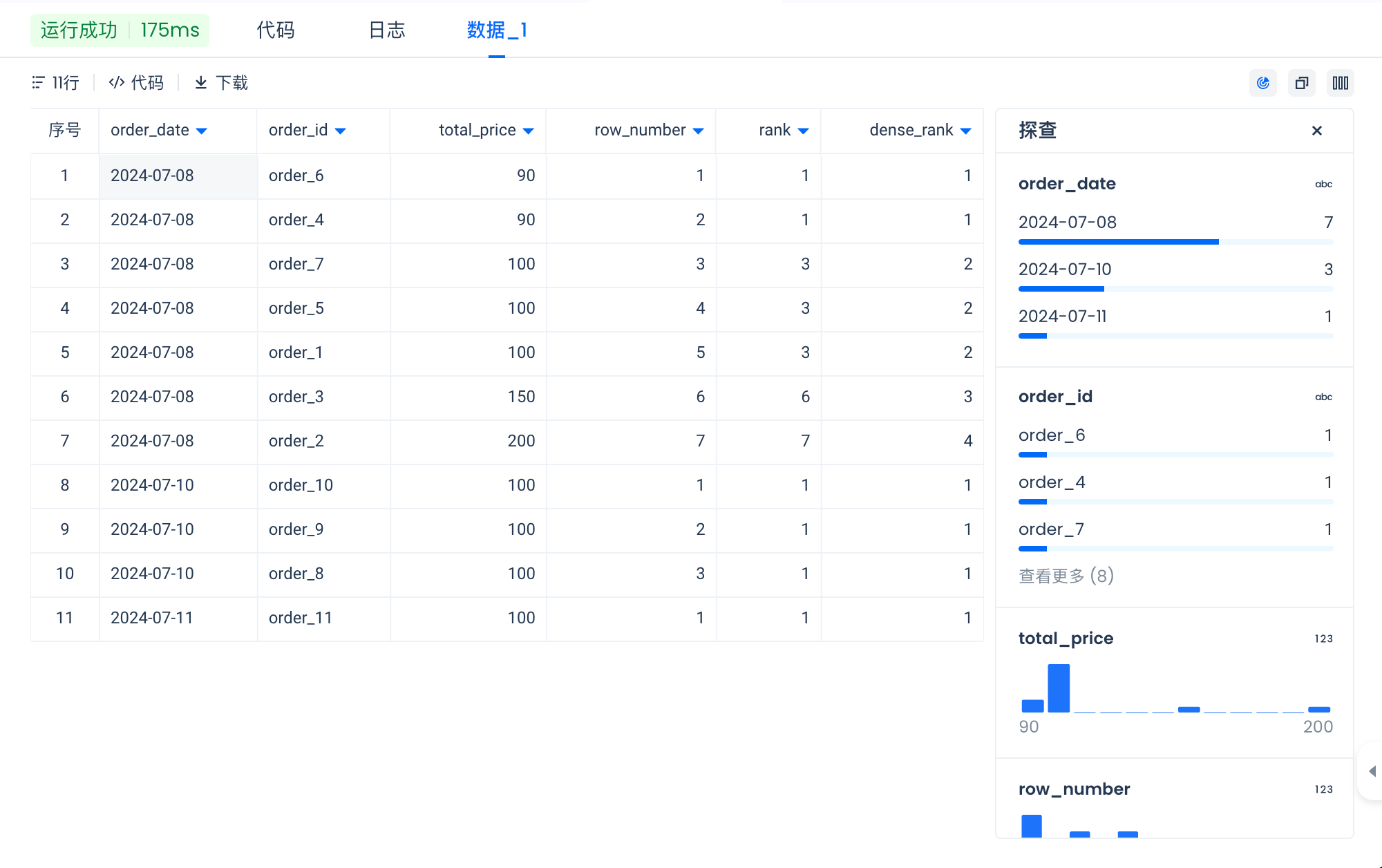
Now you have seen how to use window functions along with ranking and aggregate functions.
Why Define a Window Frame When You Already Have a Partition?
While functions operate on rows within a partition, the window frame provides a more granular way to operate on a selected subset of rows within that partition.
When you need to operate on a subset of rows within a partition (for example, a sliding window), you can use the window frame to define those rows.
Consider a scenario where you have sales data and want to calculate a 3-day moving average of sales for each store:
In this example:
- PARTITION BY store_id ensures the calculation is performed separately for each store.
- ORDER BY sale_date defines the order of rows within each partition.
- ROWS BETWEEN 2 PRECEDING AND CURRENT ROW specifies the window frame, considering the current row and the two preceding rows to compute the moving average.
Without a defined window frame, the function may not produce the specific moving average calculation you need.
Defining a Window Frame with ROWS
ROWS: Used to select a set of rows relative to the current row based on position.
-
Row definition format:
ROWS BETWEEN start_point AND end_point.-
start_point and end_point can be any of the following (in the correct order):
- n PRECEDING: n rows before the current row. UNBOUNDED PRECEDING means all rows before the current row.
- n FOLLOWING: n rows after the current row. UNBOUNDED FOLLOWING means all rows after the current row.
-
Here is how to use relative row numbers to define a window range.
Consider this window function:
Write a SQL query to retrieve the following output from the orders table:
-
- o_custkey
- order_month: formatted as YYYY-MM, using
date_format(o_orderdate, 'yyyy-MM') AS order_month - total_price: the sum of o_totalprice for that month
- three_mo_total_price_avg: the average total_price across the previous, current, and next month for that customer
Defining a Window Frame with RANGE
-
RANGE: Used to select a set of rows relative to the current row based on the value of the column specified in the
ORDER BYclause.-
Range definition format:
RANGE BETWEEN start_point AND end_point. -
start_point and end_point can be any of the following:
- CURRENT ROW: The current row.
- n PRECEDING: All rows whose values fall within n units before the current row's value.
- n FOLLOWING: All rows whose values fall within n units after the current row's value.
- UNBOUNDED PRECEDING: All rows before the current row in the partition.
- UNBOUNDED FOLLOWING: All rows after the current row in the partition.
-
RANGEis particularly useful when working with numeric or date/time ranges, enabling calculations such as running totals, moving averages, or cumulative distributions.
-
Let's see how RANGE works with AVG(total price) OVER (PARTITION BY customer id ORDER BY date RANGE BETWEEN INTERVAL '1' DAY PRECEDING AND '1' DAY FOLLOWING).
Now that you have seen how to create a window frame with ROWS, let's explore how to do the same with RANGE.
-
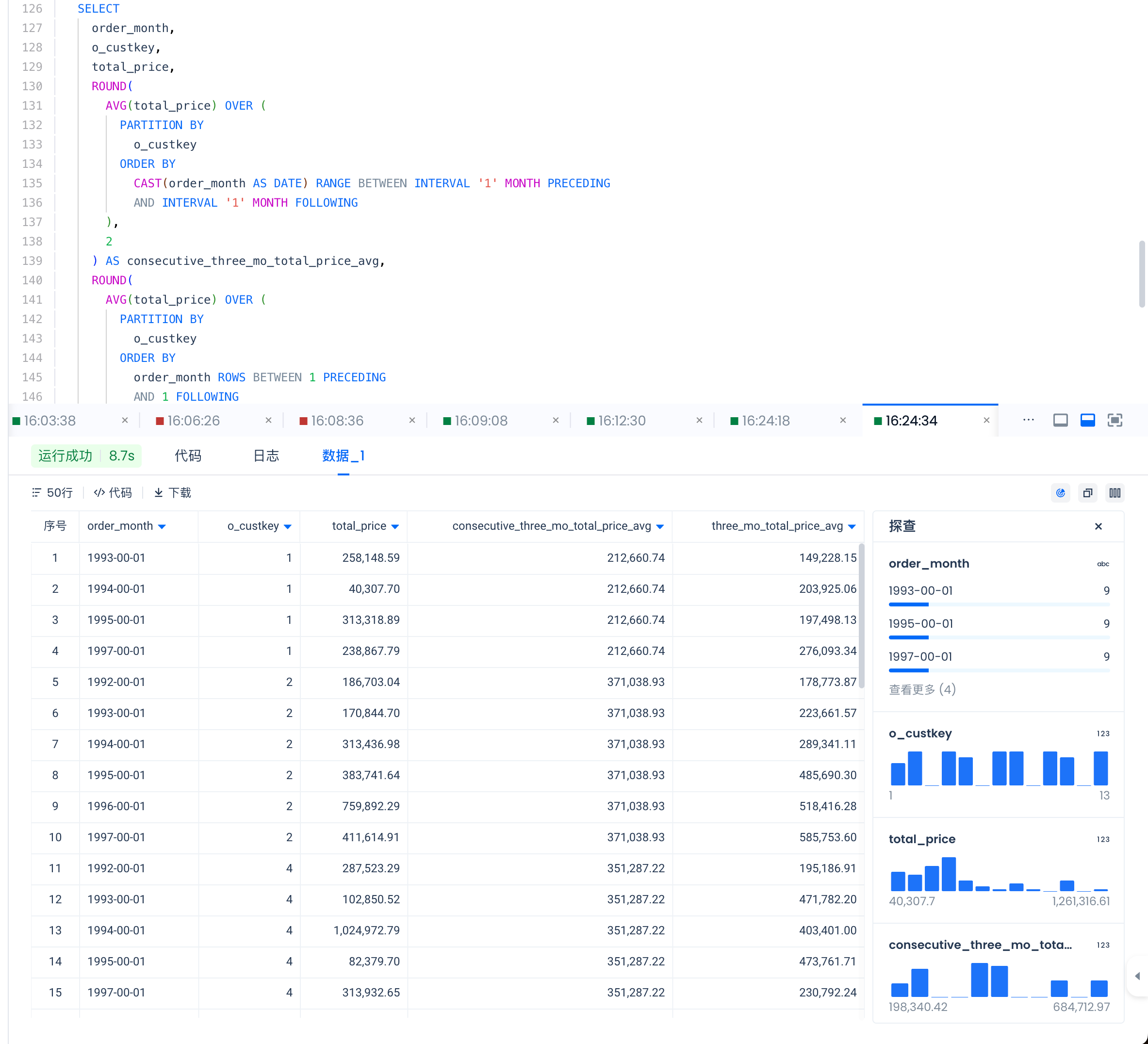
Write a query to retrieve the following output from the orders table:
- order_month,
- o_custkey,
- total_price,
- three_mo_total_price_avg
- consecutive_three_mo_total_price_avg: The average total_price over 3 consecutive months for that customer. Note that this should only include months that are consecutive in time.
Summary
-
Use window functions when you need to:
- Compute running metrics (similar to
GROUP BY, but preserving all rows) - Rank rows based on a specific column
- Access values from other rows relative to the current row
- Compute running metrics (similar to
-
A window has four key components: Partition, Order By, Function, Window Frame
-
Use ROWS or RANGE to define the window frame
-
Window functions are computationally expensive; be mindful of performance