
Develop Dynamic Tables for Near Real-Time Incremental Processing
Tutorial Overview
Through this tutorial, you will learn how to use Lakehouse Dynamic Table to build a complete real-time data ETL processing flow. The scenario design is as follows:

This tutorial will implement a streaming data processing pipeline case with minute-level latency through data import tasks, data cleaning and transformation based on dynamic tables, and data aggregation tasks.
Prerequisites
Dynamic Table is an object type that supports processing only incremental change data, similar to materialized views. When creating a dynamic table, you need to define the data computation logic. By performing a refresh action, you can trigger the computation logic and update the dynamic table. Compared to traditional ETL tasks, dynamic tables only require the declaration of full semantic computation logic at the time of definition, and dynamic tables can automatically perform incremental computation optimization during refresh. With dynamic tables, Lakehouse can perform near real-time incremental processing for streaming data, providing data preparation for real-time analysis.
Tutorial Steps
- Data Import: Create the raw table and continuously write user behavior data;
- Develop Dynamic Table Model: Construct data cleaning and data aggregation processing flows through Dynamic Table;
- Verify Processing Results: Monitor the refresh execution status of the data pipeline constructed by the dynamic table, and check the changes in the consumption layer data table to verify the real-time data processing results.
Through the above steps, you will learn how to develop streaming processing tasks in Lakehouse using dynamic tables.
Preparation
First, create a behavior log table and write test data through the INSERT INTO task.
This tutorial provides SQL scripts for creating data tables and inserting test data in the "Development" module. Open the [Tutorial_Working_With_Dynamic_Table->Step01.Preparation] script file, configure a 1-minute interval scheduling strategy, and submit the deployment to simulate real-time data import.

Transform Layer Dynamic Table Model Development
In the [Development] module, open the [Tutorial_Working_With_Dynamic_Table->Step02.Transformation_With_Dynamic_Table] sample dynamic table task file. This dynamic table defines the ETL logic for cleaning and transforming the raw table.
Refer to the figure below to configure the "Run Cluster" and "Scheduling Parameters":

Submit Deployment
Click the [Submit] button to deploy the dynamic table model to the Lakehouse target environment. The system will automatically refresh according to the refresh frequency set by the dynamic table.
Aggregate Layer Dynamic Table Model Development
In the [Development] module, open the [Tutorial_Working_With_Dynamic_Table->Step03.Aggregation_With_Dynamic_Table] sample dynamic table task file. This dynamic table defines the ETL logic for aggregating and analyzing the intermediate data model.
Please refer to the following image for scheduling configuration and submitting the run:

Verify Incremental Update Results
In the [Development] module, open the Step04.Check_Data_Freshness file. Check the data freshness of the automatically refreshed dynamic table by executing the Query.
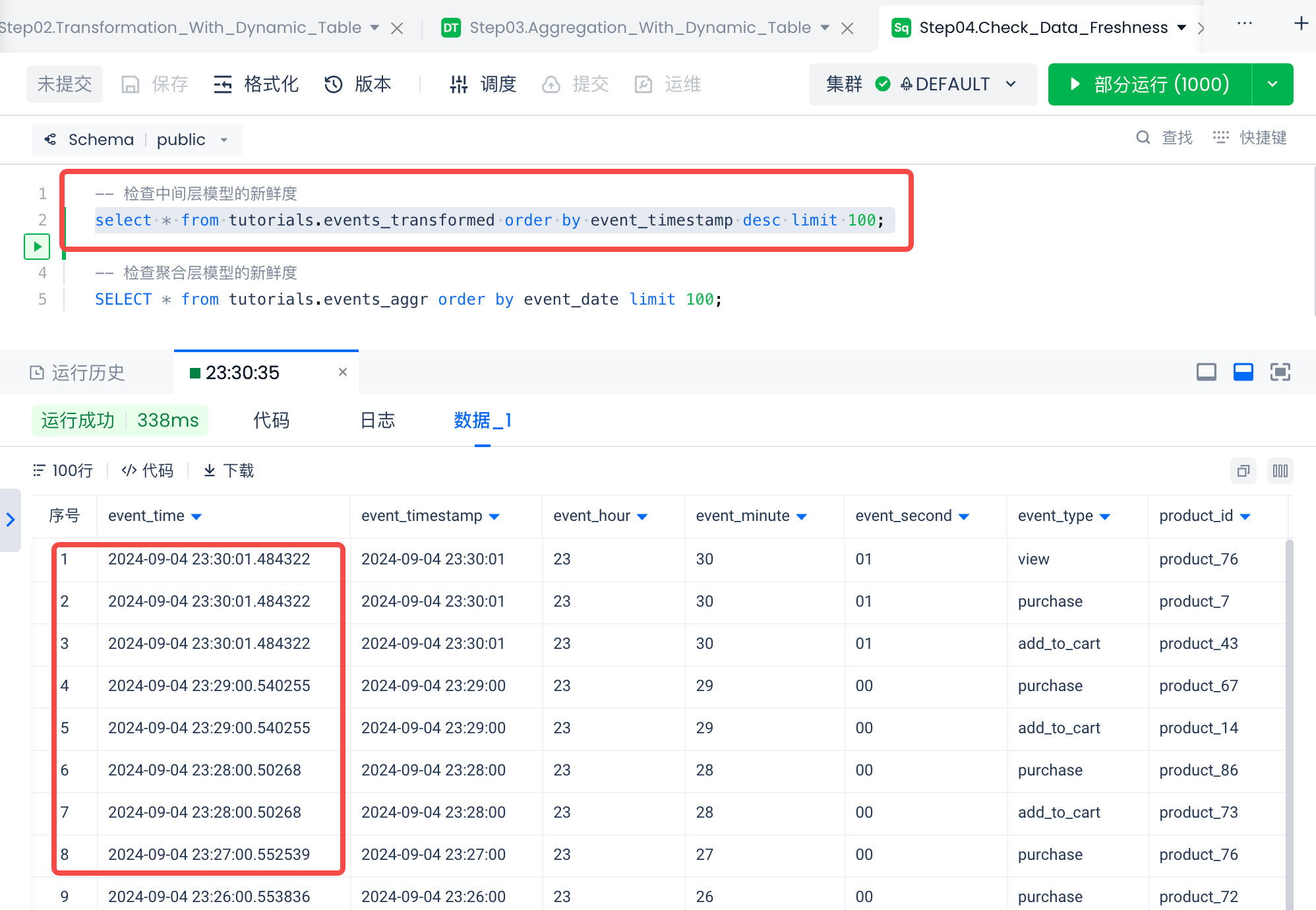 As shown in the image above, with the help of the dynamic table's automatic incremental refresh, real-time data processing can be completed with a delay of about 1 minute.
Environment Cleanup
In the [Task Operations] module, take the data import task offline from the periodic task list; take the two dynamic table model tasks offline from the dynamic table task list.
FAQ
Q1: Data is not updated after the Dynamic Table refreshes. How do I troubleshoot?
- Run
SHOW DYNAMIC TABLE REFRESH HISTORYto check the recent refresh status and confirm whether the refresh executed successfully - Confirm whether new data has been written to the source table (compare row counts before and after the refresh using
SELECT COUNT(*)) - Check whether the refresh interval is set appropriately — a long
INTERVALwill cause data delays - If
refresh_modeshowsFULLinstead ofINCREMENTAL, the SQL contains operators that do not support incremental computation
Q2: Refresh fails with "incremental refresh not supported". What should I do?
- Some SQL operators do not support incremental computation, such as window functions with
ORDER BYor certain subqueries - Solution: simplify the SQL logic, or accept full refresh by using
CREATE OR REPLACE DYNAMIC TABLE ... REFRESH_MODE = FULLto force full mode
Q3: Which VCluster should I use for refresh execution?
- Refresh is a compute-intensive operation; it is recommended to use a GENERAL type cluster
- Do not share the same cluster with query workloads to avoid refresh tasks affecting query response times
- For high-frequency refreshes (< 1 minute), it is recommended to use a dedicated small-spec cluster (XSMALL)
Q4: When should I use Dynamic Tables vs. regular Studio scheduled tasks?
| Scenario | Recommended approach |
|---|---|
| Pure SQL incremental processing with simple dependencies | Dynamic Table (automatically manages dependencies and refresh) |
| Requires Python processing or calling external APIs | Studio task |
| Multiple upstream/downstream tasks with complex dependency orchestration | Studio task flow |
| Requires precise execution timing (e.g. on the hour) | Studio scheduled task |