
Studio
Studio is both the web management console for Singdata Lakehouse and a serverless data services platform. The data sync jobs, SQL scheduling tasks, and Python scripts you configure in the UI are automatically executed by Singdata-managed serverless infrastructure — no compute resources to manage. Data engineers, analysts, and administrators can handle the full pipeline from data ingestion to data consumption in a single interface, without switching between tools.
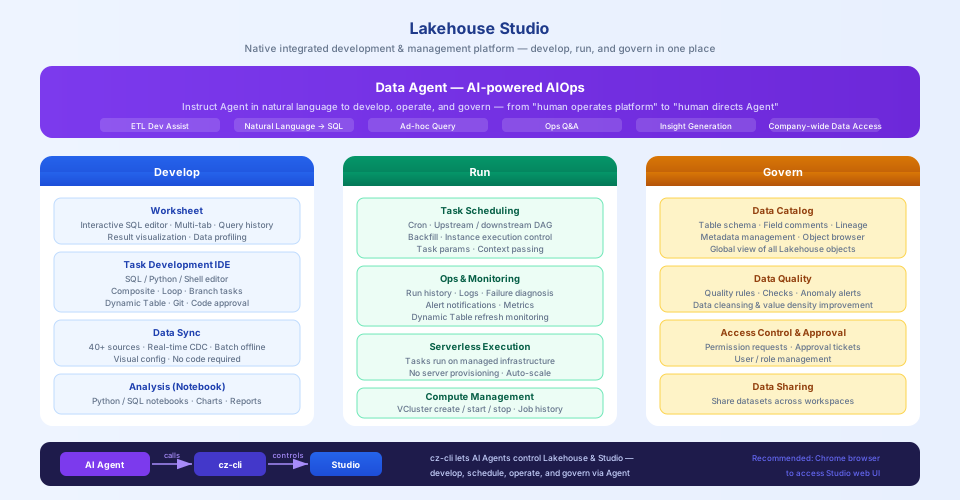
Data Agent — AI Assistant
Studio has a built-in Data Agent — a fully AI-driven interaction layer built on top of Lakehouse, covering the full lifecycle of development, operations, and governance. You can tell the Agent what to do in natural language, and it operates the platform on your behalf — shifting from "person operates platform" to "person directs Agent."
Typical use cases:
- ETL development assistance: Describe your data processing requirements, and the Agent generates SQL tasks and configures scheduling
- Natural language data retrieval: Ask "What are the order amounts by region for the last 7 days?" and the Agent translates it to SQL and returns results
- Day-to-day operations Q&A: Ask "Which tasks are currently failing?" and the Agent queries and provides remediation suggestions
- Data insight generation: Upload data or specify a table, and the Agent automatically generates an analysis report
Six Core Modules
|
Data Sync |
Task Development (IDE) |
Task Scheduling |
|
Workspace (SQL Query) |
Operations & Monitoring |
Data Catalog |
I want to sync external data in
Recommended: Data Sync module — supports 40+ data sources with visual configuration, no code required.
| Scenario | Approach | Reference |
|---|---|---|
| Relational databases (MySQL / PG / Oracle, etc.), real-time sync | Real-time sync task (CDC) | Real-time Sync Task |
| Full database sync, migrating multiple tables at once | Multi-table real-time sync | Multi-table Real-time Sync Guide |
| Offline periodic sync (T+1 or hourly) | Offline sync task | Offline Sync Task |
| Not sure which data source to use | Check supported sources | Data Source Support |
I want to develop data processing tasks
Recommended: Task Development module (IDE) — supports SQL, Python, and Shell with composable orchestration.
| Scenario | Approach | Reference |
|---|---|---|
| SQL-based data transformation | SQL task | Task Development and Scheduling |
| Python processing logic | Python task | Python Task |
| Multiple tasks in sequence with dependencies | Composite task | Composite Task |
| Loop over multiple partitions or objects | For each loop task | For Each Loop Task |
| Conditional branching (if/else logic) | Branch task | Branch Task |
| Incremental computation with auto-maintained result tables | Dynamic table task | Dynamic Table Task |
I want to configure scheduled execution
Recommended: Task Scheduling module — supports Cron expressions and upstream/downstream dependency management.
| Scenario | Reference |
|---|---|
| Set up timed task execution | Task Scheduling and Instance Execution |
| Configure dependencies between tasks | Task Scheduling Dependencies |
| Backfill historical data | Data Backfill |
I want to check task run status / troubleshoot issues
Recommended: Operations & Monitoring module.
| Scenario | Reference |
|---|---|
| View task run history and logs | Task and Instance Operations |
| Configure alert notifications | Monitoring and Alerting |
| Understand monitoring metric definitions | Monitoring Metric Specifications |
I want to query and analyze data
| Scenario | Approach | Reference |
|---|---|---|
| Interactive SQL queries | Workspace | Workspace |
| Visualize query results | Analysis (Notebook) | Analysis |
| View and manage table schemas | Data Catalog | Data Catalog |
I want to manage compute resources
| Scenario | Reference |
|---|---|
| Create, start, or stop a VCluster | Compute Clusters |
| View historical job resource consumption | Job History |
| Understand cluster size codes | Compute Cluster Size Reference |
I want to manage permissions and approvals
| Scenario | Reference |
|---|---|
| Request data access permissions | Permission Requests |
| Process approval tickets | Approval Tickets |
New to Studio?
Follow this sequence to get started:
- Lakehouse Studio Quick Tour — 5-minute overview of the interface layout
- Lakehouse Studio Getting Started Guide — complete your first end-to-end workflow
- Studio Overview — deep dive into each module's capabilities