
Manage Compute Resources
Singdata Lakehouse uses a storage-compute separation architecture — storage and compute scale independently and elastically. A compute cluster (VCluster) is the compute unit that executes all SQL jobs. It is billed by actual runtime and automatically stops when idle, incurring no charges.
Three Cluster Types
| Type | Use case | Spec unit | Elasticity |
|---|---|---|---|
| General Purpose (GP) | ETL batch processing, offline jobs | 1–256 CRU, step 1 | Vertical scaling: configure MIN_VCLUSTER_SIZE / MAX_VCLUSTER_SIZE, auto-adjusts spec based on load |
| Analytical (AP) | BI reports, ad-hoc queries, high-concurrency online queries | 1–256 CRU, must be a power of 2 (1/2/4/8/16…) | Horizontal scaling: configure MIN_REPLICAS / MAX_REPLICAS, auto-adds/removes instances based on concurrency (up to 10) |
| Integration | Real-time/offline data integration tasks | 0.25–256 CRU | Vertical scaling: configure MIN_VCLUSTER_SIZE / MAX_VCLUSTER_SIZE, auto-adjusts spec based on load |
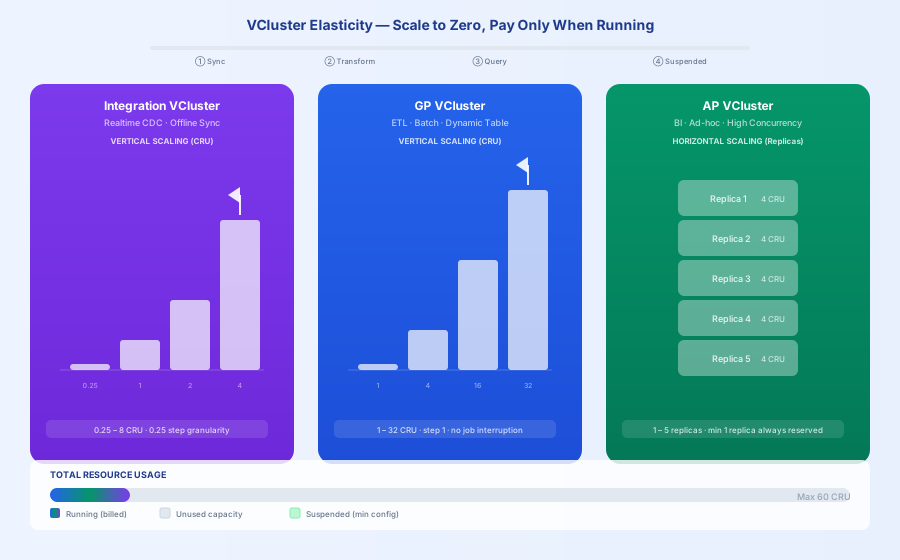
Singdata Lakehouse compute cluster elasticity operates at three levels:
GP (General Purpose) — Vertical elasticity: Single cluster spec auto-scales with load, from 1 CRU up to 256 CRU. Automatically scales up during peak load and scales back down after the peak; automatically stops billing after idle timeout. Suitable for ETL and other scenarios where a single job needs to consume full resources.
AP (Analytical) — Horizontal elasticity: When concurrent query count reaches the current instance limit, new instances (Replicas) are automatically added, up to 10 instances, linearly increasing total concurrency capacity. Instances are automatically reduced when concurrency drops; in-flight queries are not affected. Suitable for BI reports and high-concurrency online query scenarios.
Integration — Fine-grained vertical elasticity: Minimum spec of 0.25 CRU, precisely matching the actual load of sync tasks, with extremely high resource utilization and costs that scale linearly with task count. Suitable for real-time CDC and offline integration tasks.
All three cluster types support second-level cold start (auto-wake on job submission), auto-stop when idle (no billing), and no interruption to in-flight jobs during scaling.
This Section
| Page | Description |
|---|---|
| Using Lakehouse Compute Clusters | Cluster creation, start/stop, spec adjustment, SQL operations, and best practices for common use cases |
| Supporting Multi-Concurrent Queries with Horizontal Elastic Scaling | How multi-instance scaling works for Analytical clusters and hands-on tutorial |
Common Operations
View Clusters
Switch Clusters
Start and Stop
Adjust Specifications
View Cluster Jobs
Configure Auto-Suspend
Configure Cache Preloading (Analytical clusters only)
Set Job Timeout
Related Documentation
| Document | Description |
|---|---|
| Compute Cluster | Core concepts, spec selection reference table, Web UI screenshots |
| Compute Resource DDL | Full syntax for CREATE / ALTER / DROP VCLUSTER |
| Compute Cluster Cache | How active and passive caching work |
| SHOW JOBS | View and filter job records |
| Compute Cluster Spec Code Change Description | Old vs. new spec code mapping table |