Converting AWS S3 Unstructured Data into RAG-Ready Data in the Lakehouse
Unified Processing of Unstructured and Structured Data in the Lakehouse for RAG Applications
Developing Retrieval-Augmented Generation (RAG) applications within a Lakehouse architecture presents specific challenges. Integrating diverse data types such as text, images, videos, and structured tables requires robust architectural flexibility. Ensuring data quality and consistency across different formats and sources demands comprehensive validation and transformation processes. Efficiently managing the storage of large volumes of unstructured and structured data while maintaining scalability and performance represents a significant challenge. The processing and analysis of these data types require advanced algorithms and substantial computing power. Furthermore, robust data governance, security, and compliance across different data types and sources add complexity.
Despite these challenges, the unified processing of unstructured and structured data is critical in RAG application development. This approach integrates different data types, providing a comprehensive view that reveals deep insights that might not be apparent when analyzed in isolation. A unified approach streamlines operations, reduces dependency on multiple systems, simplifies maintenance, and lowers operational costs. It ensures data consistency and accuracy, improving the reliability of data-driven decisions. Unified processing allows for advanced analysis by combining insights from different data types. This approach optimizes resource utilization, enhances scalability and flexibility, simplifies architecture, and improves data consistency by reducing data duplication and movement. Additionally, a streamlined architecture with unified processing reduces operational overhead, increases development efficiency, and enhances data consistency, which is essential for effective and efficient RAG applications.
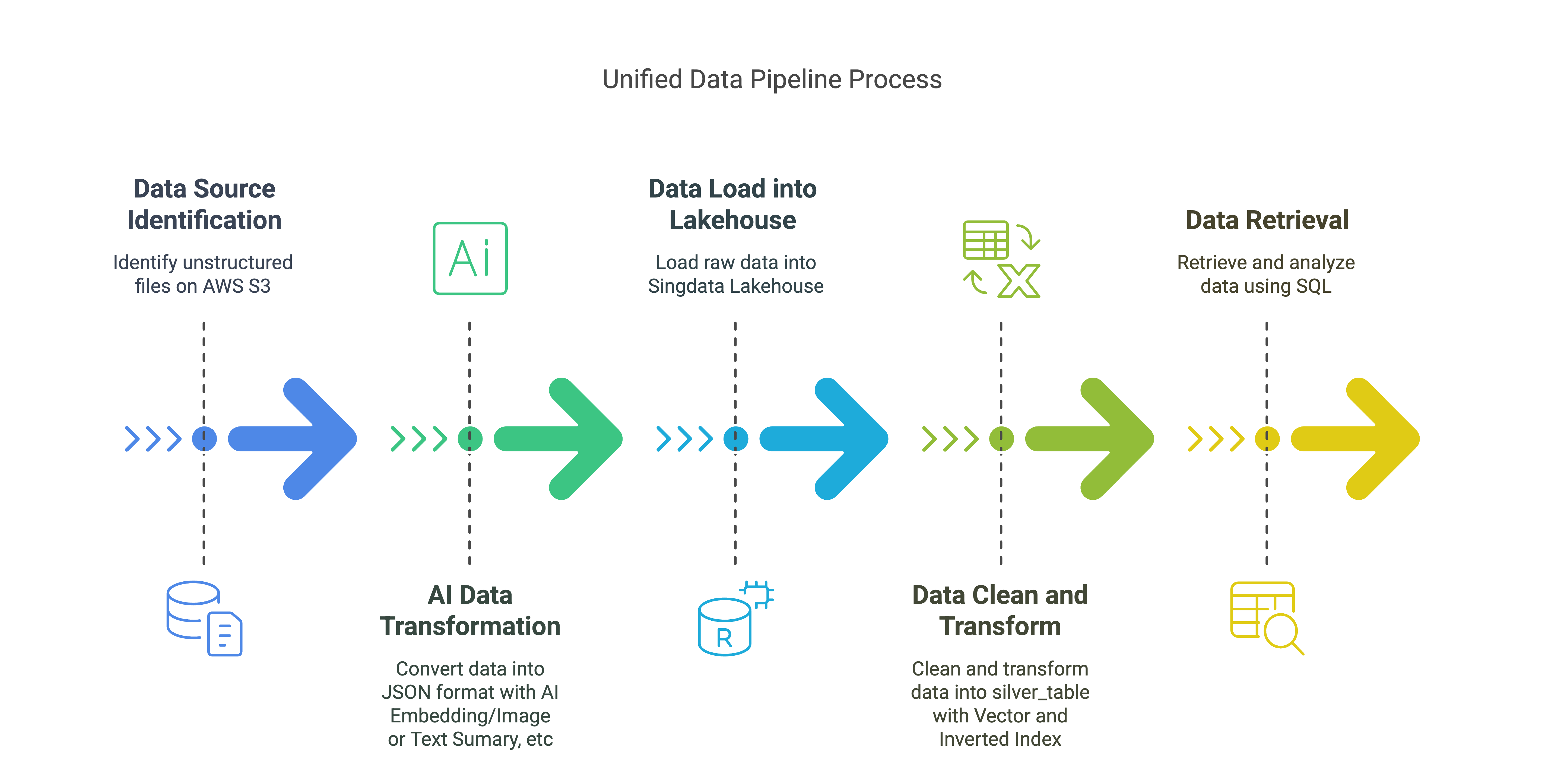
Unified Data Pipeline Solution Overview
Data Source:
- Unstructured files on AWS S3 (PDFs, emails, JPGs, etc.)
AI Data Transformation:
- Convert unstructured data into JSON format, including embedding data, text summaries, and image summaries.
Data Loading into Lakehouse:
- Load raw data into
raw_table, storing various metadata and content related to files and elements.
Data Cleansing and Transformation (Lakehouse Vector/Inverted Indexes):
- Cleanse and transform raw data into
silver_table, with vector indexes and inverted indexes.
Data Retrieval (Lakehouse SQL):
- Use Lakehouse SQL for vector and text search to retrieve and analyze data.
Key Components:
- AWS S3: Stores unstructured data.
- Unstructured Data: Ingests unstructured data from S3, converting it into JSON format.
- Unstructured Lakehouse Connector: Loads data into the Lakehouse.
- Lakehouse: Stores and manages transformed data for RAG applications, with vector indexes and inverted indexes.
In this quick tutorial, we will ingest PDFs/emails/images from an S3 bucket, use Unstructured to convert them into standardized JSON, then perform chunking, embedding, and loading into Lakehouse tables. Afterwards, RAG applications can retrieve data from the Lakehouse and obtain embedding data and text/image content in a format suitable for RAG applications.
Prerequisites:
A. Obtain your Unstructured Serverless API key. It provides a 14-day trial with up to 1000 pages per day.
B. Obtain your Lakehouse account. It provides a 1-month trial and 200 yuan in credits.
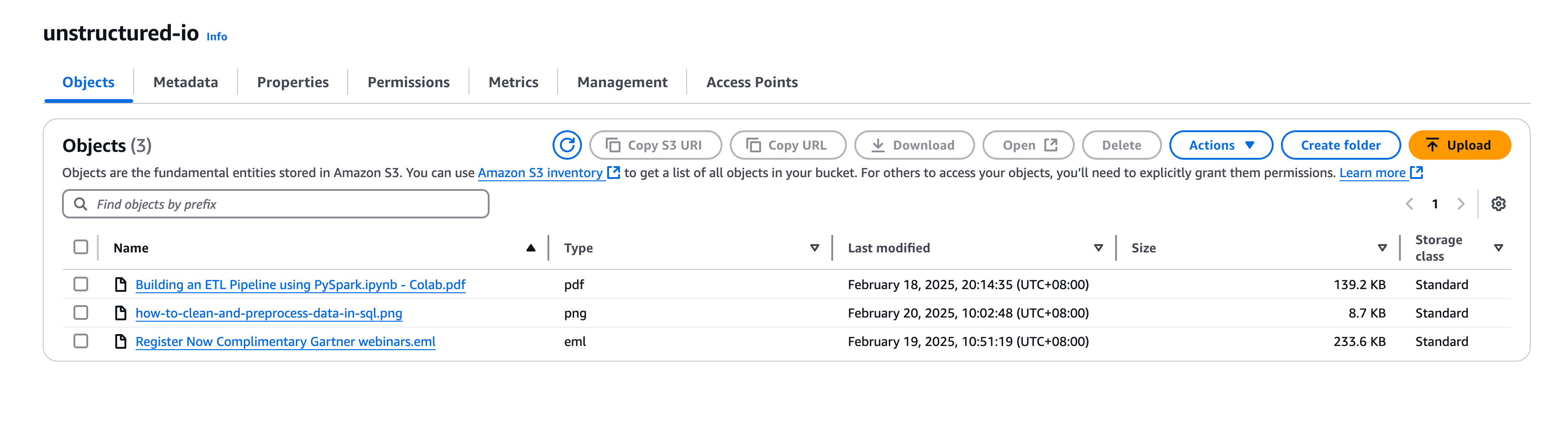
C. Create an AWS S3 bucket and populate it with PDF files of your choice. Be sure to record your credentials.
D. Install the necessary libraries:
- Open a terminal and create a new Python 3.9.21 environment named "unstructured":
conda create -n unstructured python=3.9
conda activate unstructured
Then select unstructured as the current environment
- You can contact qiliang@singdata.com to obtain unstructured_ingest-0.5.5-py3-none-any.whl.
You can get the source code from the GitHub repository.
!pip install -U dist/unstructured_ingest-0.5.5-py3-none-any.whl --force-reinstall
!pip install -U "unstructured-ingest[s3, pdf, clickzetta, embed-huggingface]"
!pip install --force-reinstall "unstructured-ingest[clickzetta]"
!pip install python-dotenv
import json
import pandas as pd
import logging
import warnings
logging.basicConfig(level=logging.ERROR)
warnings.filterwarnings("ignore", category=UserWarning)
Set drop_tables to True if you want to delete tables:
drop_tables = True
Load Environment Variables
In this example, we load all environment variables containing sensitive information from a local .env file. The .env file contains the following variables:
cz_username: Username for connecting to the Lakehouse service
cz_password: Password for connecting to the Lakehouse service
cz_service: The Lakehouse service name to connect to
cz_instance: The Lakehouse service instance name to connect to
cz_workspace: The Lakehouse service workspace name to connect to
cz_schema: The Lakehouse service schema name to connect to
cz_vcluster: The Lakehouse service virtual cluster name to connect to
AWS_KEY: Key for connecting to the AWS service
AWS_SECRET: Secret for connecting to the AWS service
AWS_S3_NAME: Bucket name for connecting to the AWS S3 service
UNSTRUCTURED_API_KEY: API key for connecting to the UNSTRUCTURED API
UNSTRUCTURED_URL: URL for connecting to the UNSTRUCTURED API
import os
import dotenv
dotenv.load_dotenv('./.env') # Replace with the path to your .env file
True
Place Unstructured Data into AWS S3
Create Indexes in the Lakehouse
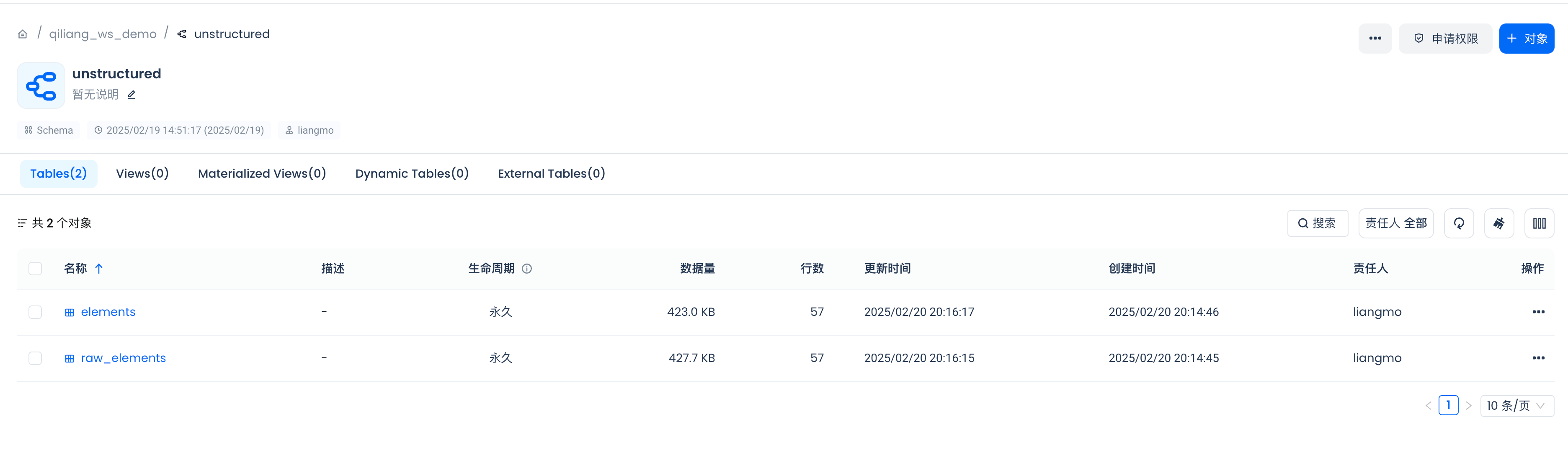
Before building the unstructured data pre-processing pipeline, let's first create a schema and a table in the Lakehouse for storing the processed data.
For an example of the schema, refer to the Unstructured documentation. If you use the schema from the documentation, ensure that the embedding dims value matches the number of dimensions produced by the embedding model you choose to use. In this example, it is set to 768, but your embedding model may produce vectors of different dimensions.
Define the table names for storing data in the Lakehouse.:
raw_table_name = "raw_elements"
silver_table_name = "elements"
embeddings_dimensions = 768
Get connection parameters for connecting to the Lakehouse.:
_username = os.getenv("cz_username")
_password = os.getenv("cz_password")
_service = os.getenv("cz_service")
_instance = os.getenv("cz_instance")
_workspace = os.getenv("cz_workspace")
_schema = os.getenv("cz_schema")
_vcluster = os.getenv("cz_vcluster")
The Silver table is designed to store various metadata and content related to files and elements. These two indexes optimize the performance of specific queries:
The inverted text index enhances full-text search capabilities, making it easier to find records based on text content.
The vector index optimizes similarity search for vector data, which is useful for tasks such as comparing and finding similar elements based on embedded data.
Benefits for RAG (Retrieval-Augmented Generation) application development:
Enhanced Search Efficiency: By supporting both inverted and vector search, this table allows RAG applications to efficiently retrieve relevant information based on text content and semantic similarity. This enhances the model's ability to find and generate contextually relevant responses.
Improved Accuracy: The combination of full-text and similarity search ensures that RAG applications can access a broader range of relevant data, thereby improving the accuracy and relevance of generated content.
Scalability: With optimized indexes, this table can handle large volumes of data and execute searches quickly, supporting the scalability needs of RAG applications.
Simplified Architecture: Combining inverted text and vector search functionality into a single table eliminates the need for separate text and vector search databases. This simplifies maintenance, reduces operational overhead, and improves development efficiency.
Data Consistency: Reducing the number of data copies from three to one improves data consistency, minimizes data duplication, and reduces the need for data synchronization and movement.
Overall, these indexes ensure that searches and retrievals on text and embedding fields are performed efficiently, supporting fast and accurate query results, which is critical for developing effective and efficient RAG applications.
Define the schemas for storing data in the Lakehouse.:
raw_table_ddl = f"""
CREATE TABLE IF NOT EXISTS {_schema}.{raw_table_name} (
id STRING, -- Auto-increment sequence
record_locator STRING,
type STRING,
record_id STRING, -- Record identifier for the data source (e.g., record locator in connector metadata)
element_id STRING, -- Unique identifier for the element (SHA-256 or UUID)
filetype STRING, -- File type (e.g., PDF, DOCX, EML, etc.)
file_directory STRING, -- Directory where the file is located
filename STRING, -- File name
last_modified TIMESTAMP, -- Last modified time of the file
languages STRING, -- Document language, supports list of multiple languages
page_number STRING, -- Page number (applicable to PDF, DOCX, etc.)
text STRING, -- Extracted text content
embeddings STRING, -- Vector data
parent_id STRING, -- Parent element ID, used to represent element hierarchy
is_continuation BOOLEAN, -- Whether it is a continuation of the previous element (for chunking)
orig_elements STRING, -- Original elements in JSON format (for storing the complete element structure)
element_type STRING, -- Element type (e.g., narrative text, heading, table, etc.)
coordinates STRING, -- Element coordinates (stored in JSONB format)
link_texts STRING, -- Added field: link text
link_urls STRING, -- Added field: link URL
email_message_id STRING, -- Added field: email message ID
sent_from STRING, -- Added field: sender
sent_to STRING, -- Added field: recipient
subject STRING, -- Added field: subject
url STRING, -- Added field: URL
version STRING, -- Added field: version
date_created TIMESTAMP, -- Added field: creation date
date_modified TIMESTAMP, -- Added field: modification date
date_processed TIMESTAMP, -- Added field: processing date
text_as_html STRING, -- Added field: text in HTML format
emphasized_text_contents STRING,
emphasized_text_tags STRING
);
"""
silver_table_ddl = f"""
CREATE TABLE IF NOT EXISTS {_schema}.{silver_table_name} (
id STRING, -- Auto-increment sequence
record_locator STRING,
type STRING,
record_id STRING, -- Record identifier for the data source (e.g., record locator in connector metadata)
element_id STRING, -- Unique identifier for the element (SHA-256 or UUID)
filetype STRING, -- File type (e.g., PDF, DOCX, EML, etc.)
file_directory STRING, -- Directory where the file is located
filename STRING, -- File name
last_modified TIMESTAMP, -- Last modified time of the file
languages STRING, -- Document language, supports list of multiple languages
page_number STRING, -- Page number (applicable to PDF, DOCX, etc.)
text STRING, -- Extracted text content
embeddings vector({embeddings_dimensions}), -- Vector data
parent_id STRING, -- Parent element ID, used to represent element hierarchy
is_continuation BOOLEAN, -- Whether it is a continuation of the previous element (for chunking)
orig_elements STRING, -- Original elements in JSON format (for storing the complete element structure)
element_type STRING, -- Element type (e.g., narrative text, heading, table, etc.)
coordinates STRING, -- Element coordinates (stored in JSONB format)
link_texts STRING, -- Added field: link text
link_urls STRING, -- Added field: link URL
email_message_id STRING, -- Added field: email message ID
sent_from STRING, -- Added field: sender
sent_to STRING, -- Added field: recipient
subject STRING, -- Added field: subject
url STRING, -- Added field: URL
version STRING, -- Added field: version
date_created TIMESTAMP, -- Added field: creation date
date_modified TIMESTAMP, -- Added field: modification date
date_processed TIMESTAMP, -- Added field: processing date
text_as_html STRING, -- Added field: text in HTML format
emphasized_text_contents STRING,
emphasized_text_tags STRING,
INDEX inverted_text_index (text) INVERTED PROPERTIES('analyzer'='unicode'),
INDEX embeddings_vec_idx(embeddings) USING vector properties (
"scalar.type" = "f32",
"distance.function" = "l2_distance")
);
"""
clean_transformation_data_sql = f"""
INSERT INTO {_schema}.{silver_table_name}
SELECT
id,
record_locator,
type,
record_id,
element_id,
filetype,
file_directory,
filename,
last_modified,
languages,
page_number,
text,
CAST(embeddings AS VECTOR({embeddings_dimensions})) AS embeddings,
parent_id,
is_continuation,
orig_elements,
element_type,
coordinates,
link_texts,
link_urls,
email_message_id,
sent_from,
sent_to,
subject,
url,
version,
date_created,
date_modified,
date_processed,
text_as_html,
emphasized_text_contents,
emphasized_text_tags
FROM {_schema}.{raw_table_name};
"""
Define a function to connect to the Lakehouse.:
from clickzetta.connector import connect
import pandas as pd
def get_connection(password, username, service, instance, workspace, schema, vcluster):
connection = connect(
password=password,
username=username,
service=service,
instance=instance,
workspace=workspace,
schema=schema,
vcluster=vcluster)
return connection
Create a connection to the Lakehouse.:
conn = get_connection(password=_password, username=_username, service=_service, instance=_instance, workspace=_workspace, schema=_schema, vcluster=_vcluster)
Function to execute SQL statements:
def excute_sql(conn,sql_statement: str):
with conn.cursor() as cur:
stmt = sql_statement
cur.execute(stmt)
results = cur.fetchall()
return results
if drop_tables:
excute_sql(conn,f"DROP TABLE IF EXISTS {_schema}.{raw_table_name}")
excute_sql(conn,f"DROP TABLE IF EXISTS {_schema}.{silver_table_name}")
Create tables in the Lakehouse:
excute_sql(conn, raw_table_ddl)
excute_sql(conn, silver_table_ddl)
[['OPERATION SUCCEED']]
Creating the database may take a few seconds. Let's check the status. We want to ensure it shows healthy before starting to write.
PDF/Image/Email Ingestion and Preprocessing Pipeline
The unstructured ingestion and transformation pipeline is composed of several necessary configurations. These configurations do not necessarily have to be in the following order.
-
ProcessorConfig: Defines general processing behavior
-
S3IndexerConfig, S3DownloaderConfig, S3ConnectionConfig: Controls data ingestion from S3, including source location and authentication options.
-
PartitionerConfig: Describes chunking behavior. Here we only set the authentication for the Unstructured API, but you can also control chunking parameters such as chunking strategy through this configuration.
-
ChunkerConfig: Defines the chunking strategy and chunk size.
-
EmbedderConfig: Sets the connection to the embedding model provider to generate embeddings for data chunks.
-
ClickzettaConnectionConfig, ClickzettaUploadStagerConfig, ClickzettaUploaderConfig: Controls the final step of the pipeline -- loading data into the Lakehouse RAW table.
from unstructured_ingest.v2.interfaces import ProcessorConfig
from unstructured_ingest.v2.pipeline.pipeline import Pipeline
from unstructured_ingest.v2.processes.chunker import ChunkerConfig
from unstructured_ingest.v2.processes.connectors.fsspec.s3 import (
S3ConnectionConfig,
S3DownloaderConfig,
S3IndexerConfig,
S3AccessConfig,
)
from unstructured_ingest.v2.processes.embedder import EmbedderConfig
from unstructured_ingest.v2.processes.partitioner import PartitionerConfig
from unstructured_ingest.v2.processes.connectors.sql.clickzetta import (
ClickzettaConnectionConfig,
ClickzettaAccessConfig,
ClickzettaUploadStagerConfig,
ClickzettaUploaderConfig
)
pipeline = Pipeline.from_configs(
context=ProcessorConfig(
verbose=True,
tqdm=True,
num_processes=20,
),
indexer_config=S3IndexerConfig(remote_url=os.getenv("AWS_S3_NAME")),
downloader_config=S3DownloaderConfig(),
source_connection_config=S3ConnectionConfig(
access_config=S3AccessConfig(
key=os.getenv("AWS_KEY"),
secret=os.getenv("AWS_SECRET"))
),
partitioner_config=PartitionerConfig(
partition_by_api=True,
api_key=os.getenv("UNSTRUCTURED_API_KEY"),
partition_endpoint=os.getenv("UNSTRUCTURED_URL"),
),
chunker_config=ChunkerConfig(
chunking_strategy="by_title",
chunk_max_characters=512,
chunk_combine_text_under_n_chars=200,
),
embedder_config=EmbedderConfig(
embedding_provider="huggingface", # "langchain-huggingface" for ingest v<0.23
embedding_model_name="BAAI/bge-base-en-v1.5",
),
destination_connection_config=ClickzettaConnectionConfig(
access_config=ClickzettaAccessConfig(password=_password),
username=_username,
service=_service,
instance=_instance,
workspace=_workspace,
schema=_schema,
vcluster=_vcluster,
),
stager_config=ClickzettaUploadStagerConfig(),
uploader_config=ClickzettaUploaderConfig(table_name=raw_table_name),
)
pipeline.run()
You can execute more SQL statements to cleanse and transform data before inserting into the Silver table.:
excute_sql(conn, clean_transformation_data_sql)
[['OPERATION SUCCEED']]
Check RAG Data-Ready Output
Let's connect to the Lakehouse. In the logs from the previous cell, you can view how many elements were uploaded per document during the upload step.
def get_rag_ready_data(conn, num_results: int = 5):
with conn.cursor() as cur:
stmt = f"""
SELECT
*
FROM {silver_table_name}
LIMIT {num_results}
"""
cur.execute(stmt)
results = cur.fetchall()
columns = [desc[0] for desc in cur.description] # Get column names from cursor description
rag_ready_data_df = pd.DataFrame(results, columns=columns)
return rag_ready_data_df
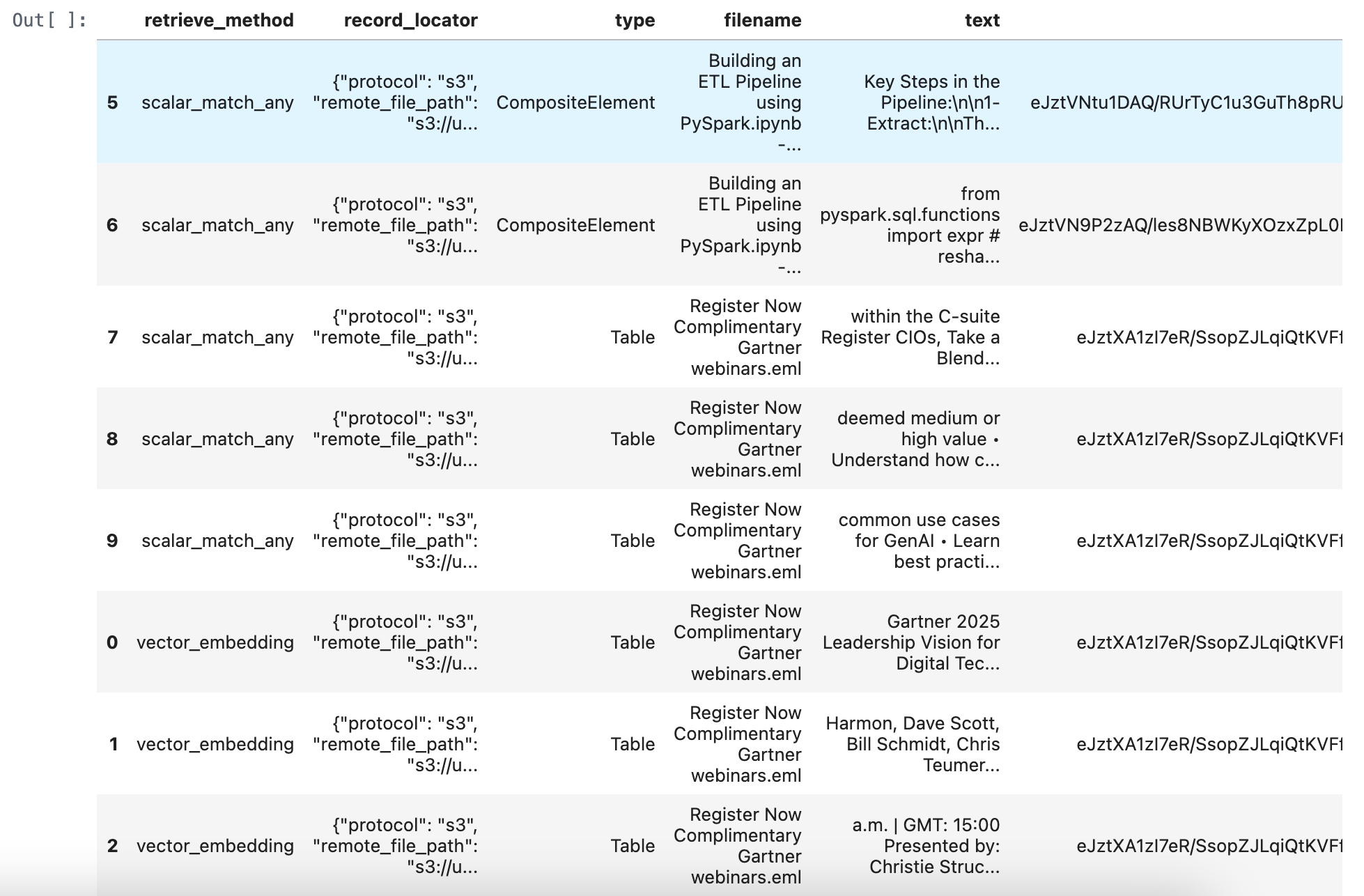
rag_ready_data_df = get_rag_ready_data(conn)
rag_ready_data_df
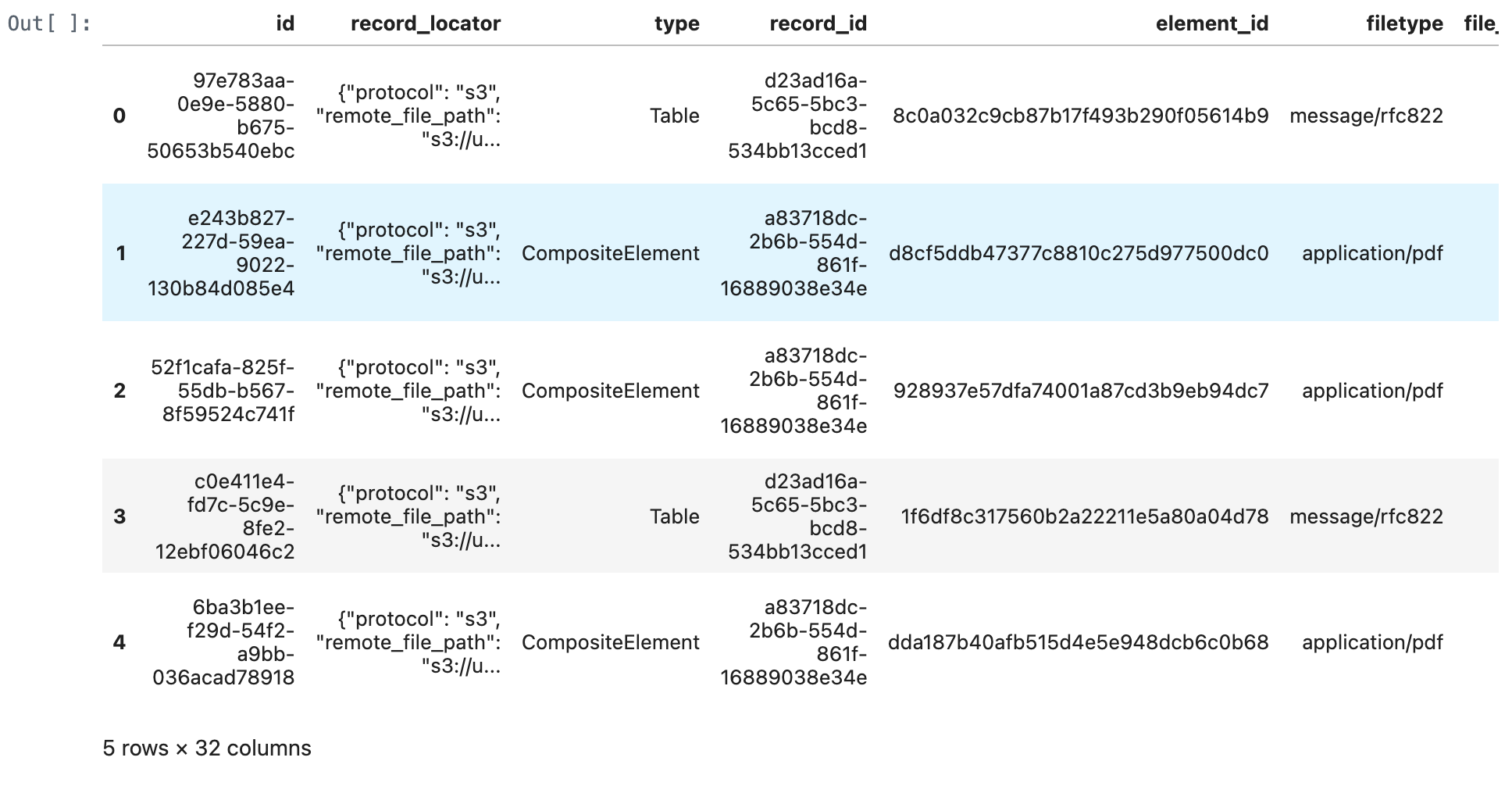
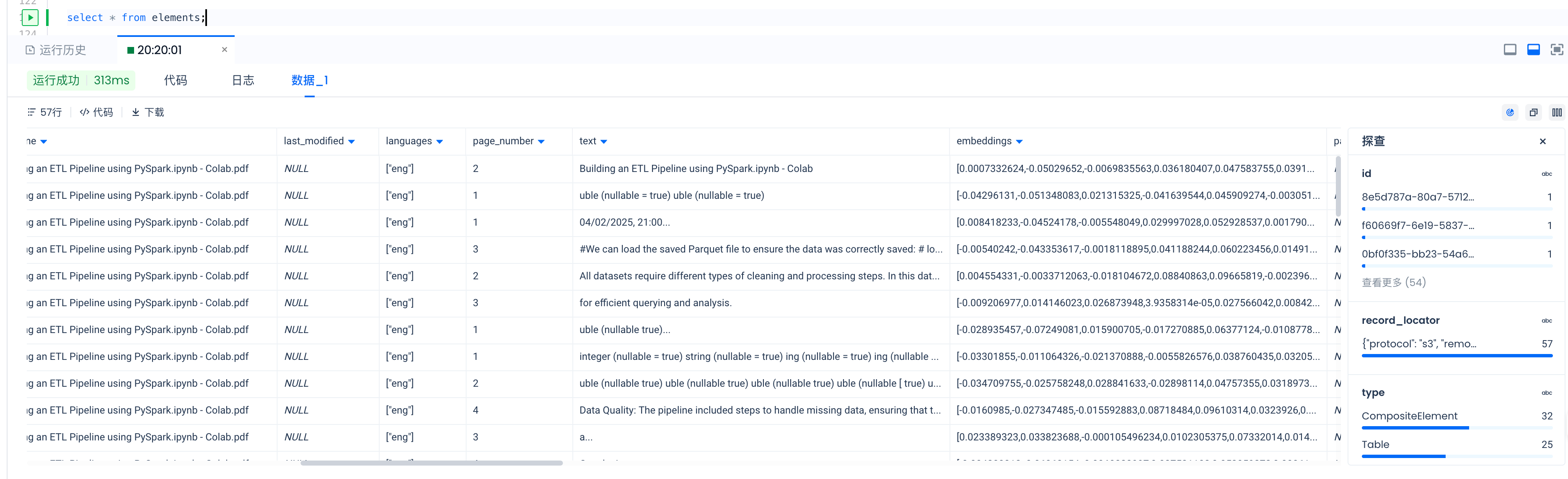
Or you can inspect the data through Lakehouse Studio.
Retrieve Relevant Documents from the Lakehouse
from sentence_transformers import SentenceTransformer
def get_embedding(query):
model = SentenceTransformer("BAAI/bge-base-en-v1.5")
return model.encode(query, normalize_embeddings=True)
def retrieve_documents(conn, query: str, num_results: int = 5):
embedding = get_embedding(query)
embedding_list = embedding.tolist()
embedding_json = json.dumps(embedding_list)
with conn.cursor() as cur:
stmt = f"""
WITH
vector_embedding_result AS (
SELECT
"vector_embedding" as retrieve_method,
record_locator,
type,
filename,
text,
orig_elements,
cosine_distance(embeddings, cast({embedding_list} as vector({embeddings_dimensions}))) AS score
FROM {silver_table_name}
ORDER BY score ASC
LIMIT {num_results}
)
SELECT * FROM vector_embedding_result
ORDER by score ASC;
"""
cur.execute(stmt)
results = cur.fetchall()
columns = [desc[0] for desc in cur.description] # Get column names from cursor description
df = pd.DataFrame(results, columns=columns)
return df
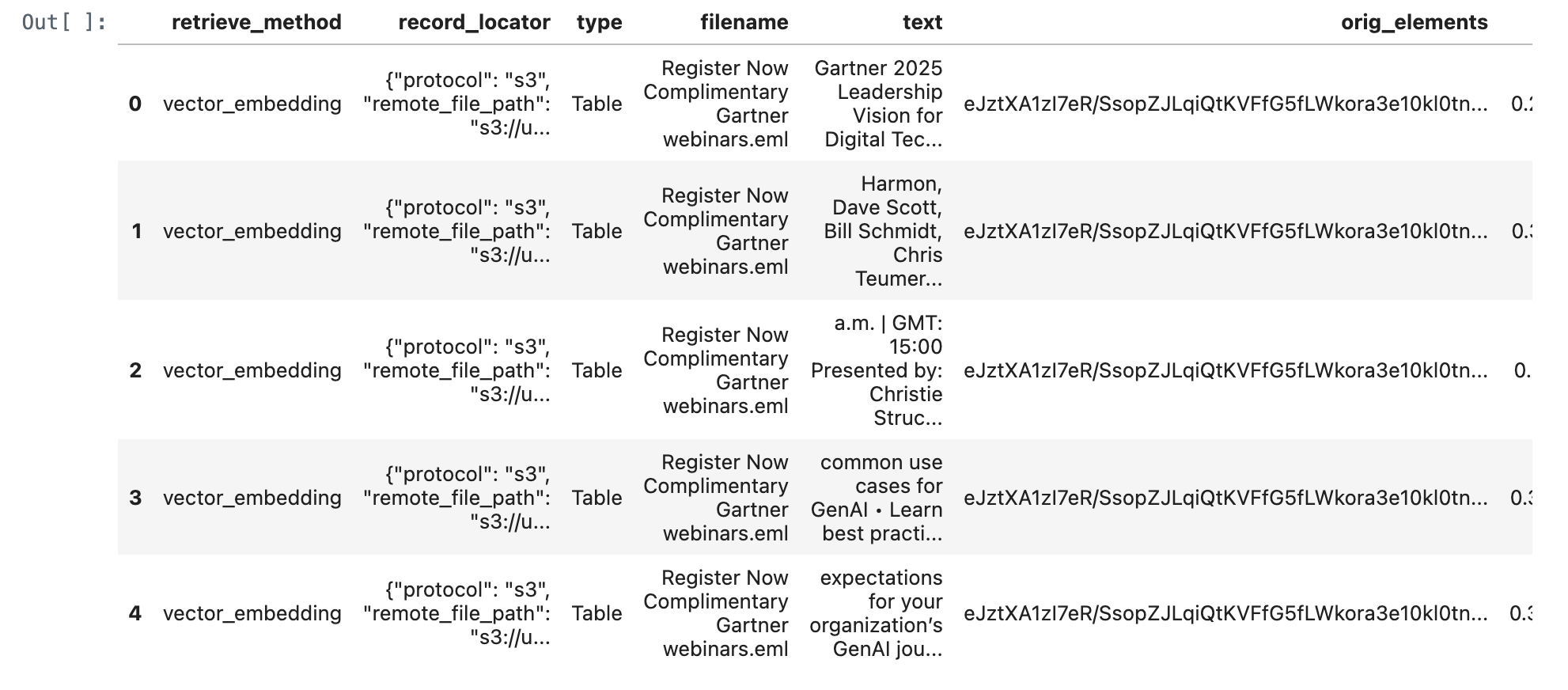
query_text = "Harmon, Dave Scott, Bill Schmidt, Chris Teumer • Gain an action plan to hiring top IT talent • Understand how to best position yourself in the market to gain top talent • Learn why CIOs need to pay attention to hiring IT talent Register The Gartner 2025 Technology Adoption Roadmap for Infrastructure & Operations (I&O) Wednesday, February 19, 2025 EST: 10:00 a.m. | GMT: 15:00 Presented by: Ajeeta Malhotra and Amol Nadkarni • Discover why 66% of surveyed technologies are":
query_text = "What is gartner leadership vision for digital tech?"
retrieve_documents_df = retrieve_documents(conn, query_text)
retrieve_documents_df
def match_all_documents(conn, query: str, num_results: int = 1):
with conn.cursor() as cur:
stmt = f"""
WITH
scalar_match_all_result AS (
SELECT
"scalar_match_all" as retrieve_method,
record_locator,
type,
filename,
text,
orig_elements,
-100 AS score
FROM {silver_table_name}
WHERE match_all(
text,
"{query}",
map("analyzer", "unicode")
)
ORDER BY score ASC
LIMIT {num_results}
)
SELECT * FROM scalar_match_all_result
ORDER by score ASC;
"""
cur.execute(stmt)
results = cur.fetchall()
columns = [desc[0] for desc in cur.description] # Get column names from cursor description
df = pd.DataFrame(results, columns=columns)
return df
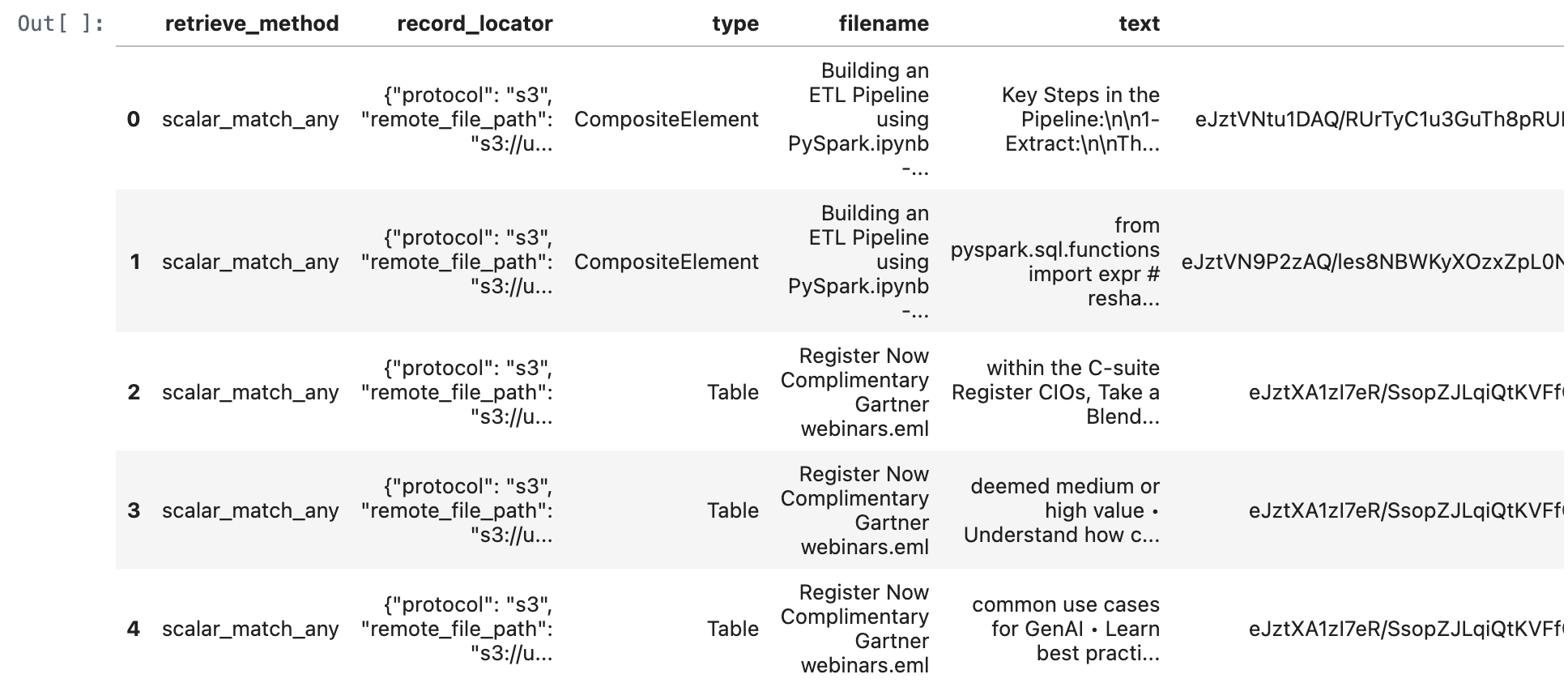
match_all_documents_df = match_all_documents(conn,query_text)
match_all_documents_df
def match_any_documents(conn, query: str, num_results: int = 5):
with conn.cursor() as cur:
stmt = f"""
WITH
scalar_match_any_result AS (
SELECT
"scalar_match_any" as retrieve_method,
record_locator,
type,
filename,
text,
orig_elements,
0 AS score
FROM {silver_table_name}
WHERE match_any(
text,
"{query}",
map("analyzer", "unicode")
)
ORDER BY score ASC
LIMIT {num_results}
)
SELECT * FROM scalar_match_any_result
ORDER by score ASC;
"""
cur.execute(stmt)
results = cur.fetchall()
columns = [desc[0] for desc in cur.description] # Get column names from cursor description
df = pd.DataFrame(results, columns=columns)
return df
match_any_documents_df = match_any_documents(conn,query_text)
match_any_documents_df
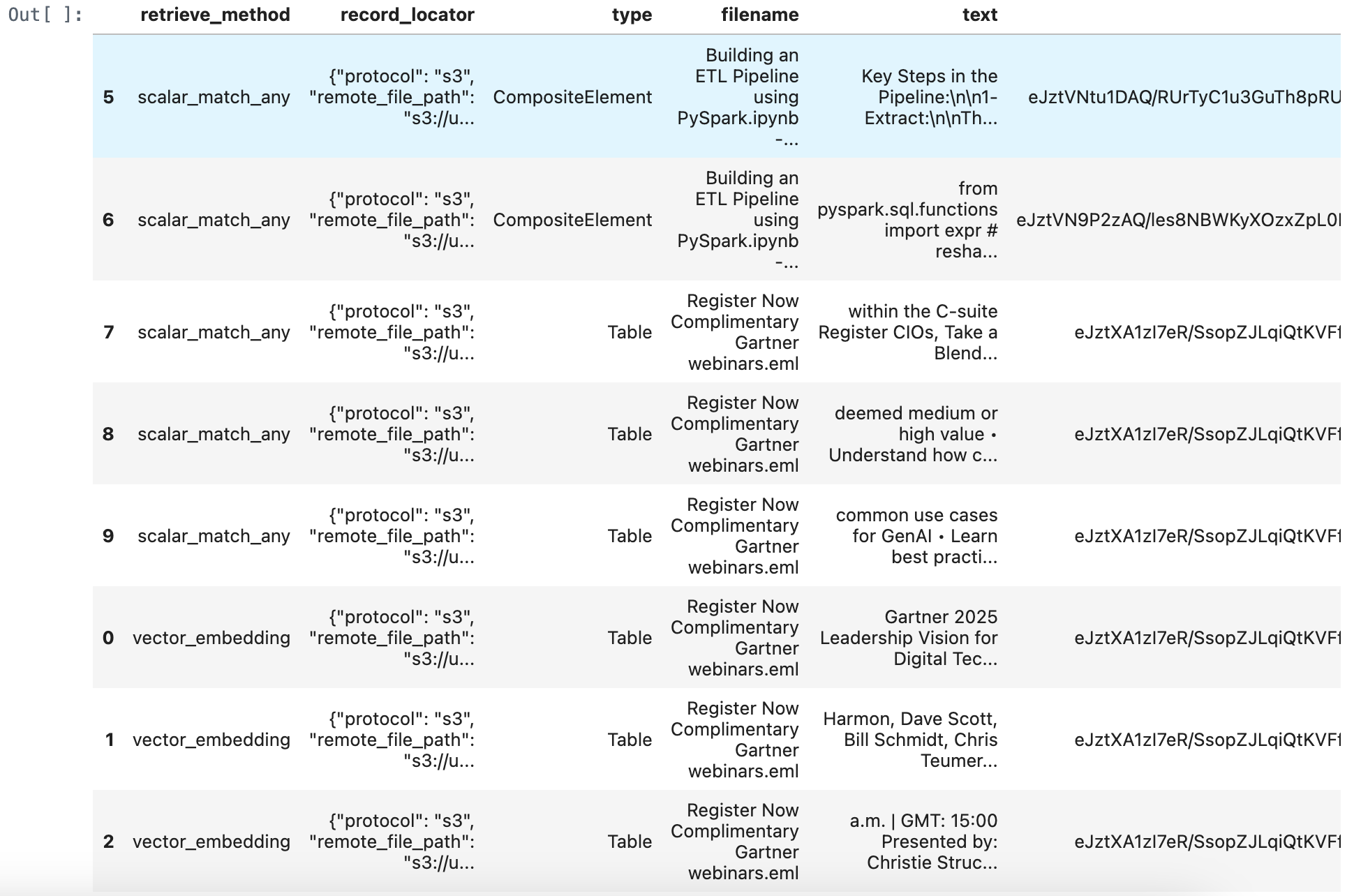
merged_df = pd.concat([retrieve_documents_df, match_all_documents_df, match_any_documents_df], ignore_index=True)
merged_df = merged_df.sort_values(by='score', ascending=True)
merged_df
import pandas as pd
import torch
import numpy as np
from transformers import AutoModelForSequenceClassification, AutoTokenizer
Define the reranking function:
def rerank_texts(query, texts, model_name="BAAI/bge-reranker-v2-m3", normalize=True):
"""
Reranks a list of texts based on their relevance to a given query using a specified reranking model.
Parameters:
- query: The query string.
- texts: A list of texts to rerank.
- model_name: The name of the reranking model to use.
- normalize: Whether to normalize scores to the [0, 1] range using the sigmoid function.
Returns:
- A list of reranked texts.
- A list of corresponding scores.
"""
# Load model and tokenizer
tokenizer = AutoTokenizer.from_pretrained(model_name)
model = AutoModelForSequenceClassification.from_pretrained(model_name)
device = torch.device("cuda" if torch.cuda.is_available() else "cpu")
model.to(device)
model.eval()
# Prepare input pairs [query, text]
pairs = [[query, text] for text in texts]
inputs = tokenizer(pairs, padding=True, truncation=True, return_tensors="pt", max_length=512)
inputs = {key: value.to(device) for key, value in inputs.items()}
# Get relevance scores
with torch.no_grad():
outputs = model(**inputs)
scores = outputs.logits.view(-1).cpu().numpy()
# Normalize scores to [0, 1] if needed
if normalize:
scores = 1 / (1 + np.exp(-scores))
# Combine texts with scores and sort by score in descending order
scored_texts = list(zip(texts, scores))
scored_texts.sort(key=lambda x: x[1], reverse=True)
# Separate sorted texts and scores
sorted_texts, sorted_scores = zip(*scored_texts)
return list(sorted_texts), list(sorted_scores)
Example usage:
query = "Which session is presented by Ajeeta Malhotra and Amol Nadkarni?":
query = "What is gartner leadership vision for digital tech?"
sorted_texts, sorted_scores = rerank_texts(query, merged_df["text"].tolist())
Update DataFrame with reranked texts and scores:
merged_df["reranked_text"] = sorted_texts
merged_df["rerank_score"] = sorted_scores
merged_df
Get the first row of the DataFrame, which has the highest reranking score:
first_row_reranked_text = merged_df.iloc[0]['reranked_text']
print(first_row_reranked_text)
Gartner 2025 Leadership Vision for Digital Technology and Business Services Wednesday, February 19, 2025 EST: 11:00 a.m. | GMT: 16:00 Presented by: Chrissy Healey, Scott Frederick and Jennifer Barry • Revert back to growth by defining and delivering transformative impact • Resolve the asset and AI-first dilemma in delivery • Decode demand in your top accounts Register How U.S. Government Executives Can Navigate Upcoming Workforce Changes Friday, February 21, 2025 EDT: 10:00
Summary of Advantages for RAG Application Development
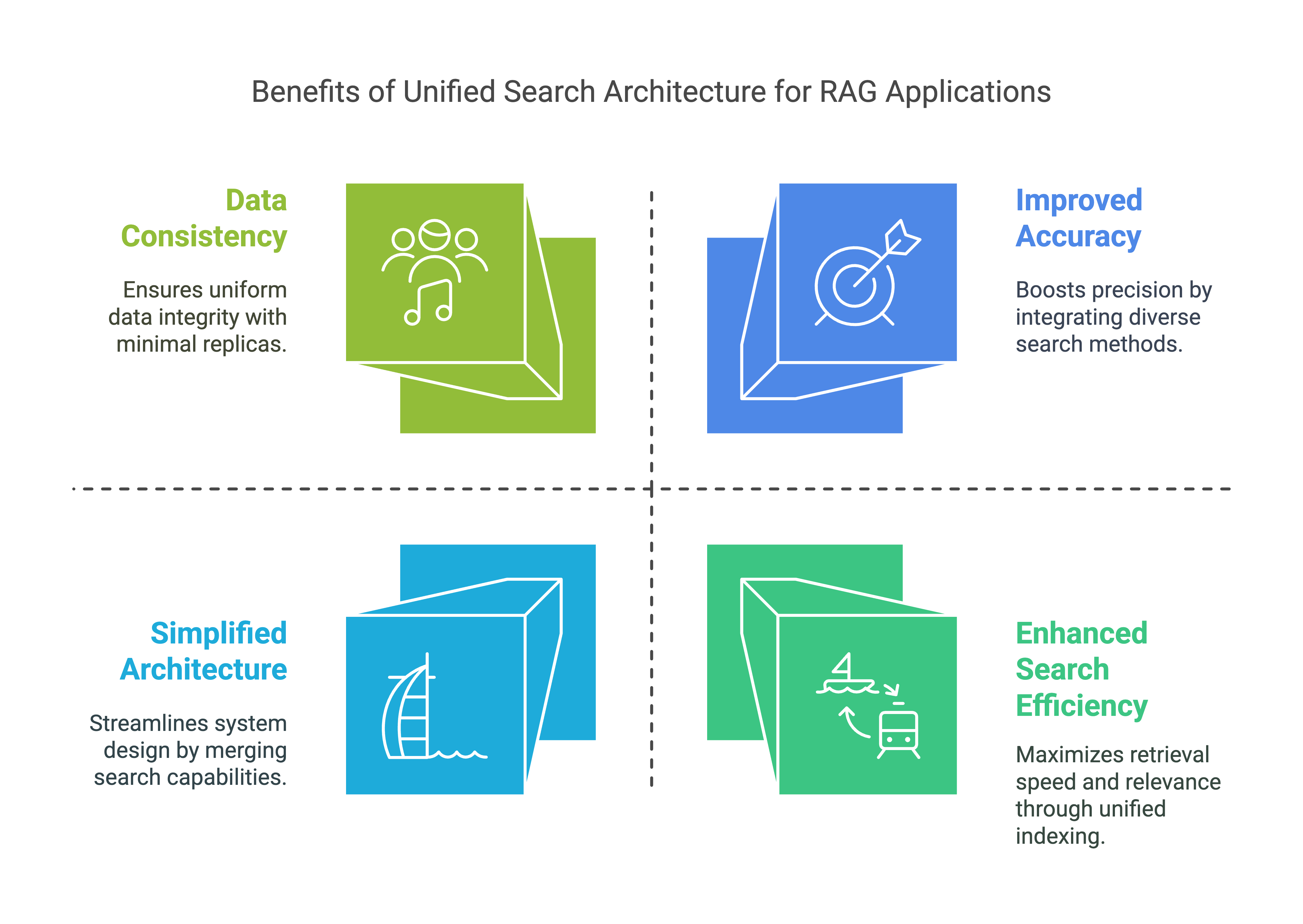
Enhanced Search Efficiency:
- By supporting both inverted and vector search, this table allows RAG applications to efficiently retrieve relevant information based on text content and semantic similarity. This enhances the model's ability to find and generate contextually relevant responses.
Improved Accuracy:
- The combination of full-text and similarity search ensures that RAG applications can access a broader range of relevant data, thereby improving the accuracy and relevance of generated content.
Scalability:
- With optimized indexes, this table can handle large volumes of data and execute searches quickly, supporting the scalability needs of RAG applications.
Simplified Architecture:
- Combining inverted text and vector search functionality into a single table eliminates the need for separate text and vector search databases. This simplifies maintenance, reduces operational overhead, and improves development efficiency.
Data Consistency:
- Reducing the number of data copies from three to one improves data consistency, minimizes data duplication, and reduces the need for data synchronization and movement.
Overall, this Lakehouse architecture reduces operational complexity, improves data consistency, and increases development efficiency, making it ideal for effective RAG application development.
Appendix:
You can also view this hands-on tutorial by visiting github.
