Using dbt for Incremental Development on Lakehouse
Notes
- Use dbt-clickzetta 1.7.8 or later (requires Python 3.10+, Python 3.12 recommended; dbt-core 1.8+).
Preparation
- Install dbt-clickzetta (dbt-core is included automatically):
pip install "dbt-clickzetta>=1.7.8"
- Initialize a dbt project
$ dbt init cz_dbt_project
Which database would you like to use?
[1] clickzetta
Enter a number: 1
service (cn-shanghai-alicloud.api.clickzetta.com): cn-shanghai-alicloud.api.clickzetta.com
instance (your_instance): <your_instance>
workspace (your_workspace): <your_workspace>
vcluster (default_ap): DEFAULT
username (your_username): <user_name>
schema (default schema): dbt_dev
password (password): <your_passwd>
Profile cz_dbt_project written to /Users/username/.dbt/profiles.yml
Your new dbt project "cz_dbt_project" was created!
$ cd cz_dbt_project
- Configure the Singdata dbt project profiles
Open and edit ~/.dbt/profiles.yml and add the production environment configuration. Update the service field to match your region_id:
cz_dbt_project:
target: dev
outputs:
prod:
type: clickzetta
service: cn-shanghai-alicloud.api.clickzetta.com
instance: <your_instance_name>
username: <user_name>
password: <passwd>
workspace: <your_workspace_name>
schema: dbt_prod
vcluster: DEFAULT
dev:
type: clickzetta
service: cn-shanghai-alicloud.api.clickzetta.com
instance: <your_instance_name>
username: <user_name>
password: <passwd>
workspace: <your_workspace_name>
schema: dbt_dev
vcluster: DEFAULT
- Verify the configuration
$ dbt debug
02:22:03 Connection test: [OK connection ok]
02:22:03 All checks passed!
- Test run
Running dbt run will build the 2 test models included in the dbt project in the target dev environment:
- model.cz_dbt_project.my_first_dbt_model
- model.cz_dbt_project.my_second_dbt_model
$ dbt run
Check the execution log for success, and verify that my_first_dbt_model and my_second_dbt_model are created in the target environment (e.g., the dbt_dev schema).
Create an Incremental Processing Task Based on Table Stream
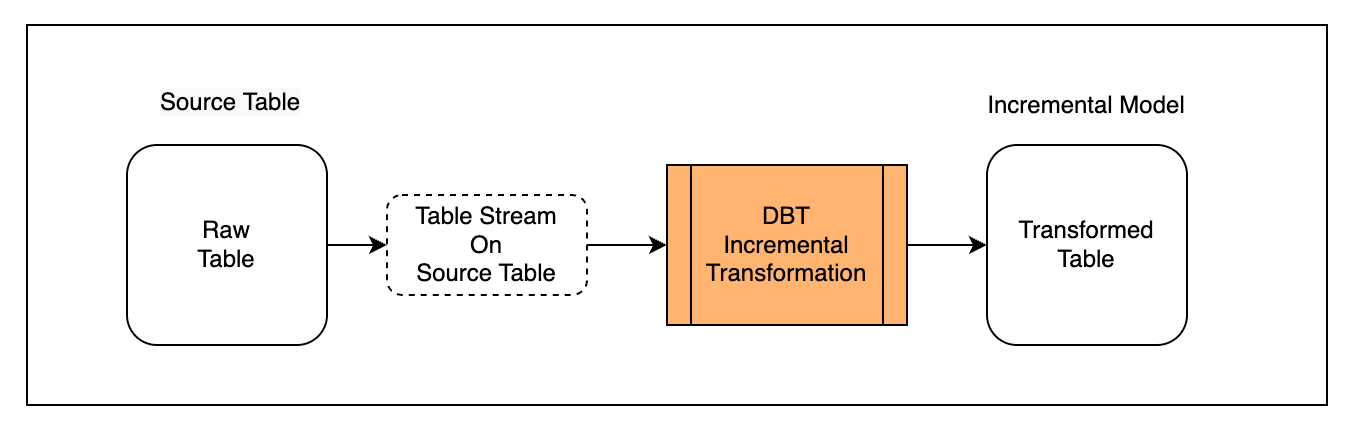
Scenario Description
First, define the externally written table as a Source Table and create a Table Stream object on it to capture incremental change data.
Second, create an incremental model in dbt that uses the Table Stream (materialized='incremental').
Finally, run the model multiple times to observe the incremental processing behavior.
Prepare the Source Table
Create a raw table and continuously import data through a data integration tool:
CREATE TABLE public.ecommerce_events_multicategorystore_live(
`event_time` timestamp,
`event_type` string,
`product_id` string,
`category_id` string,
`category_code` string,
`brand` string,
`price` decimal(10,2),
`user_id` string,
`user_session` string)
TBLPROPERTIES(
'change_tracking'='true');
Note: you must add 'change_tracking' = 'true' to the table properties to enable incremental data capture.
Create a Table Stream object on the source table to track its change records:
-- Create stream on source table
CREATE TABLE STREAM public.stream_ecommerce_events
on table ecommerce_events_multicategorystore_live
with PROPERTIES ('TABLE_STREAM_MODE' = 'APPEND_ONLY')
Also create a sources.yml file under the models directory of cz_dbt_project to declare the 2 source tables. The file should reference ecommerce_events_multicategorystore_live and stream_ecommerce_events under the public schema.
Develop the Model
Create a dbt model named events_enriched.sql and declare it as an incremental model through configuration:
{{
config(
materialized='incremental'
)
}}
SELECT
event_time,
CAST(SUBSTRING(event_time,0,19) AS TIMESTAMP) AS event_timestamp,
SUBSTRING(event_time,12,2) AS event_hour,
SUBSTRING(event_time,15,2) AS event_minute,
SUBSTRING(event_time,18,2) AS event_second,
event_type,
product_id,
category_id,
category_code,
brand,
CAST(price AS DECIMAL(10,2)) AS price,
user_id,
user_session,
CAST(SUBSTRING(event_time,0,19)AS date) AS event_date,
CURRENT_TIMESTAMP() as loaded_at
FROM
{% if is_incremental() %}
{{source('quning', 'stream_ecommerce_events')}}
{% else %}
{{source('quning', 'ecommerce_events_multicategorystore_live')}}
{% endif %}
Notes:
- When building the model with
dbt build, is_incremental() evaluates to False, and the model is built using the full data from the source table ecommerce_events_multicategorystore_live.
- When running the model with
dbt run, is_incremental() evaluates to True and incremental processing is performed.
If you want both the initial build and all subsequent runs to use only the incremental data from the Table Stream (Table Stream provides only change data captured after it was created), define the model as follows:
{{
config(
materialized='incremental'
)
}}
SELECT
`event_time` ,
`event_type` ,
`product_id` ,
`category_id` ,
`category_code` ,
`brand` ,
`price` ,
`user_id` ,
`user_session` ,
CURRENT_TIMESTAMP() as load_time
FROM
{{source('public', 'stream_ecommerce_events')}}
Build the Model
Create the model in the target environment using dbt build:
dbt build --model events_enriched
Observing the logs, the model is built with the following statement, performing an initial full-load transformation of the source table:
/* {"app": "dbt", "dbt_version": "1.8.x", "profile_name": "cz_dbt_project", "target_name": "dev", "node_id": "model.cz_dbt_project.events_enriched"} */
create table dbt_dev.events_enriched
as
SELECT
event_time,
CAST(SUBSTRING(event_time,0,19) AS TIMESTAMP) AS event_timestamp,
SUBSTRING(event_time,12,2) AS event_hour,
SUBSTRING(event_time,15,2) AS event_minute,
SUBSTRING(event_time,18,2) AS event_second,
event_type,
product_id,
category_id,
category_code,
brand,
CAST(price AS DECIMAL(10,2)) AS price,
user_id,
user_session,
CAST(SUBSTRING(event_time,0,19)AS date) AS event_date,
CURRENT_TIMESTAMP() as loaded_at
FROM
public.ecommerce_events_multicategorystore_live;
Check the data objects in the Lakehouse target environment:
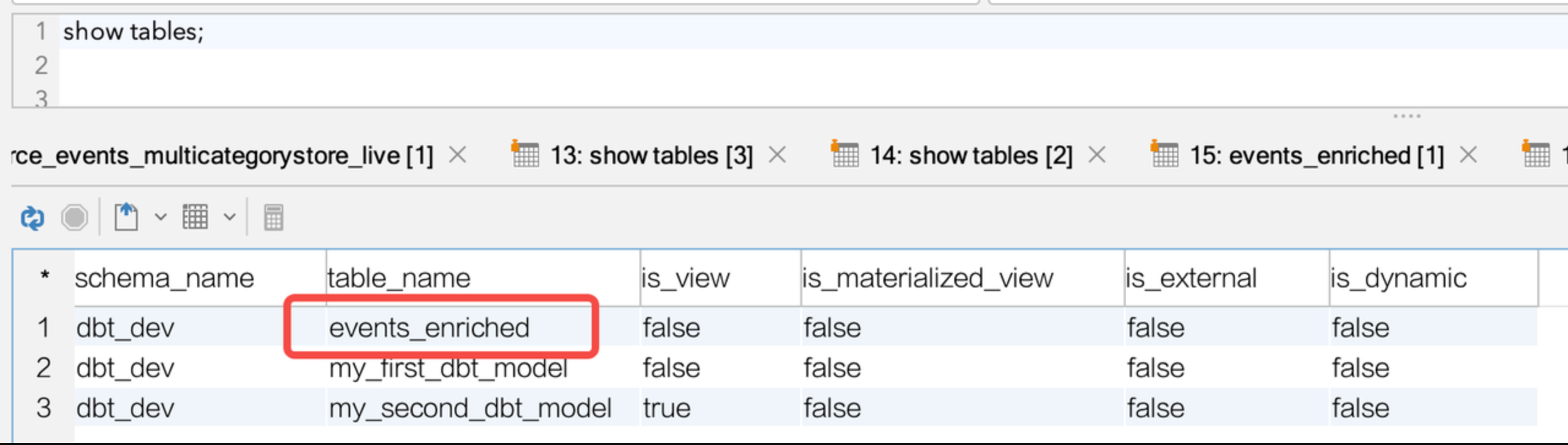
select count(*) from events_enriched ;
`count`(*)
----------
3700
The data object and initial data were created and written successfully.
Run the Model
Run the model using dbt run:
dbt run --model events_enriched
Following the dbt incremental model logic, dbt creates a temporary view in the target environment to represent the incremental data:
/* {"app": "dbt", "dbt_version": "1.8.x", "profile_name": "cz_dbt_project", "target_name": "dev", "node_id": "model.cz_dbt_project.events_enriched"} */
create or replace view dbt_dev.events_enriched__dbt_tmp as
SELECT
event_time,
CAST(SUBSTRING(event_time,0,19) AS TIMESTAMP) AS event_timestamp,
SUBSTRING(event_time,12,2) AS event_hour,
SUBSTRING(event_time,15,2) AS event_minute,
SUBSTRING(event_time,18,2) AS event_second,
event_type,
product_id,
category_id,
category_code,
brand,
CAST(price AS DECIMAL(10,2)) AS price,
user_id,
user_session,
CAST(SUBSTRING(event_time,0,19)AS date) AS event_date,
CURRENT_TIMESTAMP() as loaded_at
FROM
public.stream_ecommerce_events;
dbt then uses the materialized='incremental' configuration to write the incremental data from the Table Stream into the target model via MERGE INTO:
/* {"app": "dbt", "dbt_version": "1.8.x", "profile_name": "cz_dbt_project", "target_name": "dev", "node_id": "model.cz_dbt_project.events_enriched"} */
-- back compat for old kwarg name
merge into dbt_dev.events_enriched as DBT_INTERNAL_DEST
using dbt_dev.events_enriched__dbt_tmp as DBT_INTERNAL_SOURCE
on FALSE
when not matched then insert
(`event_time`,`event_timestamp`,`event_hour`,`event_minute`,`event_second`,`event_type`,`product_id`,`category_id`,`category_code`,`brand`,`price`,`user_id`,`user_session`,`event_date`,`loaded_at`)
values (
DBT_INTERNAL_SOURCE.`event_time`,DBT_INTERNAL_SOURCE.`event_timestamp`,DBT_INTERNAL_SOURCE.`event_hour`,DBT_INTERNAL_SOURCE.`event_minute`,DBT_INTERNAL_SOURCE.`event_second`,DBT_INTERNAL_SOURCE.`event_type`,DBT_INTERNAL_SOURCE.`product_id`,DBT_INTERNAL_SOURCE.`category_id`,DBT_INTERNAL_SOURCE.`category_code`,DBT_INTERNAL_SOURCE.`brand`,DBT_INTERNAL_SOURCE.`price`,DBT_INTERNAL_SOURCE.`user_id`,DBT_INTERNAL_SOURCE.`user_session`,DBT_INTERNAL_SOURCE.`event_date`,DBT_INTERNAL_SOURCE.`loaded_at`
);
Each time dbt run executes, data is read from the Table Stream and merged into the target model. After a successful write, the Table Stream's change record position advances automatically, so the next dbt run will process the latest incremental data.
Create a Processing Task Based on Dynamic Tables
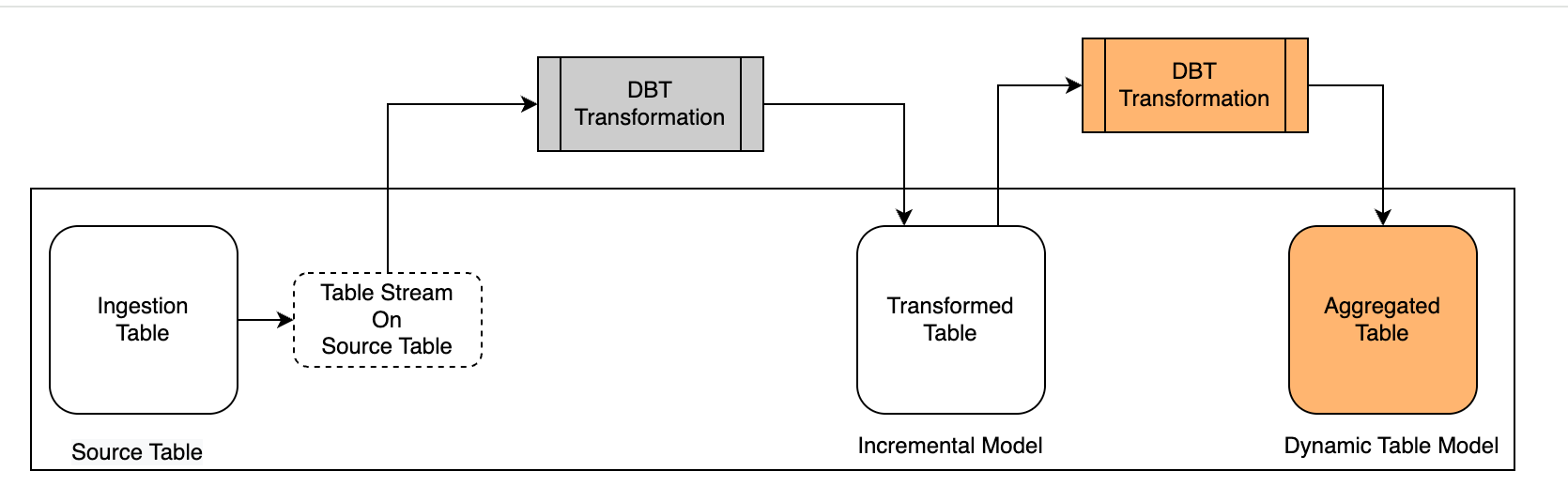
Scenario Description
Building on the previous scenario, we continue using the Dynamic Table model in dbt-clickzetta to aggregate the already-transformed table.
First, create a model in dbt using Dynamic Table (materialized='dynamic_table'), configuring the refresh interval and the Virtual Cluster used for refresh, so that the system can automatically refresh according to the schedule after the model is built.
Second, observe the build and refresh results of the Dynamic Table model in the target environment.
Develop the Model
Create a Dynamic Table model named product_grossing.sql.
{{
config(
materialized = 'dynamic_table',
refresh_vc = 'default',
refresh_interval = '5 MINUTE'
)
}}
select
event_date,
product_id,
sum(price) sum_price
from
{{ ref("events_enriched")}}
group by event_date,product_id
Build the Model
Create the model in the target environment using dbt build:
dbt build --model product_grossing
Observing the logs, the model is built with the following statement, performing an initial full-load transformation of the source table:
/* {"app": "dbt", "dbt_version": "1.8.x", "profile_name": "cz_dbt_project", "target_name": "dev", "node_id": "model.cz_dbt_project.product_grossing"} */
create or replace dynamic table dbt_dev.product_grossing
refresh interval 5 minute
vcluster default
as
select
event_date,
product_id,
sum(price) sum_price
from
dbt_dev.events_enriched
group by event_date,product_id;
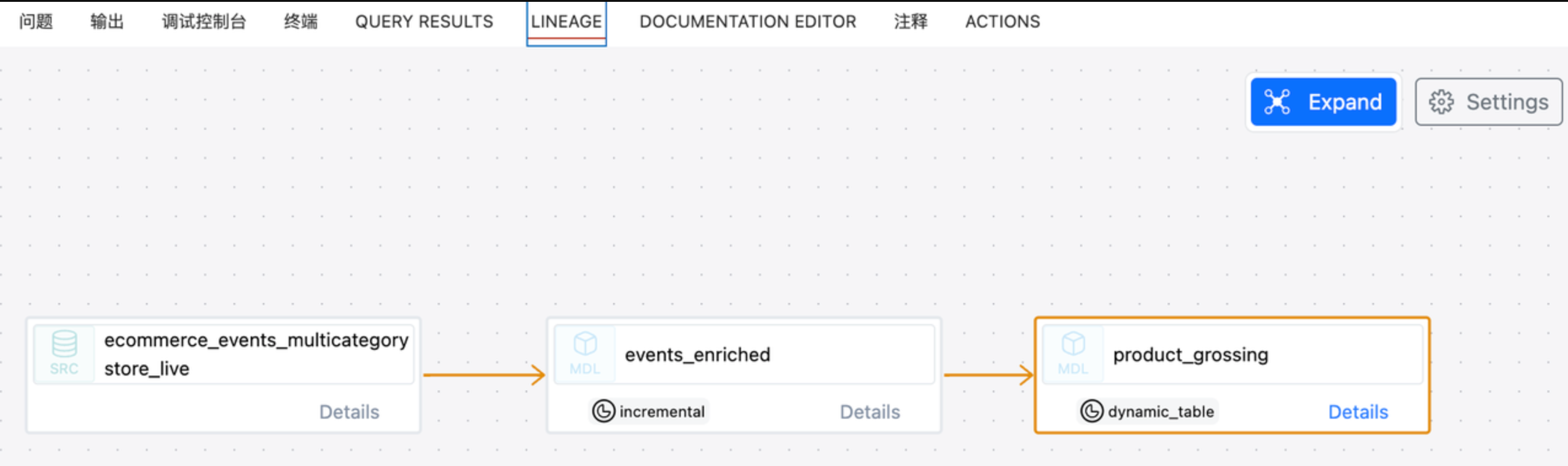
View the model lineage in dbt:
Check the data objects in the Lakehouse target environment:
show tables;
schema_name table_name is_view is_materialized_view is_external is_dynamic
----------- ------------------------ ------- -------------------- ----------- ----------
dbt_dev events_enriched false false false false
dbt_dev events_enriched__dbt_tmp true false false false
dbt_dev my_first_dbt_model false false false false
dbt_dev my_second_dbt_model true false false false
Use the DESC command to view the Dynamic Table details, focusing on confirming that the Virtual Cluster and refresh interval parameters are as expected:
desc extended product_grossing;
column_name data_type
---------------------------- -------------------------------------------------------------------------------------------------------------------------------------------------------------------------------------------------------------------------------------------------------------
event_date date
product_id string
sum_price decimal(20,2)
detailed table information:
schema dbt_dev
name product_grossing
creator xxx
created_time 2024-06-22 21:03:40.467
last_modified_time 2024-06-22 21:08:41.184
comment
properties (("refresh_vc","default"))
type DYNAMIC TABLE
view_text SELECT events_enriched.event_date, events_enriched.product_id, `sum`(events_enriched.price) AS sum_price FROM ql_ws.dbt_dev.events_enriched GROUP BY events_enriched.event_date, events_enriched.product_id;
view_original_text select
event_date,
product_id,
sum(price) sum_price
from
dbt_dev.events_enriched
group by event_date,product_id;
source_tables [86:ql_ws.dbt_dev.events_enriched=8278006558627319396]
refresh_type on schedule
refresh_start_time 2024-06-22 21:03:40.418
refresh_interval_second 300
unique_key_is_valid true
unique_key_version_info unique_key_version: 1, explode_sort_key_version: 1, digest: H4sIAAAAAAAAA3NMT9cx0nEP8g8NUHCKVDBScPb3CfX1C+ZSCE5OzANKBfmHx3u7Riq4Bfn7KqSWpeaVFMen5hVlJmekpnABAIf7bMY+AAAA, unique key infos:[sourceTable: 86:ql_ws.dbt_dev.events_enriched, uniqueKeyType: 1,]
format PARQUET
format_options (("cz.storage.parquet.block.size","134217728"),("cz.storage.parquet.dictionary.page.size","2097152"),("cz.storage.parquet.page.size","1048576"))
statistics 99 rows 4468 bytes
Run the Model
Dynamic Table dbt models are automatically scheduled by Lakehouse using the refresh parameters set at build time — no dbt run command is needed.
After the model is built in the target environment, you can check the Dynamic Table's refresh history on the Lakehouse platform with the following SQL:
show dynamic table refresh history where name ='product_grossing'
workspace_name schema_name name virtual_cluster start_time end_time duration state refresh_trigger suspended_reason refresh_mode error_message source_tables stats completion_target job_id
-------------- ----------- ---------------- --------------- ------------------- ------------------- -------------------- ------- ---------------- ---------------- ------------ ------------- ------------------------------------------------------------------------- ----------------------------------------- ----------------- ------------------------
ql_ws dbt_dev product_grossing DEFAULT 2024-06-22 21:08:40 2024-06-22 21:08:41 0 00:00:00.566000000 SUCCEED SYSTEM_SCHEDULED (null) INCREMENTAL (null) [{"schema":"dbt_dev","table_name":"events_enriched","workspace":"ql_ws"}] {"rows_deleted":"0","rows_inserted":"99"} (null) 202406222108406319689694
