
How to Run a Permission Application: From Request to Enforceable Grant
A step-by-step guide to the enterprise permission application workflow: classify the request, separate delegated from app-only access, scope AI agents to least privilege, route review decisions, verify the grant, and test revocation.
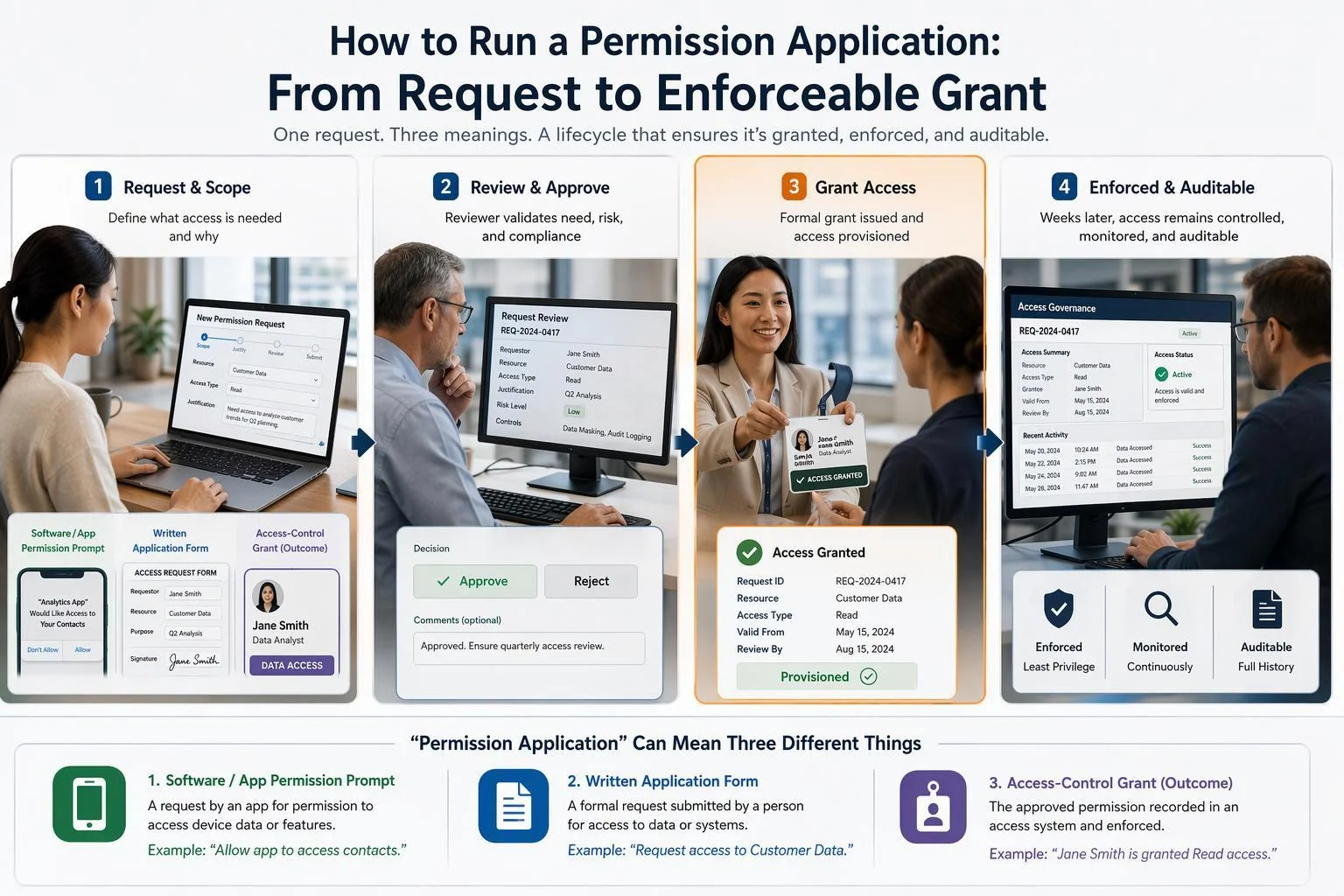
A permission application succeeds when the grant it produces is still correct weeks later: scoped to what the requester actually needs, reviewed by someone with authority to say no, recorded in a form you can audit, and revocable without guesswork. That is the outcome this guide is organized around.
The phrase itself is ambiguous, so it is worth fixing the scope. This guide treats a permission application as the enterprise authorization workflow: an application, service, or AI agent requests access to a protected organizational resource, a reviewer decides, and the resulting grant is enforced and can be withdrawn. Two other artifacts share the name and belong elsewhere. A consumer app-consent prompt is a decision a person makes about their own data inside a product they are already using. A data-subject rights request is a privacy-law filing in which someone asks the organization to act on their records. If either of those is what you meant, stop here and route to the team that owns it; the steps below will not fit.
Four things need to exist before the first request arrives. You need an identity provider that records consent or approval decisions rather than merely issuing tokens. You need a named reviewer, or a small set of them, with the role permissions required to grant the access being requested. You need a permission inventory for the requesting application, so a reviewer can see what the app is asking for and why. And you need a revocation path that has been exercised at least once, because an untested revocation is a plan, not a control.
Step 1: Classify the request before you touch a form
Triage first, because the three request types differ in who requests, who decides, and what artifact records the decision. In a consumer app-consent prompt, the individual user decides about their own data and the record is a consent grant tied to that user. In a rights request, a data subject asks the organization to act under privacy law, and the record is a case file with a statutory clock. In enterprise authorization, an application or agent asks an administrator for access to organizational resources, and the record is a permission grant or role assignment that outlives the requester.
Misclassification is expensive in both directions. A rights request dropped into an app-consent queue loses its legal deadline, because nobody in that queue is measuring one. An app-consent prompt forwarded to legal has no permission scope to evaluate, so it either stalls or comes back with an answer that does not bind the identity system. Neither failure looks like an error at the time; both surface later as an audit finding or a missed deadline.
The checkpoint before any queue accepts the request: it carries a type tag, the identity of the requester, and the specific resource it targets. A request missing any of the three is returned to the requester rather than triaged by guesswork.
Step 2: Separate delegated access from app-only access
The identity model decides what the grant can ever do, so settle it before anyone argues about which permissions to include. Microsoft's documentation draws the line clearly: delegated permissions let an application act on behalf of a signed-in user and reach only what that user could reach, while application permissions let an app act as its own identity with no user present and access any data the permission is associated with. In a delegated scenario, the app's effective privilege is the intersection of the permissions granted to it and the user's own rights.
Who can consent follows from that split. Users can consent to delegated permissions for their own data, subject to the tenant's app consent policies, which may restrict user consent even where admin consent is not required by default. Only administrators and service principal owners can consent to application permissions.
The checkpoint is a single question the request must answer in writing: is a user present when this call happens? If yes, the request should be delegated, and the reviewer should ask what happens when that user lacks the underlying access. If no, it is app-only, and the reviewer is now approving a grant that no user's permissions constrain.
Step 3: Treat an AI agent's request as its own identity, not a user's
Agent requests are where the identity model most often breaks down, because an agent can look like a user and behave like a service. An agent operating under delegated authority inherits the user's permissions, but it also adds a delegation chain, a longer lifetime, and the capacity to act after the user has gone. NIST's digital identity guidance is blunt about the token problem: a relying party shall not interpret the presence of an access token as an indicator of the subscriber's presence, because the access token and any refresh tokens could remain valid long after the authentication session ended. An agent holding application permissions has no user at all, so the grant is bounded only by what the permission covers.
OWASP's Excessive Agency entry names excessive permissions and excessive autonomy as the root causes, which maps directly onto this step: an agent with broad permissions and wide latitude to act on them is the failure case, not an edge case.
The checkpoint for every agent request is a recorded triple: the principal (user, agent, or service), the delegation path from the original authorizing party, and the maximum lifetime of the grant. If the request cannot state the lifetime, it is not ready for review.
Step 4: Scope the request to the least permission that works
Least privilege becomes tractable once you treat it as a mapping exercise rather than a principle to admire. List the exact API calls the application makes, then find the least-privileged permission that permits each one. Microsoft's own example is a good calibration: an app that only reads the signed-in user's profile needs User.Read, and granting User.ReadWrite makes it over-privileged because the app never updates the profile.
Over-privilege has a precise definition worth using in review: any application with unused or reducible permissions. Unused means the app holds a permission it never exercises. Reducible means a lower-privileged alternative would suffice, as when an app requests Files.ReadWrite.All but only ever reads files and should hold Files.Read.All. The security consequence is horizontal privilege escalation: an attacker who exploits a vulnerability in the app can use a permission the app never needed, reaching an API or operation outside the app's intended function.
The checkpoint is mechanical. Every requested permission maps to a named feature or API call, recorded in the request itself. Anything without a mapping is removed before the request reaches a reviewer, not negotiated during review.
Step 5: Route the request through a review queue with a real decision
The admin consent workflow is a useful reference model even if you run a different platform. When user consent is disabled, or a permission requires admin consent, users submit a request that lands in a reviewer queue. Reviewers see the requested permissions, the application details, and who is asking, then choose among three actions.
The distinction between two of those actions matters more than it appears. Deny rejects the current request but does not prevent the same users from requesting the same application again later. Block denies the current request and creates a disabled service principal, so future requests for that application cannot be submitted at all. Deny is for legitimate apps that need more information; block is for apps judged untrustworthy or unnecessary.
Two operational details deserve attention. Approval typically grants tenant-wide access unless the app is restricted through user assignment, so a reviewer approving one user's request may be opening the app to everyone. And audit coverage is imperfect: Microsoft's own documentation notes that the audit record for a reviewer approving a request currently lacks the user context and the app ID granted consent. The checkpoint is therefore a decision record you control — decision, justification, reviewer identity — plus notification to the requester.
Step 6: Verify the grant matches the request
Approval is not the same event as a correct grant, so inspect what was actually written. The artifact differs by permission type: consent to delegated permissions produces an OAuth2PermissionGrant object, while application permissions produce an appRoleAssignment. Whatever your platform calls them, the recorded object should match the approved scope exactly.
Extras arrive through mundane routes. A previous grant for the same application may still be in place and was never reduced. A default configuration may add a permission nobody asked for. An approval may have been granted for a broader scope than the reviewer believed they were approving. None of these show up in the approval record; they show up only when you read the grant.
The checkpoint is a direct comparison: granted permissions equal approved permissions, with no additions. Do this before the requester starts depending on the access, because after that point removing an extra permission becomes an incident rather than a correction.
Step 7: Make the grant enforceable and revocable after approval
Enforcement is layered, and each layer answers a different question. Role-based access control sets the coarse boundary of what the principal can reach. Row-level and column-level controls restrict what data within that boundary is visible, which is where fine-grained policy actually lands. A revocation path closes access when the answer to either question changes.
Revocation has a gap that catches teams repeatedly. Revoking a granted permission does not stop users from re-consenting to the application's requested permissions, so the app's requested-permission list must be updated alongside the revocation, or through dynamic consent the same access returns. Token revocation is a separate lever with its own semantics: RFC 7009 states that invalidation takes place immediately, but in practice there could be a propagation delay in which some servers know about the invalidation and others do not, and implementations should minimize that window.
For agents the problem is harder still. An IETF draft on revocation closure for agentic systems makes the point precisely: credential invalidation alone does not establish that every path from revoked authority to a consequential effect has been closed, because authority can be delegated, cached, queued, or propagated before the revocation arrives. The checkpoint is a timed revocation test that confirms access stops within a defined window, paired with the requested-permission update.
Common failure modes
Standing broad grants that were never reduced. An application accumulates permissions as it grows, and the granted set drifts above the used set. Microsoft calls the difference a permission gap, and it widens silently because nothing breaks. The control is a periodic review that compares granted permissions against actual API calls and downgrades reducible ones.
Orphaned service principals and service accounts. The owner leaves, the project ends, and the permissions persist because no one owns the cleanup. The control is ownership recorded on the grant itself, with an offboarding step that lists grants by owner rather than by application.
Tokens and refresh tokens that outlive the session. A session ends; the token does not. The control is a maximum grant lifetime recorded at approval, plus revocation that targets the underlying authorization grant rather than only the current access token.
Consent fatigue. Reviewers facing a long queue approve without reading the scope, and the queue's throughput becomes the security posture. The control is a review surface that puts the permission diff and the mapped feature list in front of the reviewer, and a policy that returns incomplete requests instead of completing them on the requester's behalf.
Acceptance checklist for a vendor or internal build
Request classified and tagged with type, requester identity, and target resource
Delegated versus app-only stated explicitly, with the user-present question answered
Agent principal, delegation path, and maximum grant lifetime recorded
Every requested permission mapped to a named feature or API call; unmapped permissions removed
Reviewer decision logged with justification and reviewer identity; requester notified
Granted scope verified against approved scope, with no inherited or default extras
Revocation tested and timed against a defined window
Application's requested-permission list updated at the same time as any revocation
FAQ
Do we need user consent or admin consent? It depends on the permission type. Users can consent to delegated permissions for their own data, subject to tenant app consent policies; only admins can consent to application permissions. See Step 2.
What does block do that deny does not? Deny rejects the current request but allows future requests for the same application. Block denies the request and creates a disabled service principal, so users cannot request that application again. See Step 5.
How long does a revoked token stay usable? RFC 7009 requires immediate invalidation, but acknowledges a propagation delay while servers learn about it, and asks implementations to minimize that window. Measure it in your own environment rather than assuming zero. See Step 7.
Can an agent be given a user's permissions? Yes, through delegated access, but the agent then inherits the user's permission boundary along with a delegation chain and a lifetime that can outlast the session. Record the principal, path, and lifetime before approving. See Step 3.
Next steps
Pick one live permission application in your environment and run it through Steps 1 to 7 this week, keeping the artifacts each step produces. If you would rather start from the other end, run the acceptance checklist against your highest-privilege application and treat every unchecked box as a finding with an owner.
If your platform is a data lakehouse, remember where these grants are ultimately enforced. Fine-grained access control, row-level and column-level restrictions, and audit logging are the layers that make an approved scope real, and they are the layers a revocation test actually exercises. Singdata's governance documentation is one place to see how those controls are described in practice; the Lakehouse Studio product page lists data governance, fine-grained access control, audit logging, and sensitive data masking among its modules, and the documentation overview points administrators to user and permission management. Whatever platform you run, verify the enforcement layer before you trust the approval record.
See Also
Exploring AI-Driven Layered Structures in Global Supply Chains
Transforming Loyalty Programs with Engaging Gamification Strategies
Understanding OLAP Cubes: Their Importance and Functionality