
How Unified Batch & Stream Solves Backfill Challenges
Unified Batch & Stream streamlines backfill by unifying batch and streaming jobs, reducing errors, boosting reliability, and improving data quality.

You want to reduce the headaches that come with backfill tasks. Unified Batch & Stream lets you process both old and new data together, so you no longer need to juggle separate systems. This approach cuts down on errors and makes your work faster. For example, you can see live financial activity and past trends at the same time, which helps you spot problems and make better choices right away. Many companies now use this method to power real-time alerts and smarter recommendations.
Key Takeaways
Unified Batch & Stream simplifies data processing by combining old and new data in one system, reducing errors and speeding up workflows.
Using a single codebase for both batch and streaming tasks saves time and minimizes mistakes, making data management more efficient.
Replay historical data through the same pipeline to maintain consistent transformation logic and improve data quality.
Adopt best practices like durable event logs and deterministic operators to enhance reliability and manage schema changes effectively.
Start your migration to Unified Batch & Stream by auditing your current state, defining use cases, and testing a proof of concept.
Unified Batch & Stream: Solving Backfill

Simplifying Pipeline Complexity
You often face tangled pipelines when you try to manage batch and stream jobs separately. Unified Batch & Stream helps you keep everything in one place. You use a single codebase for both batch and streaming tasks. This means you do not need to learn multiple systems or rewrite logic for each job. You save time and reduce mistakes.
Take a look at the architectural features that make this possible:
Architectural Feature | Description |
|---|---|
Unified Pipeline with Apache Beam | Lets you handle batch and streaming jobs together, cutting down on complexity. |
Seamless Switching Between Job Types | Makes it easy to move between streaming and batch processing, which helps with backfill tasks. |
Single Codebase Maintenance | You maintain one codebase, which boosts productivity and lowers the risk of errors. |
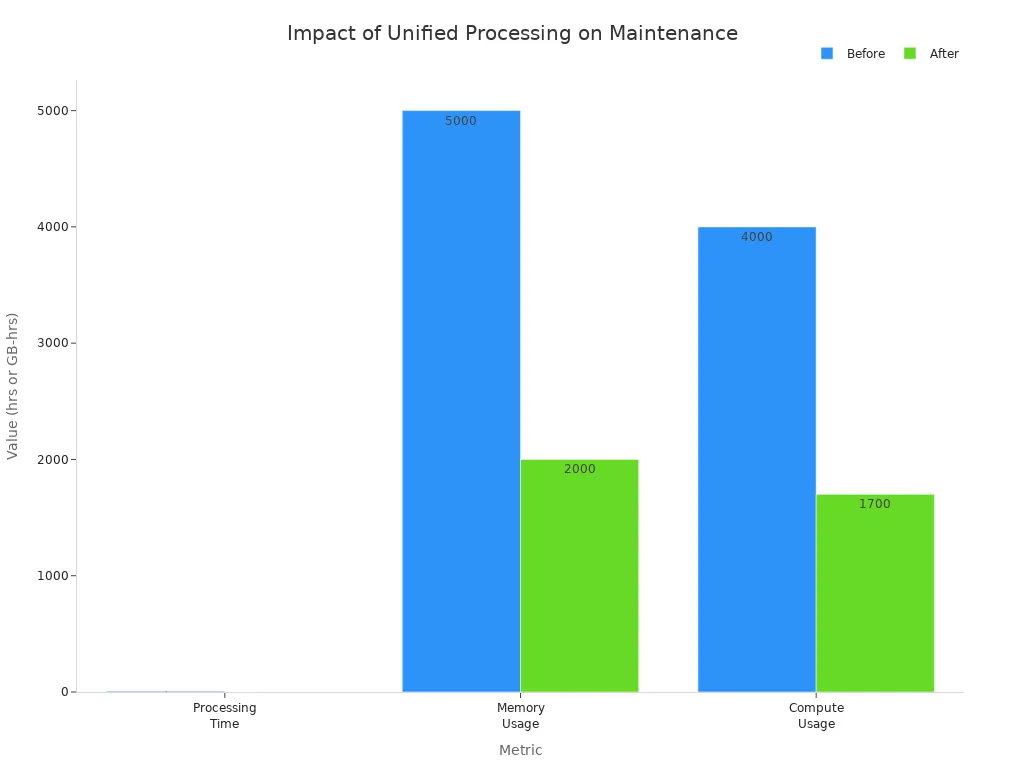
You see real results when you switch to Unified Batch & Stream. For example, LinkedIn reduced processing time by 94% and cut resource use in half after moving away from the old Lambda architecture. You can see similar improvements in your own pipelines.
Here is a comparison of metrics before and after migration:
Metric | Before Migration | After Migration | Reduction |
|---|---|---|---|
Total Memory Allocated | 5000 GB-Hours | 2500 GB-Hours | 50% |
Total CPU Time | 4000 hours | 2000 hours | 50% |
Backfilling Duration | 7 hours | 25 minutes | Significant drop |
Processing Time | N/A | N/A | 94% |
Operating Cost | N/A | N/A | 11 times reduction |
Tip: You can replay historical data through the same pipeline. This keeps your transformation logic consistent and avoids translation errors.
You also see a drop in maintenance workload. The chart below shows how Unified Batch & Stream improves processing time, memory usage, and compute usage:
Enhancing Reliability and Data Quality
You want your data to be reliable, especially when you run backfill jobs. Unified Batch & Stream makes this easier. You avoid duplicated logic and keep your pipelines simple. You can switch between batch and stream jobs without changing your code. This means you can process both real-time and historical data with the same tools.
Here are some best practices that help you keep data consistent:
Best Practice | Explanation |
|---|---|
Replay Historical Data | You can replay old data through the same pipeline, keeping logic consistent. |
Durable Event Log | You use a durable log to track events and maintain data quality. |
Deterministic Operators | You apply operators that give predictable results every time. |
Reasoning About Time | You use watermarks and event-time windows to manage time-related data. |
You also handle schema changes better. Unified Batch & Stream uses schema registries and evolution policies. You track changes and validate new schemas so your pipelines do not break. You can process only the changes, not the whole dataset, which saves time and resources.
Aspect | Description |
|---|---|
Schema Registries | You track and manage schema changes. |
Evolution Policies | You set rules for how schemas can change without breaking things. |
Validation | You check if new schemas work with old data. |
Change Data Feed | You capture changes over time for incremental processing. |
Table-level Change Logs | You log inserts, updates, and deletes since a specific version. |
Downstream Consumer Deltas | You let consumers process only the changes, not the whole dataset. |
Note: You should plan for failures. Create standard procedures so you can fix issues quickly when they happen.
Unified Batch & Stream lets you use tools like Apache Flink and Apache Hive. These tools support both batch and streaming jobs. You get a unified infrastructure that is easier to manage and scale.
You see fewer pipeline breaks. For example, a retailer’s sales reporting pipeline broke because of a schema change. With Unified Batch & Stream, you avoid these problems. You can add new features or metadata without worrying about breaking downstream systems.
You also scale backfill jobs faster. Massive backfills that used to take weeks now finish in hours. You use the same tool for both real-time and historical data, which makes your work easier and more efficient.
Backfill Challenges in Batch Pipelines

Complexity and Brittleness
You may notice that batch pipelines often become hard to manage during backfill. These pipelines can break easily when you try to add or update historical data. Many industry reports show that you face several common problems:
Data quality issues can lead to incomplete or inaccurate historical data.
You need to transform data to fit new systems, which can break data integrity.
You must keep the correct order of events using timestamp columns, or you risk data inconsistencies.
You have to make sure old and new data types work together, or downstream analysis will fail.
Batch pipelines also become more complex as your data grows. You may see hidden statefulness, which means the pipeline remembers things you did not expect. This can cause strange errors. Dependency chains make things worse. If you change one part, it can break other parts. As your company grows, you need more complex solutions, which adds even more points of failure.
A unified approach treats data movement as a continuous flow rather than a series of scheduled jobs. The more frequently we check data freshness, the sooner stale data or any related issues can be detected.
Cost and Operational Risks
You may spend a lot of time and money fixing problems in batch pipelines. When you run backfill jobs, you often need to pause other work. This can lead to downtime and lost business. If you have to reprocess large amounts of data, you use more memory and CPU, which increases costs.
Batch pipelines also carry operational risks. If you miss a step or make a mistake, you can lose important data. You may need to rerun jobs, which takes even more time. You also risk breaking downstream systems if your data does not match expected formats.
Unified Batch & Stream helps you avoid these problems. You use one codebase for both batch and streaming jobs. This makes your work easier and faster. You spend less time fixing errors and more time getting value from your data.
A unified data movement layer handles incremental change continuously, reducing backfills, downtime, and data inconsistency.
Unified Batch & Stream: Practical Advantages
Faster Backfill Processing
You want your backfill jobs to finish quickly and without errors. Unified Batch & Stream helps you reach this goal by combining the strengths of both batch and streaming systems. You can process large amounts of historical data while also handling new data as it arrives. This approach gives you better speed and flexibility.
Pathway, a modern data framework, outperforms other solutions for online streaming tasks, even at high speeds.
It can run both batch and streaming jobs together, which makes it unique for hybrid workloads.
In tests, Pathway ran about 20 times faster than Flink on smaller datasets.
Flink could not finish the full LiveJournal dataset on six cores within two hours, while Pathway succeeded.
Many teams use an append-only pipeline design. This pattern lets you add new data without changing old records, which makes backfill much faster.
Hybrid pipelines help you manage old data and real-time updates at the same time.
You can see these results in real-world projects. For example, companies that use both batch and streaming together finish backfill jobs in hours instead of days.
Seamless Data Management
Unified Batch & Stream gives you a single way to manage all your data. You do not need to switch between different tools or rewrite your code for each job. Frameworks like Apache Beam make this possible.
Apache Beam uses PCollections, which can hold both fixed (bounded) and live (unbounded) data.
Windowing lets you break up live data into time chunks, so you can process it more easily.
Triggers help you decide when to get results, so you can see insights right away.
Transformations work for both batch and streaming data, so you only write your logic once.
You can use the same model for both types of data, which makes development simple.
Apache Beam runs on many engines, so you do not worry about the underlying system.
You can use SDKs in different programming languages.
Many organizations report better efficiency with Unified Batch & Stream. You can join real-time event streams with batch data for fast analytics. You use the same code for both types of pipelines, which reduces mistakes. You also keep your historical data for cost-effective analysis.
You gain several advantages with Unified Batch & Stream for backfill:
Operational efficiencies streamline your workflows.
Correctness guarantees improve data quality.
Reduced operational toil lowers maintenance challenges.
To start your migration, follow these steps:
Define your use cases.
Evaluate a proof of concept.
Embrace a hybrid future.
Unified Batch & Stream helps you analyze both historical and real-time data, making your team more agile and creative. New trends, like unified lake storage and materialized tables, continue to improve efficiency and flexibility.
Trend/Feature | Description |
|---|---|
Supports both streaming and batch writes for better architecture. | |
Materialized Tables | Offers a unified SQL interface for easier development. |
Refresh Modes | Provides streaming, batch, and incremental refresh options. |
Performance Optimization | Improves computation and storage efficiency. |
Data Backfilling | Ongoing improvements make backfill easier in streaming mode. |
FAQ
What is unified batch and stream processing?
You use unified batch and stream processing to handle both old and new data in one system. This method lets you run the same logic for real-time and historical data. You avoid building separate pipelines.
How does unified processing help with backfill jobs?
You run backfill jobs faster because you use the same code for all data. You do not need to rewrite or duplicate logic. This approach reduces errors and saves time.
Can I use my current tools with unified batch and stream?
You can use popular frameworks like Apache Beam or Flink. These tools support both batch and streaming jobs. You do not need to learn a new language or system.
What are the main benefits for my team?
You spend less time fixing errors. You keep your data quality high. You also finish backfill jobs quickly. Your team can focus on new features instead of pipeline maintenance.
Is unified batch and stream hard to set up?
You start by auditing your current pipelines. You then test a small project using a unified framework. Most teams find the switch easier than expected.
See Also
The Speed And Simplicity Of Streaming Data With Kafka
Navigating The Difficulties Of Dual Pipelines In Lambda
An Introductory Guide To Understanding Data Pipelines