
The Technology Behind Sub-Second Log Retrieval
Sub-second log retrieval uses in-memory databases, vector indexes, and smart caching to deliver instant, reliable access to critical log data at scale.

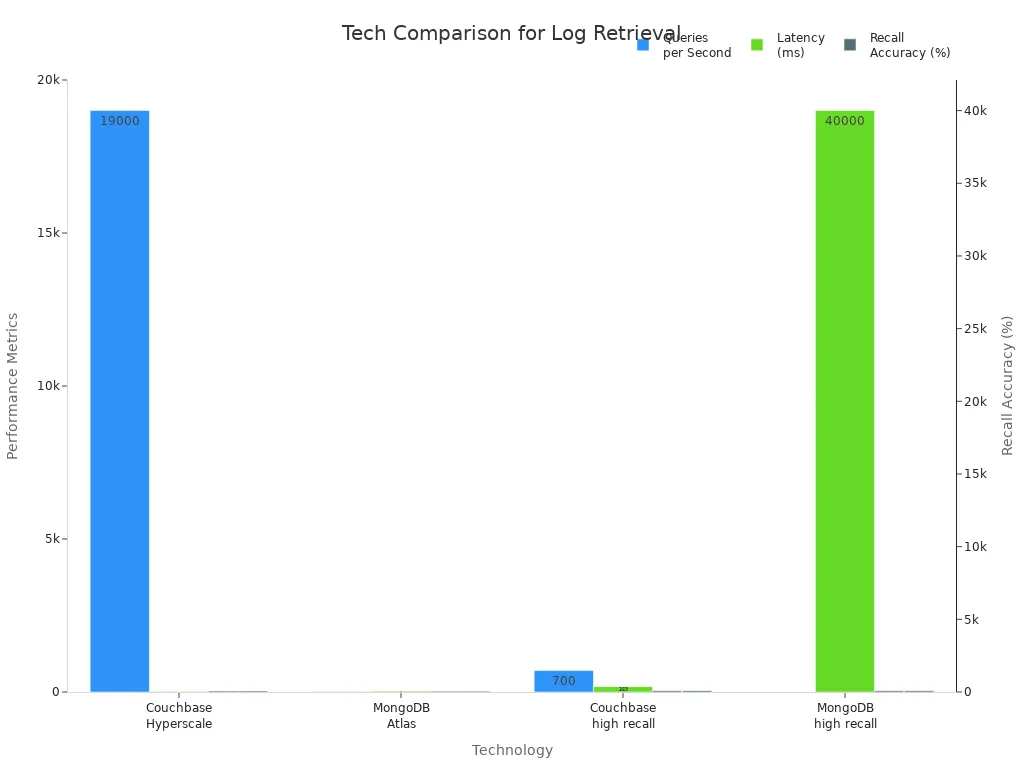
You achieve sub-second log retrieval by using smart technologies that handle huge amounts of data quickly. When you use in-memory databases, vector indexes, and AI-driven detection, you get answers almost instantly. Speed matters because you need to solve problems fast and keep systems running smoothly. The table below shows how different systems perform when retrieving logs:
Technology | Queries per Second (QpS) | Latency (ms) | Recall Accuracy (%) |
|---|---|---|---|
Couchbase Hyperscale Index | 19,000 | 28 | 66 |
MongoDB Atlas | 6 | 57 | 57 |
Couchbase (high recall) | 700 | 369 | 93 |
MongoDB (high recall) | 2 | 40,000 | 89 |
Key Takeaways
Use in-memory databases to speed up log retrieval. Storing data in RAM allows for almost instant access.
Implement caching strategies to reduce response times. Caching frequently accessed data keeps systems running smoothly.
Adopt vector indexing for semantic searches. This helps find related logs even if the wording differs.
Follow key architectural principles to enhance performance. Strategies like asynchronous processing and data locality improve speed and reliability.
Leverage AI tools for faster anomaly detection. AI can alert you to issues before they escalate, ensuring quick responses.
Sub-Second Log Retrieval Fundamentals
Core Technologies
You can achieve Sub-Second Log Retrieval by using a mix of advanced technologies. These tools help you find the right log data almost instantly, even when you have millions of records. Here is a table that shows some of the main technical approaches and what they do:
Technical Approach | Description |
|---|---|
Combines large language models with retrieval systems for real-time insights. | |
Document Processing Pipeline | Processes different document formats to extract and enrich data for better querying. |
Vector Embedding | Converts content into vectors for semantic understanding and similarity searches. |
MongoDB Atlas for Vector Search | Stores and retrieves vector embeddings for efficient query handling. |
Fireworks AI Intelligence Layer | Synthesizes information and generates answers quickly and accurately. |
You can also use in-memory databases, like Oracle Database In-Memory, to keep data in RAM. This makes data access much faster than reading from disks. In-memory processing gives you very low latency, while disk-based systems are slower because they need to read from physical drives. Here is a quick comparison:
Feature | In-Memory Stream Processing | Disk-Based Stream Processing |
|---|---|---|
Performance (Latency) | Very Low | Higher (due to disk I/O) |
When you use vector indexes, such as the Neo4j vector index, you can search for logs based on meaning, not just keywords. This helps you find related events even if the words are different. Result caching, like the caching in Amazon Redshift, stores answers to common queries. This means you get results faster and reduce the load on your database.
In-memory processing has much lower latency because RAM is faster than disk.
Caching frequently accessed data reduces response times and keeps your system running smoothly.
Vector search lets you find logs that are similar, even if they do not match exactly.
Key Architectural Principles
You need to follow some key principles to keep log retrieval fast and reliable. These ideas help you design systems that can handle heavy loads and still give you answers in less than a second.
Implement caching strategies. Caching stores popular data close to you, so you do not have to wait for it to come from far away.
Optimize database performance. You can tune your queries and use smart indexing to make data retrieval faster.
Adopt asynchronous processing. This lets your system handle tasks in the background, so you do not have to wait for everything to finish before you get results.
Leverage in-memory data stores. Tools like Redis keep data in memory, which means you get faster access compared to disk-based storage.
Prioritize data locality. Placing data and services near you reduces the time it takes for data to travel.
Pre-calculate aggregates. By calculating statistics ahead of time, you can answer common questions quickly.
Combine pre-aggregates and raw queries. This gives you both speed and accuracy.
Use server-side pagination. Only retrieve the data you need, which keeps your system fast.
Tip: Be careful with caching dynamic data. If you cache data that changes often, you might get old results. Always check if the data should be cached.
When you follow these principles, you can build a system that supports Sub-Second Log Retrieval. Leading platforms use these ideas to give you fast, accurate answers, even when many users are searching at the same time.
Why Speed Matters

Operational Impact
You need fast log retrieval to keep your systems safe and your business running. When you use Sub-Second Log Retrieval, you can make decisions quickly and respond to problems before they grow. Fast access to logs helps you spot issues, fix them, and keep your customers happy.
Here is a table that shows how quick log retrieval helps your organization:
Benefit | Description |
|---|---|
Rapid Decision-Making | Access to up-to-the-minute insights enables swift responses to critical situations and opportunities. |
Enhanced Operational Efficiency | Faster data processing reduces time and effort in obtaining insights, streamlining workflows. |
Improved Customer Experience | Personalization and targeted recommendations lead to a superior customer experience. |
Competitive Advantage | Quick data analysis provides a significant edge in responding to market changes and trends. |
You can see the impact in real-world situations. For example:
A security leader at a food company shared that their team stopped a ransomware attack within an hour because they had instant access to logs.
An energy company improved their response to security events by practicing with real data, which helped them act fast during incidents.
A pharmaceutical company found gaps in their response plan and fixed them, which led to faster detection of threats later.
When you have fast log retrieval, you can protect your business and serve your customers better.
Scale and Performance Challenges
As your data grows, you face new challenges. Handling logs at petabyte scale is not easy. You must solve problems like data silos, high costs, and slow queries.
Here is a table that explains the main challenges and solutions:
Challenge | Key Issues | Solutions |
|---|---|---|
Data Integration and Interoperability | Fragmented data silos, different formats | Use data integration tools and API management for smooth data flow |
Cost Management and Optimization | High infrastructure costs, unpredictable usage costs | Monitor expenses and manage data lifecycle to control costs |
Data Analytics and Insights | Complex, slow queries, need for advanced analytics | Use optimized query engines and machine learning for big data |
You may also see performance bottlenecks. These can look like slow transactions, memory leaks, or rising error rates. If you monitor your systems closely, you can catch these problems early and keep your users happy.
Sub-Second Log Retrieval helps you overcome these challenges. You get speed, reliability, and the power to grow your business.
Architecture for Fast Log Retrieval

Data Ingestion & Preprocessing
You need a strong data pipeline to achieve fast log retrieval. The way you bring in and prepare data affects how quickly you can search it. If you use real-time streaming instead of batch processing, you can cut down on delays. You should also pick the right techniques for preprocessing. Here is a table that shows some of the best methods:
Technique | Description |
|---|---|
Bulk Inserts | Group many records together to load data faster. |
Indexing | Add indexes early to speed up searches later. |
Parallel Processing | Use many processors at once to handle large amounts of data quickly. |
Data Partitioning | Split data into smaller parts for easier management and faster access. |
Caching and Buffering | Store popular data in memory so you can get it quickly. |
When you use these methods, you can handle more data and keep your system fast.
Indexing for Speed
You can make searches much faster by using smart indexing strategies. Focus on columns with lots of unique values. Use covering indexes so you do not have to look at the whole table. AI tools can help you pick the best indexes by looking at how you search your data. Sort your tables when you bring in new data. This helps you find what you need quickly. You should also check your indexes often and remove the ones you do not use.
Storage & Data Layout
The way you store your logs matters. Columnar storage works better for analytics than row-based storage. With columnar storage, you only read the columns you need. This saves time and makes queries faster. You also get better compression, which means you use less space. Here is a quick comparison:
Advantage | Columnar Storage | Row-Based Storage |
|---|---|---|
Storage Structure | Stores data by column for better compression | Stores data by row, less efficient |
Selective Retrieval | Reads only needed columns, saves time | Reads whole rows, slower |
Processing Efficiency | Works on compressed data, faster queries | Needs to decompress, slower |
Query Optimization | Good for analytics, uses column pruning | Not optimized for analytics |
Query Execution Optimization
You can speed up queries by pushing LIMIT and ORDER BY to the data server. Process data in parallel across CPUs. Index keys you use often in WHERE clauses. Avoid SELECT * and SELECT DISTINCT to keep things simple and fast. Use inner joins instead of WHERE for better performance. AI-driven tools like LogSeam and embeddings from Mistral or OpenAI can spot problems early and help you find answers faster. These tools can make log searches up to 100 times faster and send you alerts right away. With these steps, you can reach Sub-Second Log Retrieval and keep your systems running smoothly.
Distributed Storage Solutions
Distributed File Systems
You need a strong foundation for storing and retrieving logs quickly. Distributed file systems help you manage large amounts of log data across many machines. Some of the most common systems include:
Google File System (GFS) stores and analyzes logs from many Google services. This helps you spot trends and monitor how systems perform.
LogDevice is built for logging workloads. It keeps your data safe and always available, which is important for log storage.
LogDevice improves write availability by separating how it sequences records from how it stores them. It also uses non-deterministic record placement to handle high loads.
When you deal with many users at once, these systems use special methods to keep performance high:
Concurrency Control Mechanism | Description |
|---|---|
Pessimistic Concurrency Control | Uses locks to prevent conflicts when many users access data at the same time. |
Optimistic Concurrency Control | Lets users access data without locks and checks for problems only when saving changes. |
Serialization | Handles requests one by one, making sure each happens in order. |
Data Replication & Locality
You can make log retrieval faster by copying data and keeping it close to where you need it. Here are some strategies:
Log-based incremental replication shares only the changes, so updates happen almost in real time.
Key-based incremental replication focuses on important keys, which saves network resources.
Multi-source Change Data Capture (CDC) collects changes from many places, keeping your data up to date everywhere.
Hybrid strategies mix different methods to balance speed and resource use.
Continuous Data Protection (CDP) backs up data all the time, so you can recover quickly if something goes wrong.
Data locality also plays a big role. When you store data near the computers that process it, you cut down on delays. This means you get faster responses and use less network bandwidth.
Tip: Placing data close to where you use it helps your system run faster and reduces network traffic.
Consistency & Availability
You want your log system to be both fast and reliable. Different consistency models help you find the right balance:
Strong consistency gives you the latest data every time, which is important for real-time apps.
Eventual consistency lets updates happen faster, which helps your system scale.
Causal consistency keeps related actions in the right order, making your data more predictable.
Reliable data access builds trust with users by always showing accurate information.
You also need high availability. Systems like TiDB use the Raft protocol to keep data safe and available, even if some machines fail. Many platforms use Kafka for high throughput, Apache Flink for real-time processing, and Elasticsearch for fast log searches. These tools help you capture events from many services, track system health, and debug problems quickly.
You can achieve sub-second log retrieval by using in-memory databases, vector indexes, and smart caching. These tools help you find answers fast and keep your systems reliable. Real-time monitoring and predictive analytics give you early warnings. AI and large language models make troubleshooting easier. You stay agile with best practices like real-time alerting.
Real-time insights boost observability
Predictive analytics warn you early
FAQ
How do in-memory databases speed up log retrieval?
You get faster results because in-memory databases store data in RAM. This lets you access logs almost instantly.
Tip: RAM is much quicker than disk storage.
What is a vector index and why does it matter?
A vector index helps you find logs by meaning, not just keywords. You can search for similar events even if words differ.
Feature | Benefit |
|---|---|
Semantic Search | Finds patterns |
Can AI help detect log anomalies faster?
You use AI to spot unusual patterns in logs. AI tools can alert you to problems before they grow.
Early warnings
Faster troubleshooting
Is caching safe for dynamic log data?
You must use caching carefully with changing data. Cached results may become outdated.
Note: Always check if your data changes often before caching.
See Also
Effective SQL Techniques for Understanding User Behavior Easily
Strategies for Streamlined Analysis of Large Data Sets
Evaluating ROI: A Comparison of Data Feed Sources