
Real-time Data Sync from Oracle Database to Singdata Lakehouse via BluePipe
Solution Overview
For over 30 years, Oracle has held an important position in the relational database and data warehouse space. With the introduction of integrated systems such as Exadata, Exalytics, Exalogic, SuperCluster, and 12c Database, the tight integration of storage and compute has enabled faster processing of large volumes of data using on-premises infrastructure. However, the volume, velocity, and variety of data have grown dramatically, and the cloud has opened up new possibilities for modern data analytics. For example, by separating compute from storage, Singdata Lakehouse has realized a new generation of cloud data platform, achieving automatic and instant scaling of compute and storage with a share-nothing data architecture.
Solution Advantages
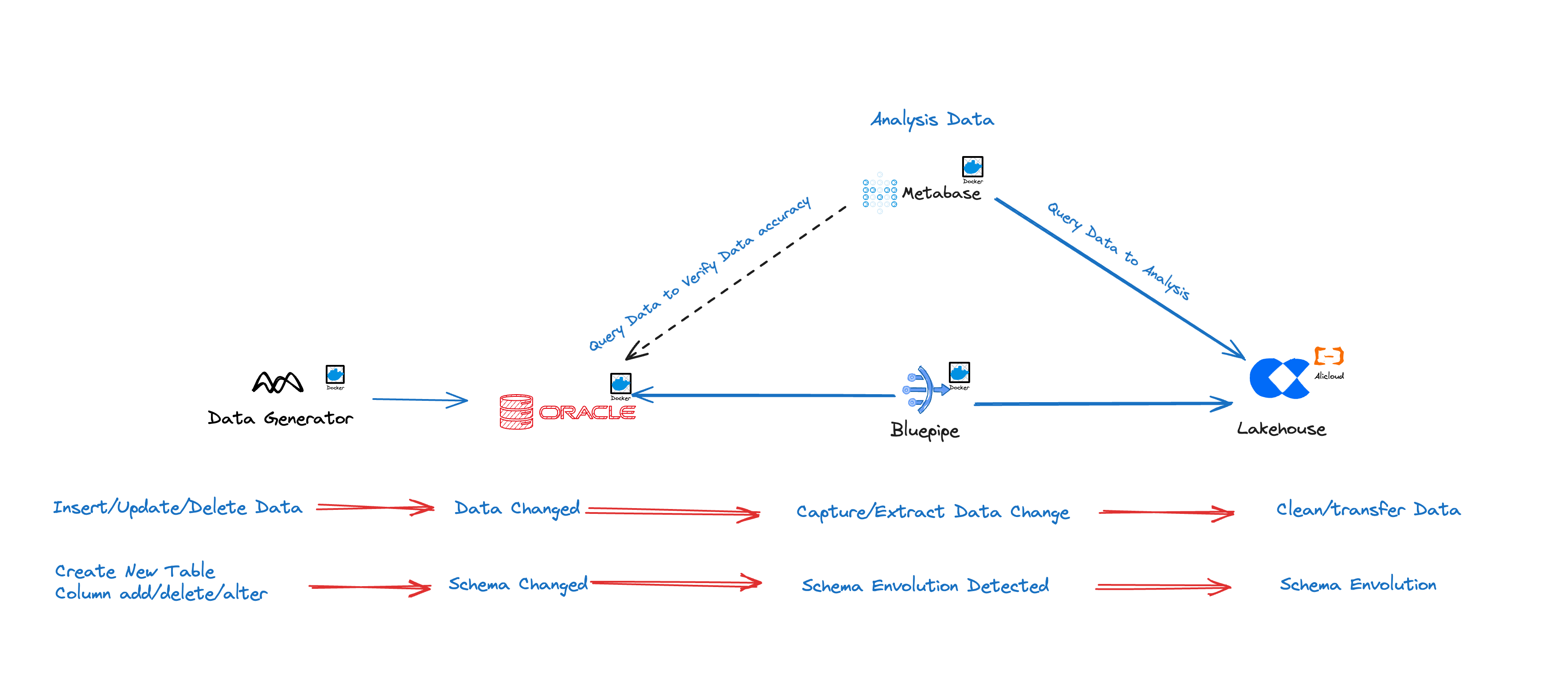
BluePipe supports real-time data sync from Oracle to Singdata Lakehouse. Especially in complex database environments with multiple instances and many tables, BluePipe automates synchronization, greatly reducing the complexity and effort of manually configuring sync jobs. For source databases with tens of thousands of tables, BluePipe can automatically configure sync tasks.
Ready Out of the Box — Configuration in 10 Minutes
BluePipecan run on virtually anyLinuxsystem, supporting bothx86andarmchips; common rack servers, laptops, and even Raspberry Pi can be used for deployment.- A minimal configuration process — default parameters achieve optimal performance.
Full and Incremental Sync Unified — No Operational Intervention Required
- Full sync and incremental sync are deeply coordinated, requiring almost no routine operations.
- Efficient data comparison and hot-fix technology, always guaranteeing data consistency.
- Highly robust
Schema Evolutionsupport.
Push Data, Not Expose Ports
BluePipeis deployed alongside your database in your internal network — no need to expose external ports.- Elastic
buffer sizetechnology automatically balances betweenThroughputandlatency.
Unique Advantages of the Oracle Link
BluePipe implements change data capture based on Oracle LogMiner, with deep optimizations in the following areas:
Deep Compatibility with DDL Operations
Under the default LogMiner strategy, after a DDL operation occurs, subsequent DML operations on the affected table cannot be correctly parsed, making it impossible to capture changes correctly.
BluePipe maintains an automated dictionary file construction strategy, ensuring that incremental data can still be captured correctly after schema changes.
Large Transaction Optimization
Oracle Redo Log records the complete Transaction process, but business logic typically only requires data after commit. Therefore, a buffer is needed during transmission to temporarily hold uncommitted change records.
BluePipe uses unique memory management technology to handle large transactions with tens of millions of records on a single node with ease.
From Oracle 12.2 onward, the maximum length for table names and column names was extended to 128 bytes. However, for various reasons, LogMiner on instances without an OGG LICENSE still does not support DML parsing for tables with long names. See the official documentation for details.
BluePipe uses efficient stream-batch fusion technology to fully support incremental data capture and delivery in such scenarios.
Support for RAC Architecture
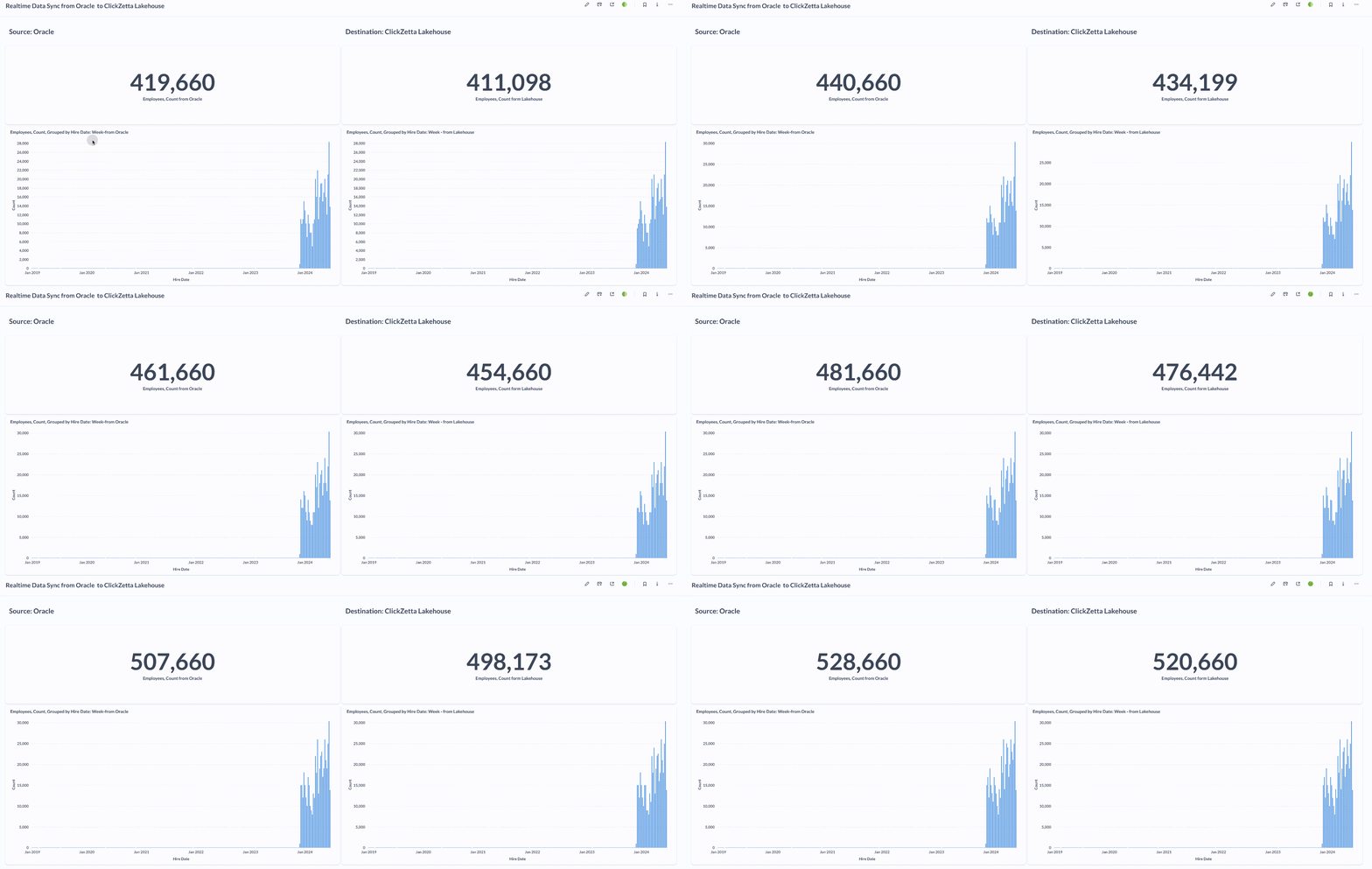
Sync Performance
LAG: approximately 10 seconds
Sync speed: 20,000 rows/second
Implementation Steps
Install and Deploy BluePipe
If you have not yet completed the installation and deployment of BluePipe, please contact Singdata or BluePipe.
Configure the Sync Data Source in BluePipe
Configure Oracle Data Source
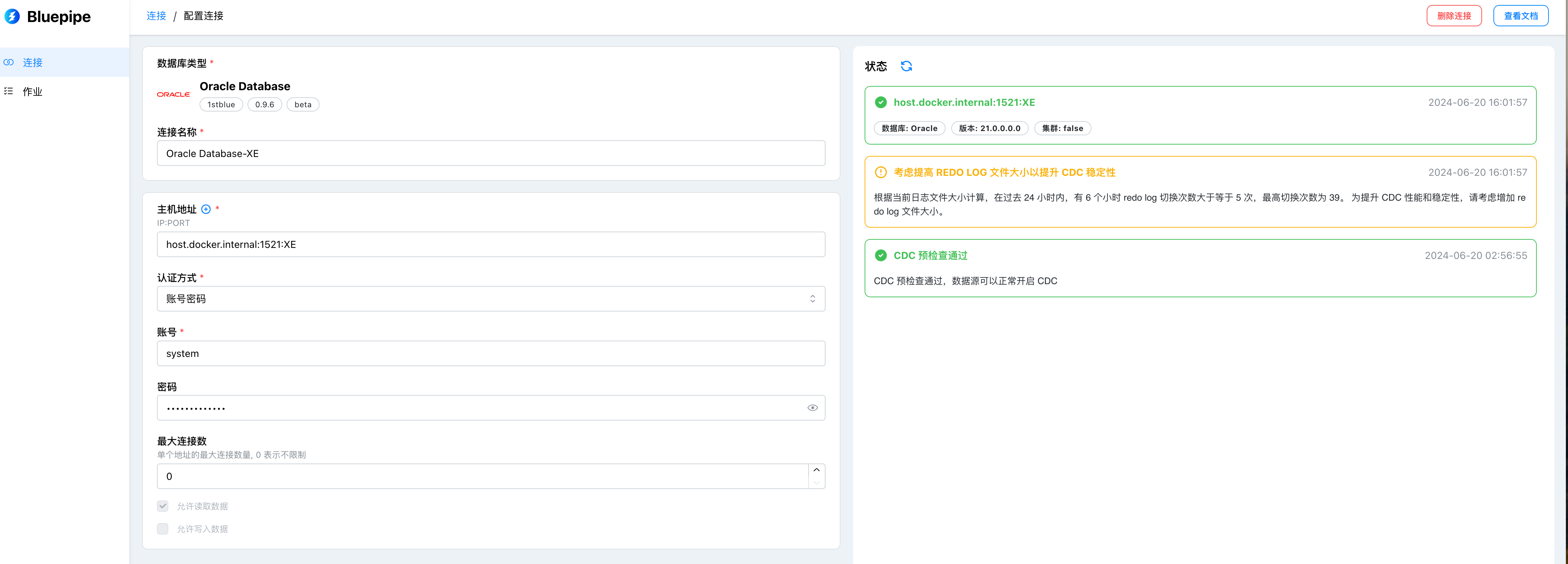
Configuration Item Descriptions
| Configuration Item | Description |
|---|---|
| Connection String | The connection method for the data source, in the format: IP:PORT:SID, e.g., 127.0.0.1:1521:XE |
| Username | Username for connecting to the database, e.g., C##CDC_USER |
| Password | The password corresponding to the database username, e.g., userpassword |
| Connection Name | A custom name for the data source for easy management, e.g., local test instance |
| Allow Batch Extraction | Read data tables via query, supports row-level filtering; enabled by default |
| Allow Streaming Extraction | Capture database changes in real time via CDC; enabled by default |
| Allow Data Write | Can be used as a target data source; enabled by default |
Basic Features
| Feature | Description |
|---|---|
| Schema Migration | If the target table does not exist, automatically generates and executes the create statement based on source metadata combined with mappings |
| Full Data Migration | Logical migration, sequentially scans table data and writes data to the target database in batches |
| Incremental Real-time Sync | Supports common DML sync: INSERT, UPDATE, DELETE |
Configure Singdata Lakehouse as the Target
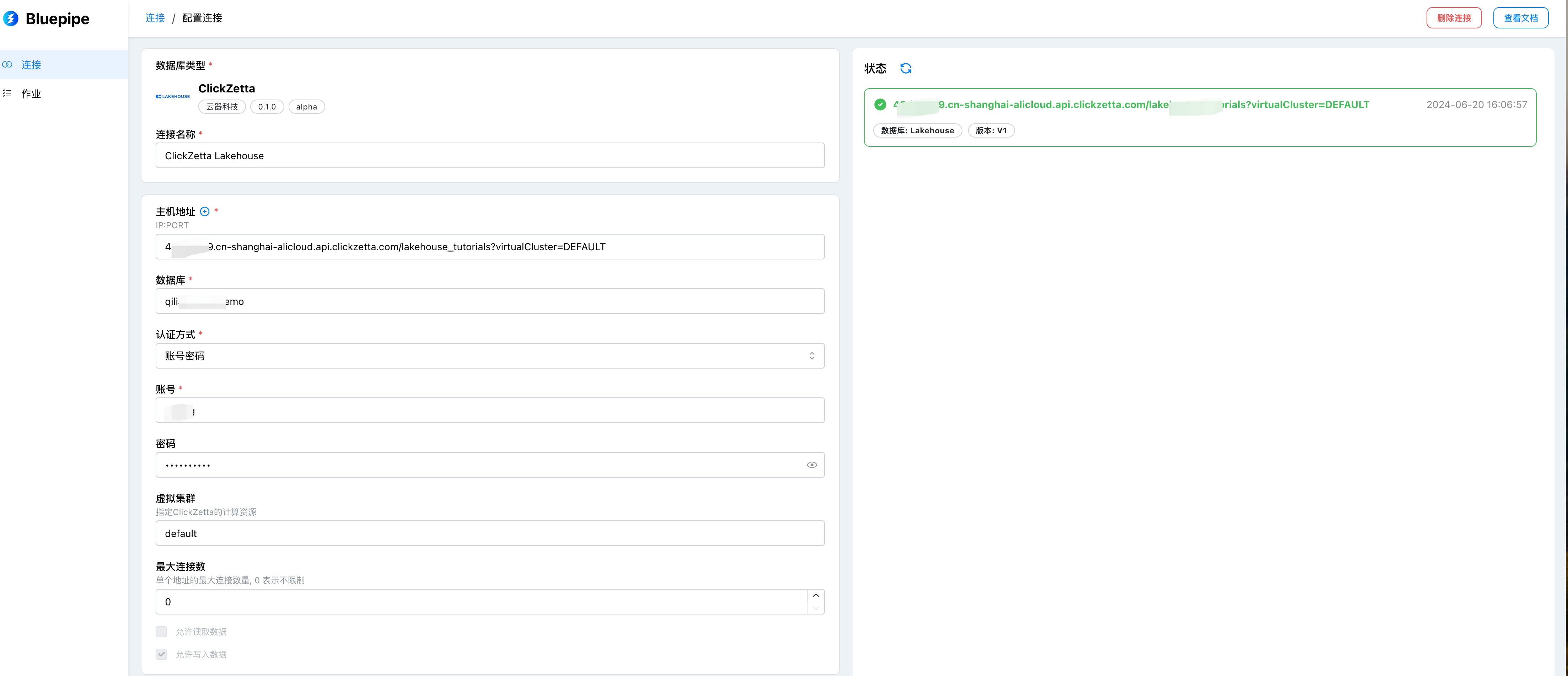
Configuration Item Descriptions
| Configuration Item | Description |
|---|---|
| Connection String | The connection method for the data source, in the format: {instance}.{domain}/{workspace}, e.g., abcdef.cn-shanghai-alicloud.api.singdata.com/quick_start |
| Virtual Cluster | Set the virtual cluster to run on; default value is default |
| Username | Username for connecting to the database, e.g., username |
| Password | The password corresponding to the database username, e.g., userpassword |
| Connection Name | A custom name for the data source for easy management, e.g., local test instance |
| Allow Batch Extraction | Read data tables via query, supports row-level filtering; extraction not yet supported |
| Allow Streaming Extraction | Capture database changes in real time via CDC; extraction not yet supported |
| Allow Data Write | Can be used as a target data source; enabled by default |
Create Tables in Oracle Database
Create a New Sync Job in BluePipe
Please note:
- When selecting the source, the
{namespace}in the target table name{namespace}/{table}can be replaced with the schema name you want, such asbluepipe_oracle_staging. - In the design step, for incremental replication, select "Real-time replication using CDC technology".
The result after successfully creating a new sync job is shown below:
 The new job will start automatically and begin a full data sync, followed by continuous real-time incremental data sync.
Data Generation
Run the following Python code to insert data in real time into the Oracle source table employees:
Connect to the Oracle database and obtain a cursor:
Total number of records to insert:
Build the insert statement:
Execute the insert:
Close the cursor and connection:
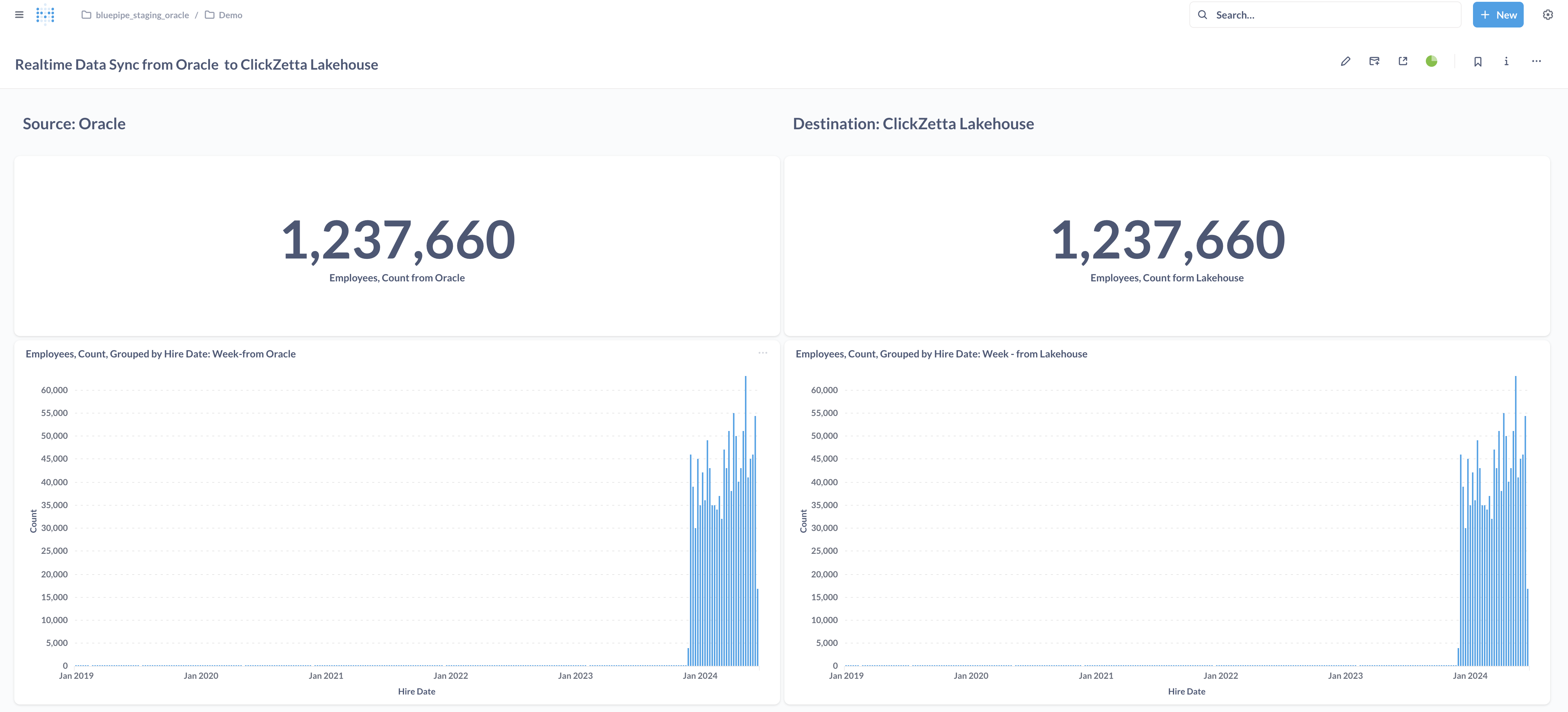
Observe Source and Target Data via Metabase
 See also: Metabase Installation and Deployment