Ingesting Data from Alibaba Cloud Data Lake into the Singdata Lakehouse 3-Layer Data Warehouse
About the 3-Layer Data Warehouse
In modern Lakehouse architectures, the 3-Layer Data Warehouse is typically divided into a Bronze layer, a Silver layer, and a Gold layer. This architecture provides a systematic approach to managing data in different states, from raw data to high-quality data.
1. Bronze Layer (Raw Data Layer)
The Bronze layer is the bottom layer of the Data Warehouse, used to store raw data extracted from various data sources. This data is unprocessed and retains its original form.
Characteristics:
- Data state: Raw, unprocessed data.
- Data sources: Various data sources (databases, logs, files, etc.).
- Purpose: Provides a backup of raw data and data traceability, ensuring data completeness and auditability.
The Silver layer stores data that has been cleansed and transformed. Data in this layer has been processed through an ETL (Extract, Transform, Load) pipeline, with noise and redundancy removed, and converted into structured and standardized data formats.
Characteristics:
- Data state: Cleansed and standardized data.
- Data operations: Cleansing, deduplication, data transformation, and integration.
- Purpose: Provides high-quality, structured data for further processing and analysis.
The Gold layer is an important data layer oriented toward analytics and business, storing data that has been further optimized and aggregated. Data in this layer typically supports business intelligence (BI), data analytics, and reporting applications.
Characteristics:
- Data state: High-quality, aggregated, and optimized data.
- Data operations: Data aggregation, multi-dimensional analysis, data modeling.
- Purpose: Supports data analytics, business intelligence, and decision support, providing optimized data views.
Advantages of the 3-Layer Data Warehouse Architecture
- Data management efficiency: Layered storage and processing makes management and maintenance more convenient.
- Improved data quality: The cleansing and transformation layer ensures data consistency and accuracy.
- Efficient data access: The optimized data structures in the business information layer improve query performance.
- High flexibility: Adapts to different business needs and supports integration and processing of various data sources.
Through this three-layer architecture, enterprises can manage and analyze data more effectively, ensuring that data is properly handled and optimized at every stage from collection to analysis.
What You Need
Implementation Plan Based on Singdata Lakehouse
This plan creates a multi-layer Data Warehouse architecture based on Singdata Lakehouse, with three layers: a Bronze layer for data ingestion, a Silver layer for data cleansing and transformation, and a Gold layer for business-level aggregation and data modification.
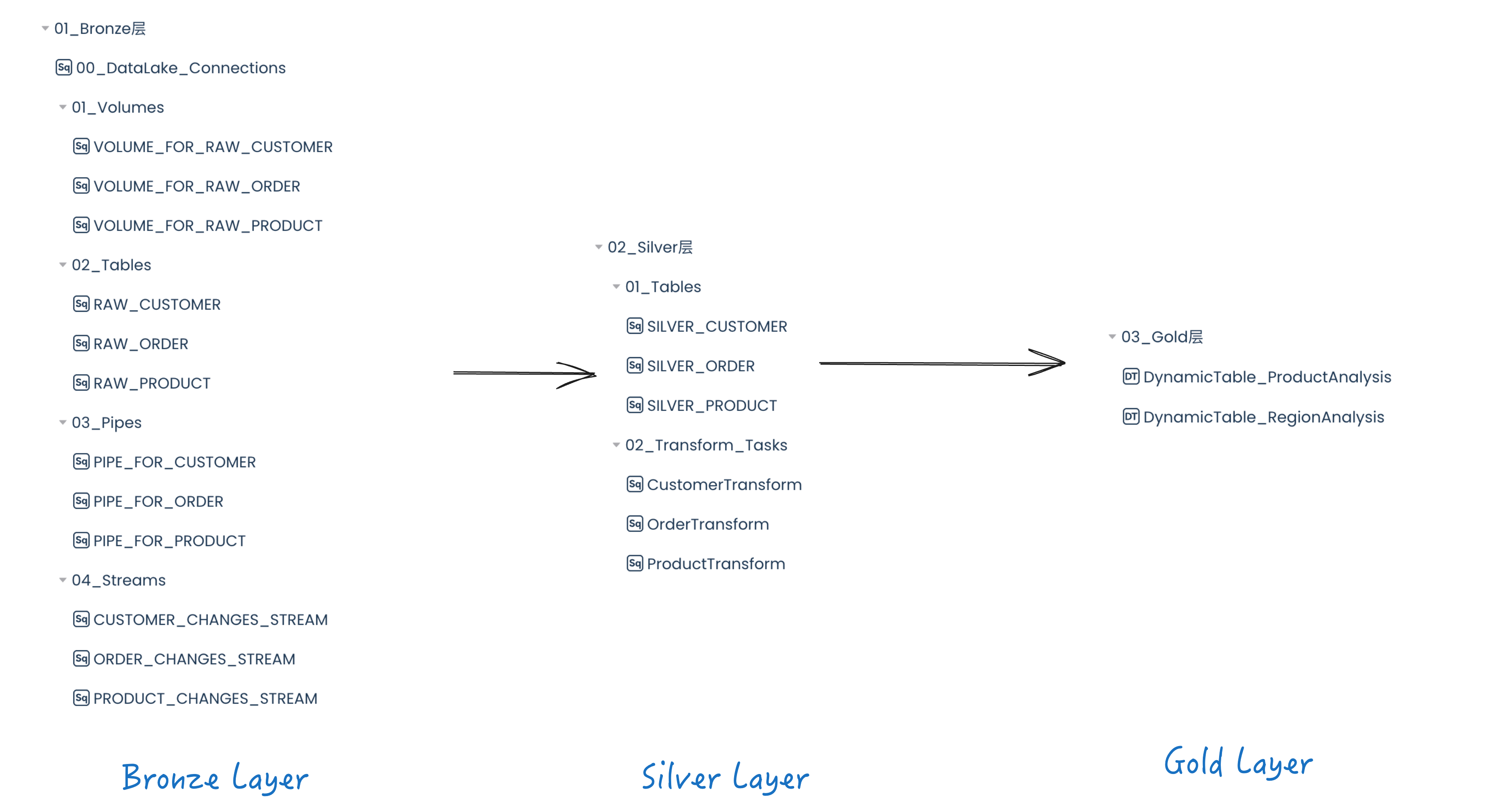
Bronze Layer
The Bronze layer focuses on data ingestion from Alibaba Cloud Object Storage (OSS) into Singdata Lakehouse. This is accomplished by creating a Data Lake Connection and External Volume, as well as a Lakehouse Pipe and Table Stream. In this phase, the External Volume specifies the location of data in Alibaba Cloud OSS. Using an External Volume, you can use a Lakehouse Pipe to automatically ingest data into Lakehouse tables in real time.
Finally, a Table Stream is created for each table to track and save any changes made to the table. These streams can be used to identify changes in Bronze layer tables and apply corresponding updates to the Silver layer.
Silver Layer
The Silver layer focuses on data cleansing and transformation. It takes raw data from the Bronze layer and transforms it to meet the company's needs. These transformations include cleansing missing or anomalous values, data validation, and removing unused or unimportant data.
| Transformation | Details |
|---|
| Email validation | Ensure email is not empty |
| Customer type | Standardize customer type to "Regular", "Premium", or "Unknown" |
| Age validation | Ensure age is between 18 and 120 |
| Gender standardization | Classify gender as "Male", "Female", or "Other" |
| Total purchases validation | Ensure total purchases is a number; default to 0 if invalid |
| Transformation | Details |
|---|
| Price validation | Ensure price is a positive number |
| Stock quantity validation | Ensure stock quantity is non-negative |
| Rating validation | Ensure rating is between 0 and 5 |
| Transformation | Details |
|---|
| Amount validation | Ensure transaction amount is greater than 0 |
| Transaction ID validation | Ensure transaction ID is not empty |
Gold Layer
The Gold layer is designed to use the transformed data from the Silver layer to create dynamic tables that can be used for business analytics. For example, DT_RegionAnalysis is a unified data view combining all 3 tables, used to analyze sales performance across different regions and identify the top-performing regions.
In addition to the simple dynamic tables demonstrated in this project, many additional analyses can be performed in the Gold layer.
Data Flow
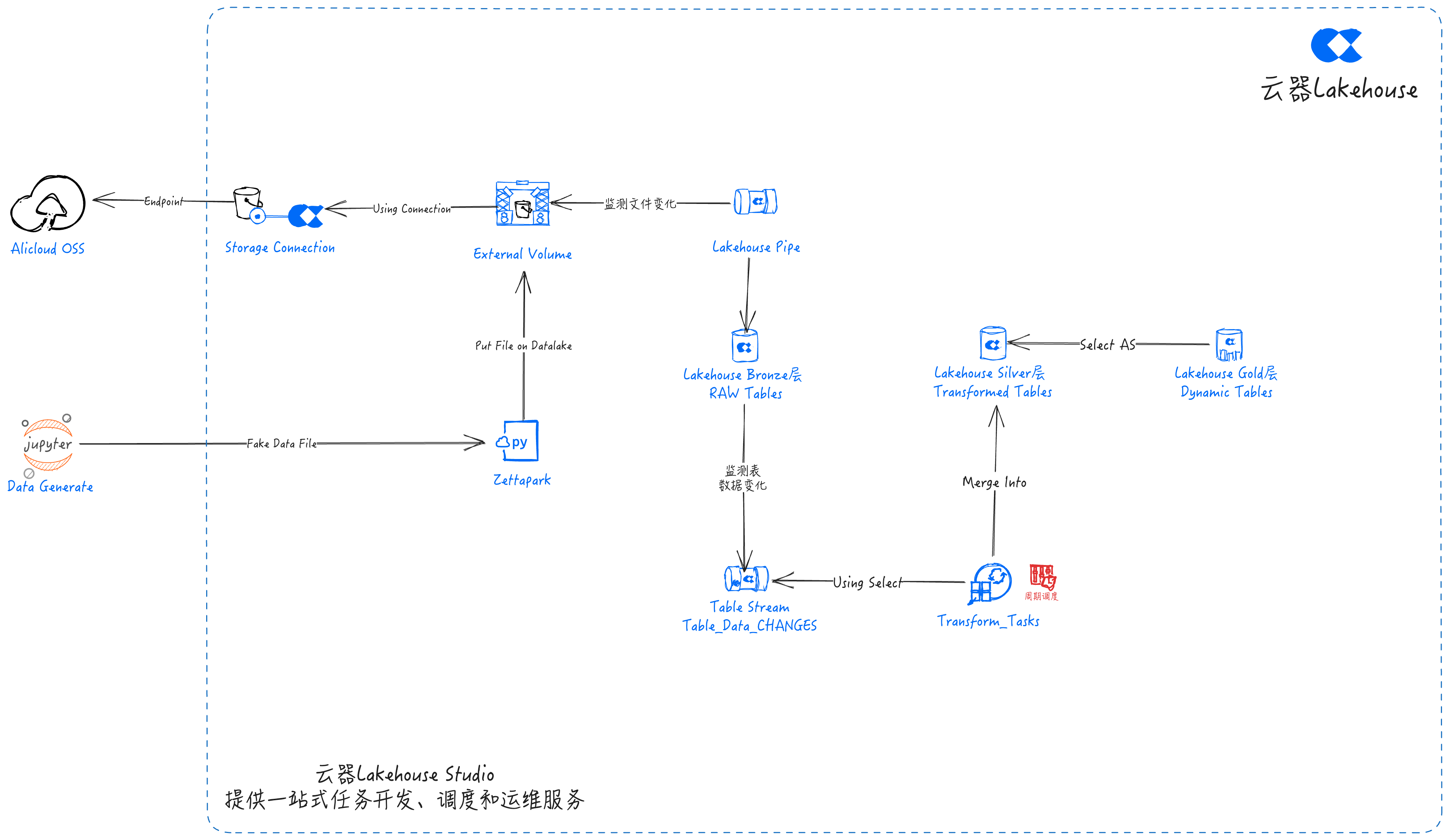
Implementation Steps Based on Singdata Lakehouse
Navigate to Lakehouse Studio Development -> Tasks,
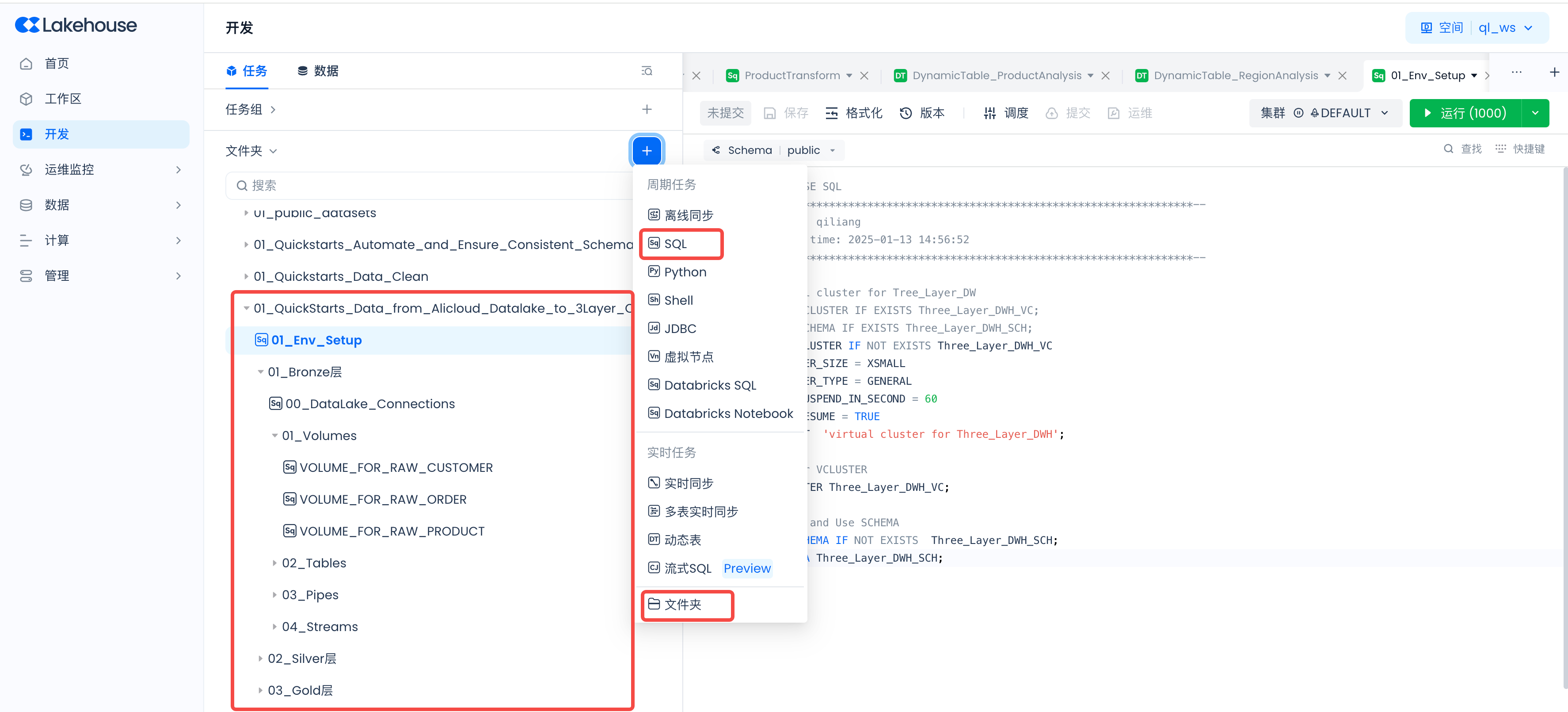
Click "+" to create the following directory:
- 01_QuickStarts_Data_from_Alicloud_Datalake_to_3Layer_Clickzetta_Data_Warehouse
Click "+" to create the following SQL tasks, then click Run after creating each one:

Set Up the Lakehouse Environment
Create SQL task: 01_Env_Setup
CREATE VCLUSTER IF NOT EXISTS Three_Layer_DWH_VC
VCLUSTER_SIZE = XSMALL
VCLUSTER_TYPE = GENERAL
AUTO_SUSPEND_IN_SECOND = 60
AUTO_RESUME = TRUE
COMMENT 'virtual cluster for Three_Layer_DWH';
-- Use our VCLUSTER
USE VCLUSTER Three_Layer_DWH_VC;
-- Create and Use SCHEMA
CREATE SCHEMA IF NOT EXISTS Three_Layer_DWH_SCH;
USE SCHEMA Three_Layer_DWH_SCH;
Develop the Bronze Layer
Create directory: 01_Bronze Layer
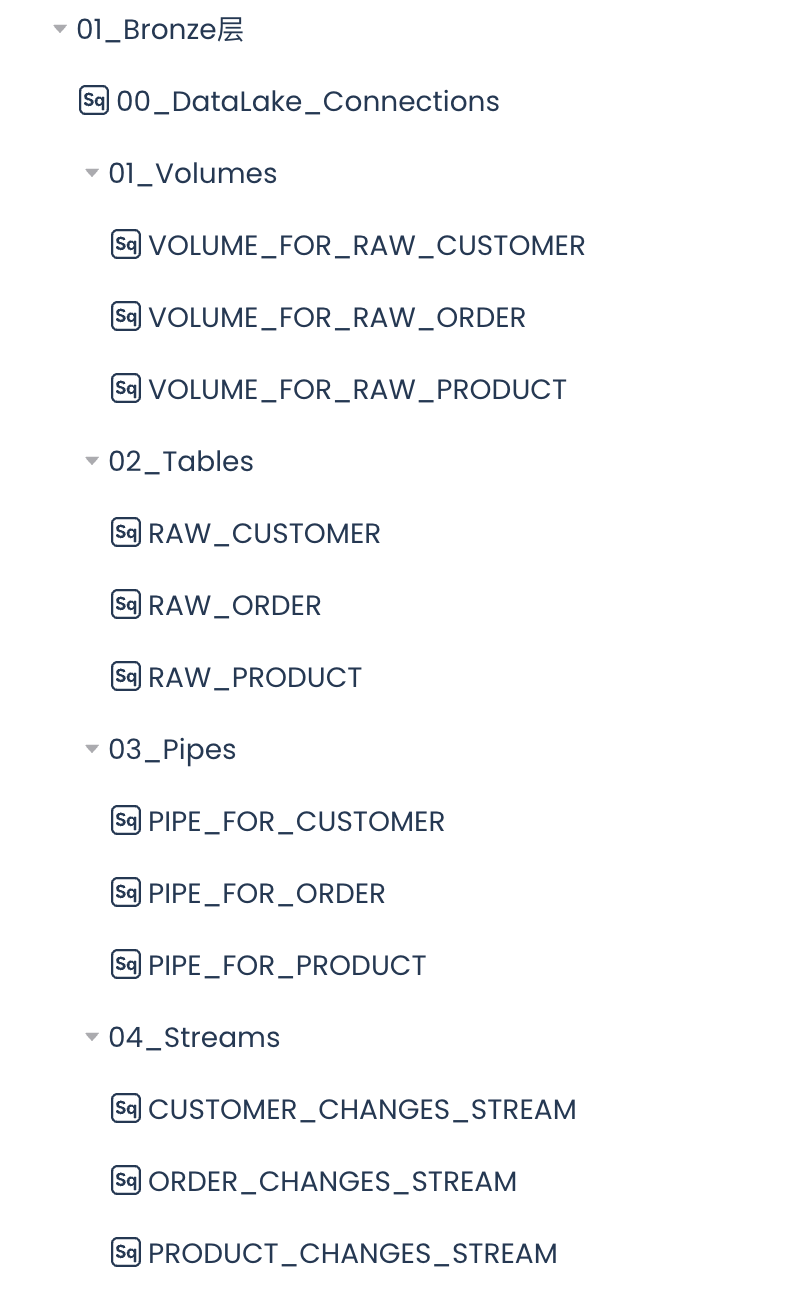
Create the Data Lake Connection
Create SQL task: 00_DataLake_Connections
-- Use our VCLUSTER and SCHEMA
USE VCLUSTER Three_Layer_DWH_VC;
USE SCHEMA Three_Layer_DWH_SCH;
-- Create a Data Lake Connection to the external data lake
CREATE STORAGE CONNECTION if not exists hz_ingestion_demo
TYPE oss
ENDPOINT = 'oss-cn-hangzhou-internal.aliyuncs.com'
access_id = 'enter your access_id here'
access_key = 'enter your access_key here'
comments = 'hangzhou oss private endpoint for ingest demo';
Create Data Lake Volumes
Create Data Lake Volumes, with each Volume corresponding to the storage location of customer, product, and order data files.
Create SQL task: VOLUME_FOR_RAW_CUSTOMER
-- Use our VCLUSTER and SCHEMA
USE VCLUSTER Three_Layer_DWH_VC;
USE SCHEMA Three_Layer_DWH_SCH;
-- Create a Volume pointing to the data lake file storage location
CREATE EXTERNAL VOLUME if not exists VOLUME_FOR_RAW_CUSTOMER
LOCATION 'oss://yourbucketname/VOLUME_FOR_RAW_CUSTOMER'
USING connection hz_ingestion_demo -- storage Connection
DIRECTORY = (
enable = TRUE
)
recursive = TRUE;
-- Sync the Data Lake Volume directory to Lakehouse
ALTER volume VOLUME_FOR_RAW_CUSTOMER refresh;
-- View files on the Singdata Lakehouse Data Lake Volume
SELECT * from directory(volume VOLUME_FOR_RAW_CUSTOMER);
Create SQL task: VOLUME_FOR_RAW_ORDER
-- Use our VCLUSTER and SCHEMA
USE VCLUSTER Three_Layer_DWH_VC;
USE SCHEMA Three_Layer_DWH_SCH;
-- Create a Volume pointing to the data lake file storage location
CREATE EXTERNAL VOLUME if not exists VOLUME_FOR_RAW_ORDER
LOCATION 'oss://yourbucketname/VOLUME_FOR_RAW_ORDER'
USING connection hz_ingestion_demo -- storage Connection
DIRECTORY = (
enable = TRUE
)
recursive = TRUE;
-- Sync the Data Lake Volume directory to Lakehouse
ALTER volume VOLUME_FOR_RAW_ORDER refresh;
-- View files on the Singdata Lakehouse Data Lake Volume
SELECT * from directory(volume VOLUME_FOR_RAW_ORDER);
Create SQL task: VOLUME_FOR_RAW_PRODUCT
-- Use our VCLUSTER and SCHEMA
USE VCLUSTER Three_Layer_DWH_VC;
USE SCHEMA Three_Layer_DWH_SCH;
-- Create Volumes pointing to the data lake file storage location
CREATE EXTERNAL VOLUME if not exists VOLUME_FOR_RAW_PRODUCT
LOCATION 'oss://yourbucketname/VOLUME_FOR_RAW_PRODUCT'
USING connection hz_ingestion_demo -- storage Connection
DIRECTORY = (
enable = TRUE
)
recursive = TRUE;
-- Sync the Data Lake Volume directory to Lakehouse
ALTER volume VOLUME_FOR_RAW_PRODUCT refresh;
-- View files on the Singdata Lakehouse Data Lake Volume
SELECT * from directory(volume VOLUME_FOR_RAW_PRODUCT);
Create Tables
Create Tables, with each table storing the raw data for customers, products, and orders respectively.
Create SQL task: RAW_CUSTOMER
-- Use our VCLUSTER and SCHEMA
USE VCLUSTER Three_Layer_DWH_VC;
USE SCHEMA Three_Layer_DWH_SCH;
-- Create the table to store customer data
CREATE TABLE IF NOT EXISTS raw_customer (
customer_id INT,
name STRING,
email STRING,
country STRING,
customer_type STRING,
registration_date STRING,
age INT,
gender STRING,
total_purchases INT,
ingestion_timestamp TIMESTAMP_NTZ DEFAULT CURRENT_TIMESTAMP()
);
Create SQL task: RAW_ORDER
-- Use our VCLUSTER and SCHEMA
USE VCLUSTER Three_Layer_DWH_VC;
USE SCHEMA Three_Layer_DWH_SCH;
-- Create table to store order data
CREATE TABLE IF NOT EXISTS raw_order (
customer_id INT,
payment_method STRING,
product_id INT,
quantity INT,
store_type STRING,
total_amount DOUBLE,
transaction_date DATE,
transaction_id STRING,
ingestion_timestamp TIMESTAMP_NTZ DEFAULT CURRENT_TIMESTAMP()
);
Create SQL task: RAW_PRODUCT
-- Use our VCLUSTER and SCHEMA
USE VCLUSTER Three_Layer_DWH_VC;
USE SCHEMA Three_Layer_DWH_SCH;
-- Create the table to store the the product data
CREATE TABLE IF NOT EXISTS raw_product (
product_id INT,
name STRING,
category STRING,
brand STRING,
price FLOAT,
stock_quantity INT,
rating FLOAT,
is_active BOOLEAN,
ingestion_timestamp TIMESTAMP_NTZ DEFAULT CURRENT_TIMESTAMP()
);
Create Pipes
Create Pipes, with each Pipe ingesting data from customer, product, and order files into the raw tables in Singdata Lakehouse in real time.
Create SQL task: PIPE_FOR_CUSTOMER
-- Use our VCLUSTER and SCHEMA
USE VCLUSTER Three_Layer_DWH_VC;
USE SCHEMA Three_Layer_DWH_SCH;
CREATE PIPE IF NOT EXISTS PIPE_FOR_CUSTOMER
VIRTUAL_CLUSTER = 'Three_Layer_DWH_VC'
-- Use scan file mode to fetch the latest files
INGEST_MODE = 'LIST_PURGE'
AS
COPY INTO raw_customer FROM VOLUME VOLUME_FOR_RAW_CUSTOMER (
customer_id INT,
name STRING,
email STRING,
country STRING,
customer_type STRING,
registration_date STRING,
age INT,
gender STRING,
total_purchases INT,
ingestion_timestamp TIMESTAMP_NTZ
)
USING CSV OPTIONS (
'header'='true'
)
-- Must add purge parameter to delete data after successful import
PURGE=true
;
Create SQL task: PIPE_FOR_ORDER
-- Use our VCLUSTER and SCHEMA
USE VCLUSTER Three_Layer_DWH_VC;
USE SCHEMA Three_Layer_DWH_SCH;
CREATE PIPE IF NOT EXISTS PIPE_FOR_ORDER
VIRTUAL_CLUSTER = 'Three_Layer_DWH_VC'
-- Use scan file mode to fetch the latest files
INGEST_MODE = 'LIST_PURGE'
AS
COPY INTO raw_ORDER FROM VOLUME VOLUME_FOR_RAW_ORDER (
customer_id INT,
payment_method STRING,
product_id INT,
quantity INT,
store_type STRING,
total_amount DOUBLE,
transaction_date DATE,
transaction_id STRING,
ingestion_timestamp TIMESTAMP_NTZ
)
USING CSV OPTIONS (
'header'='true'
)
-- Must add purge parameter to delete data after successful import
PURGE=true
;
Create SQL task: PIPE_FOR_PRODUCT
-- Use our VCLUSTER and SCHEMA
USE VCLUSTER Three_Layer_DWH_VC;
USE SCHEMA Three_Layer_DWH_SCH;
CREATE PIPE IF NOT EXISTS PIPE_FOR_PRODUCT
VIRTUAL_CLUSTER = 'Three_Layer_DWH_VC'
-- Use scan file mode to fetch the latest files
INGEST_MODE = 'LIST_PURGE'
AS
COPY INTO raw_PRODUCT FROM VOLUME VOLUME_FOR_RAW_PRODUCT (
product_id INT,
name STRING,
category STRING,
brand STRING,
price FLOAT,
stock_quantity INT,
rating FLOAT,
is_active BOOLEAN,
ingestion_timestamp TIMESTAMP_NTZ
)
USING CSV OPTIONS (
'header'='true'
)
-- Must add purge parameter to delete data after successful import
PURGE=true
;
Create Table Streams
Create Table Streams, with each Stream detecting data changes in the raw tables and storing the changed data in the Table Stream.
Create SQL task: CUSTOMER_CHANGES_STREAM
-- Use our VCLUSTER and SCHEMA
USE VCLUSTER Three_Layer_DWH_VC;
USE SCHEMA Three_Layer_DWH_SCH;
CREATE TABLE STREAM IF NOT EXISTS customer_changes_stream
ON TABLE raw_customer
WITH PROPERTIES ('TABLE_STREAM_MODE' = 'APPEND_ONLY');
Create SQL task: ORDER_CHANGES_STREAM
-- Use our VCLUSTER and SCHEMA
USE VCLUSTER Three_Layer_DWH_VC;
USE SCHEMA Three_Layer_DWH_SCH;
CREATE TABLE STREAM IF NOT EXISTS order_changes_stream
ON TABLE raw_order
WITH PROPERTIES ('TABLE_STREAM_MODE' = 'APPEND_ONLY');
Create SQL task: PRODUCT_CHANGES_STREAM
-- Use our VCLUSTER and SCHEMA
USE VCLUSTER Three_Layer_DWH_VC;
USE SCHEMA Three_Layer_DWH_SCH;
CREATE TABLE STREAM IF NOT EXISTS product_changes_stream
ON TABLE raw_product
WITH PROPERTIES ('TABLE_STREAM_MODE' = 'APPEND_ONLY');
Develop the Silver Layer
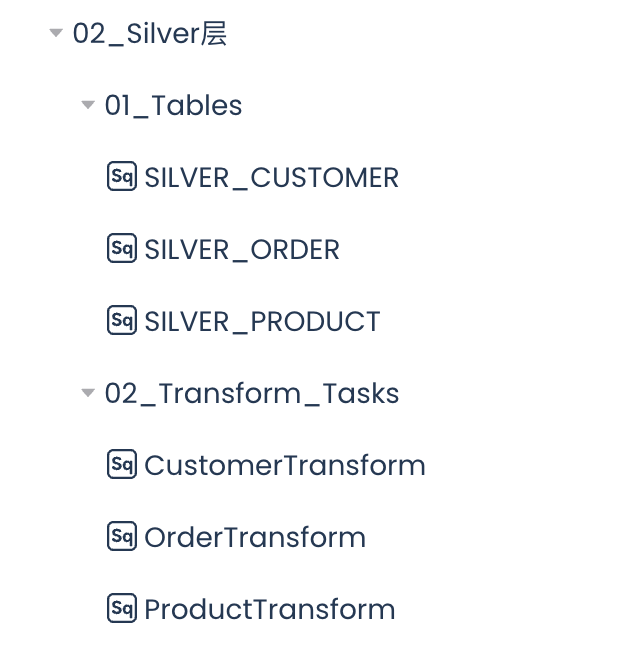
Create Tables
Create Silver layer Tables to store cleansed and transformed data.
Create SQL task: SILVER_CUSTOMER
-- Use our VCLUSTER and SCHEMA
USE VCLUSTER Three_Layer_DWH_VC;
USE SCHEMA Three_Layer_DWH_SCH;
-- Silver Customer Table
CREATE TABLE IF NOT EXISTS SILVER_CUSTOMER (
customer_id INT,
name STRING,
email STRING,
country STRING,
customer_type STRING,
registration_date DATE,
age INT,
gender STRING,
total_purchases INT,
last_updated_timestamp TIMESTAMP_NTZ DEFAULT CURRENT_TIMESTAMP()
);
Create SQL task: SILVER_ORDERS
-- Use our VCLUSTER and SCHEMA
USE VCLUSTER Three_Layer_DWH_VC;
USE SCHEMA Three_Layer_DWH_SCH;
-- Silver Order Table
CREATE TABLE IF NOT EXISTS SILVER_ORDERS (
transaction_id STRING,
customer_id INT,
product_id INT,
quantity INT,
store_type STRING,
total_amount DOUBLE,
transaction_date DATE,
payment_method STRING,
last_updated_timestamp TIMESTAMP_NTZ DEFAULT CURRENT_TIMESTAMP()
);
Create SQL task: SILVER_PRODUCT
-- Use our VCLUSTER and SCHEMA
USE VCLUSTER Three_Layer_DWH_VC;
USE SCHEMA Three_Layer_DWH_SCH;
-- Silver Product Table
CREATE TABLE IF NOT EXISTS SILVER_PRODUCT (
product_id INT,
name STRING,
category STRING,
brand STRING,
price FLOAT,
stock_quantity INT,
rating FLOAT,
is_active BOOLEAN,
last_updated_timestamp TIMESTAMP_NTZ DEFAULT CURRENT_TIMESTAMP()
);
Develop SQL tasks to cleanse and transform the raw data.
Create SQL task: CustomerTransform
-- Use our VCLUSTER and SCHEMA
USE VCLUSTER Three_Layer_DWH_VC;
USE SCHEMA Three_Layer_DWH_SCH;
-- Merge changes into silver layer
MERGE INTO silver_customer AS target
USING (
SELECT
customer_id,
name,
email,
country,
-- Customer type standardization
CASE
WHEN TRIM(UPPER(customer_type)) IN ('REGULAR', 'REG', 'R') THEN 'Regular'
WHEN TRIM(UPPER(customer_type)) IN ('PREMIUM', 'PREM', 'P') THEN 'Premium'
ELSE 'Unknown'
END AS customer_type,
-- Convert registration_date to DATE type for compatibility
CAST(registration_date AS DATE) AS registration_date,
-- Age validation
CASE
WHEN age BETWEEN 18 AND 120 THEN age
ELSE NULL
END AS age,
-- Gender standardization
CASE
WHEN TRIM(UPPER(gender)) IN ('M', 'MALE') THEN 'Male'
WHEN TRIM(UPPER(gender)) IN ('F', 'FEMALE') THEN 'Female'
ELSE 'Other'
END AS gender,
-- Total purchases validation
CASE
WHEN total_purchases >= 0 THEN total_purchases
ELSE 0
END AS total_purchases,
current_timestamp() AS last_updated_timestamp
FROM customer_changes_stream
WHERE customer_id IS NOT NULL AND email IS NOT NULL -- Basic data quality rule
) AS source
ON target.customer_id = source.customer_id
WHEN MATCHED THEN
UPDATE SET
name = source.name,
email = source.email,
country = source.country,
customer_type = source.customer_type,
registration_date = source.registration_date,
age = source.age,
gender = source.gender,
total_purchases = source.total_purchases,
last_updated_timestamp = source.last_updated_timestamp
WHEN NOT MATCHED THEN
INSERT (customer_id, name, email, country, customer_type, registration_date, age, gender, total_purchases, last_updated_timestamp)
VALUES (source.customer_id, source.name, source.email, source.country, source.customer_type, source.registration_date, source.age, source.gender, source.total_purchases, source.last_updated_timestamp);
Create SQL task: VOLUME_FOR_RAW_ORDER
-- Use our VCLUSTER and SCHEMA
USE VCLUSTER Three_Layer_DWH_VC;
USE SCHEMA Three_Layer_DWH_SCH;
MERGE INTO silver_orders AS target
USING (
SELECT
transaction_id,
customer_id,
product_id,
quantity,
store_type,
total_amount,
transaction_date,
payment_method,
CURRENT_TIMESTAMP() AS last_updated_timestamp
FROM order_changes_stream where transaction_id is not null
and total_amount> 0) AS source
ON target.transaction_id = source.transaction_id
WHEN MATCHED THEN
UPDATE SET
customer_id = source.customer_id,
product_id = source.product_id,
quantity = source.quantity,
store_type = source.store_type,
total_amount = source.total_amount,
transaction_date = source.transaction_date,
payment_method = source.payment_method,
last_updated_timestamp = source.last_updated_timestamp
WHEN NOT MATCHED THEN
INSERT (transaction_id, customer_id, product_id, quantity, store_type, total_amount, transaction_date, payment_method, last_updated_timestamp)
VALUES (source.transaction_id, source.customer_id, source.product_id, source.quantity, source.store_type, source.total_amount, source.transaction_date, source.payment_method, source.last_updated_timestamp);
Create SQL task: VOLUME_FOR_RAW_PRODUCT
-- Use our VCLUSTER and SCHEMA
USE VCLUSTER Three_Layer_DWH_VC;
USE SCHEMA Three_Layer_DWH_SCH;
MERGE INTO silver_product AS target
USING (
SELECT
product_id,
name AS name,
category,
-- Price validation and normalization
CASE
WHEN price < 0 THEN 0
ELSE price
END AS price,
brand,
-- Stock quantity validation
CASE
WHEN stock_quantity >= 0 THEN stock_quantity
ELSE 0
END AS stock_quantity,
-- Rating validation
CASE
WHEN rating BETWEEN 0 AND 5 THEN rating
ELSE 0
END AS rating,
is_active,
CURRENT_TIMESTAMP() AS last_updated_timestamp
FROM product_changes_stream
) AS source
ON target.product_id = source.product_id
WHEN MATCHED THEN
UPDATE SET
name = source.name,
category = source.category,
price = source.price,
brand = source.brand,
stock_quantity = source.stock_quantity,
rating = source.rating,
is_active = source.is_active,
last_updated_timestamp = source.last_updated_timestamp
WHEN NOT MATCHED THEN
INSERT (product_id, name, category, price, brand, stock_quantity, rating, is_active, last_updated_timestamp)
VALUES (source.product_id, source.name, source.category, source.price, source.brand, source.stock_quantity, source.rating, source.is_active, source.last_updated_timestamp);
Develop the Gold Layer
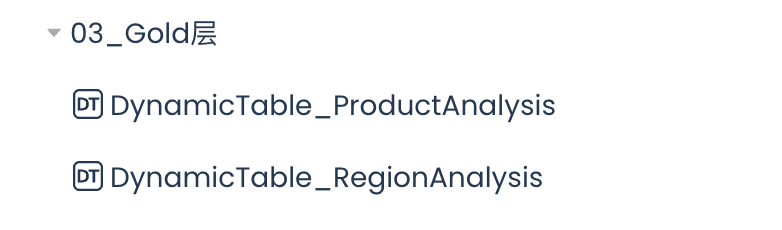
Develop Dynamic Tables
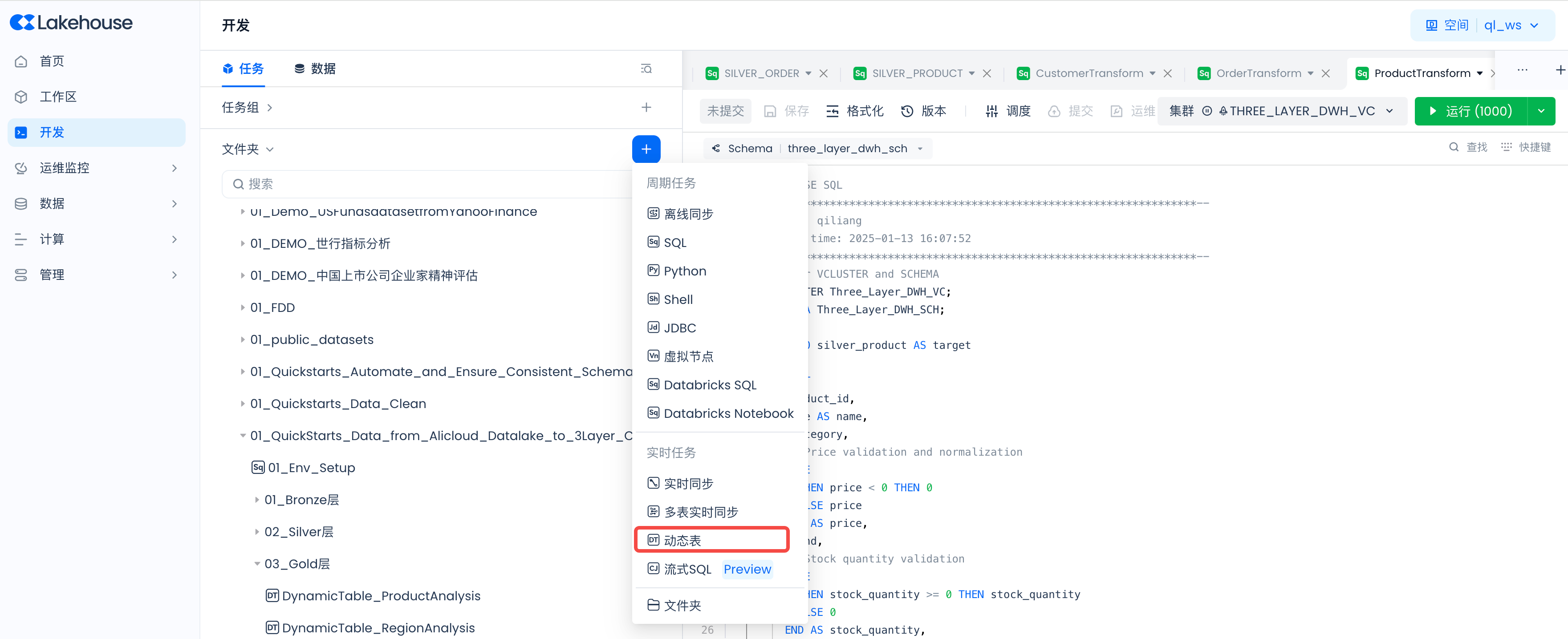
Develop dynamic tables to perform business analytics on the data.
Create dynamic table: DynamicTable_ProductAnalysis
SELECT
p.CATEGORY,
c.GENDER,
SUM(o.TOTAL_AMOUNT) AS TOTAL_SALES,
AVG(p.RATING) AS AVG_RATING
FROM SILVER_ORDERS AS o
JOIN SILVER_PRODUCT AS p
ON o.product_id = p.product_id
JOIN SILVER_CUSTOMER AS c
ON o.customer_id = c.customer_id
GROUP BY
P.CATEGORY,
C.GENDER
ORDER BY
c.GENDER,
TOTAL_SALES DESC;
Create dynamic table: DynamicTable_RegionAnalysis
SELECT
CASE
WHEN c.COUNTRY IN ('USA', 'Canada') THEN 'NA'
WHEN c.COUNTRY IN ('Brazil') THEN 'SA'
WHEN c.COUNTRY IN ('Australia') THEN 'AUS'
WHEN c.COUNTRY IN ('Germany', 'UK', 'France') THEN 'EU'
WHEN c.COUNTRY IN ('China', 'India', 'Japan') THEN 'ASIA'
ELSE 'UNKNOWN'
END AS REGION,
o.STORE_TYPE,
SUM(o.TOTAL_AMOUNT) AS TOTAL_SALES,
AVG(o.TOTAL_AMOUNT) AS AVG_SALE,
AVG(o.QUANTITY) AS AVG_QUANTITY
FROM SILVER_ORDERS AS o
JOIN SILVER_PRODUCT AS p
ON o.product_id = p.product_id
JOIN SILVER_CUSTOMER AS c
ON o.customer_id = c.customer_id
GROUP BY
REGION,
o.STORE_TYPE
ORDER BY
TOTAL_SALES DESC,
AVG_SALE DESC,
AVG_QUANTITY DESC;
Follow the steps below to schedule the three Silver layer data transformation tasks to run on a one-minute cycle.
Set the scheduling parameters:
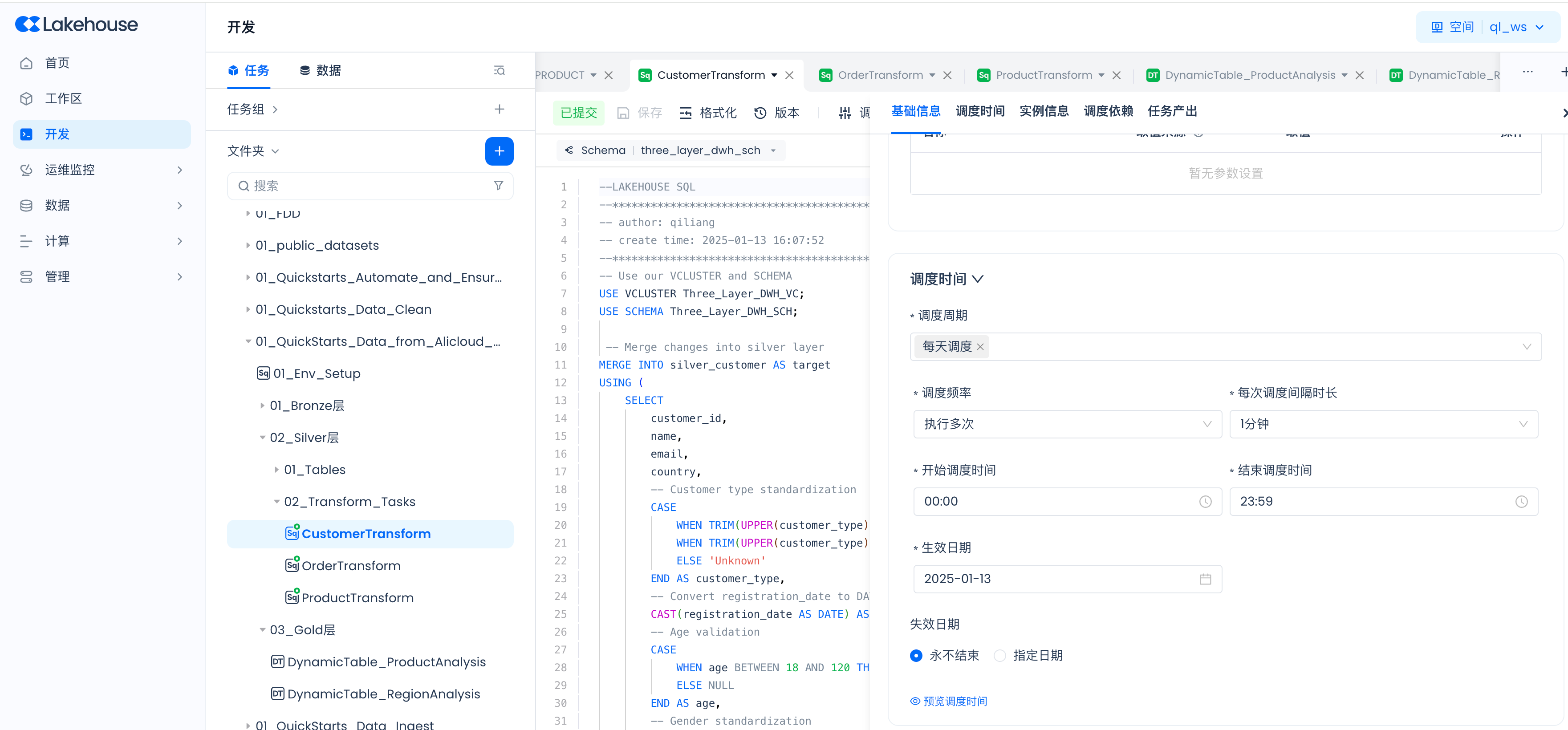
Then submit:
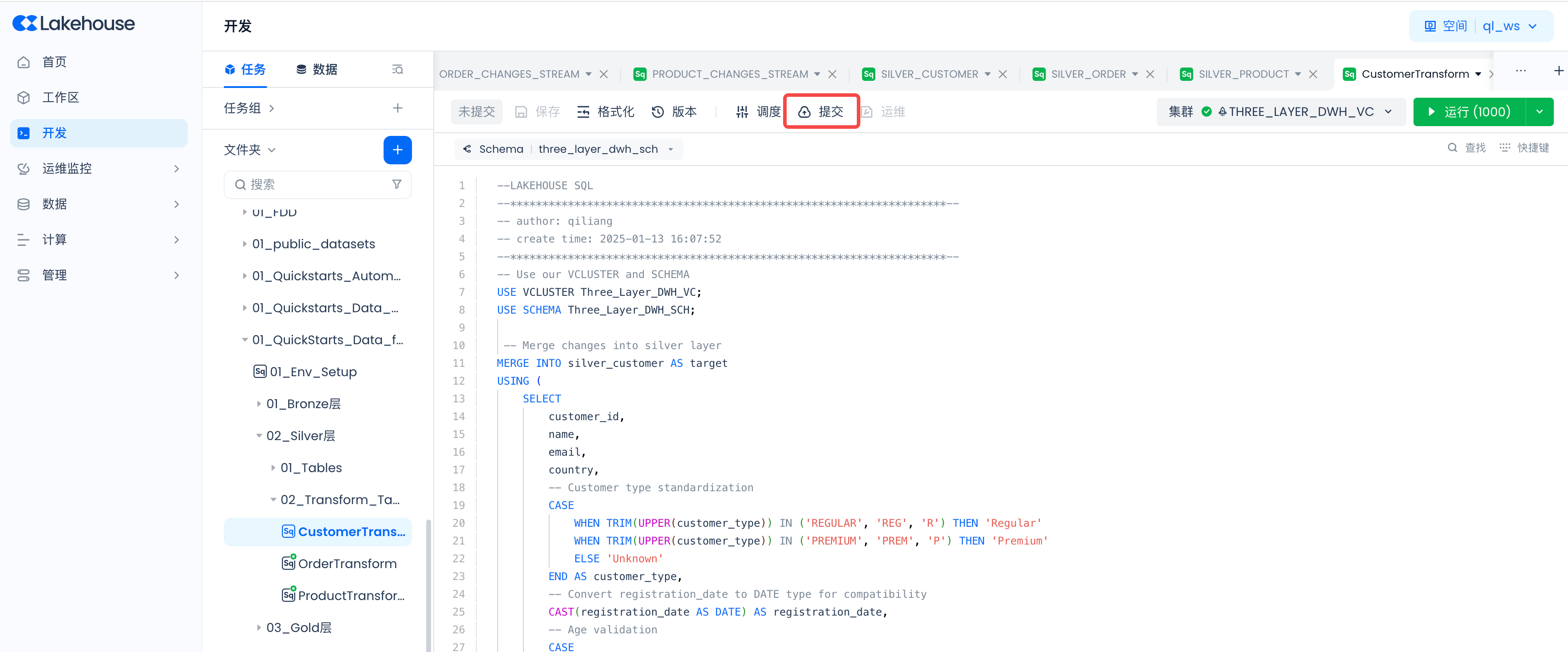
Make sure to repeat the above steps to configure and start scheduling for all three data transformation tasks.
You can set the scheduling cycle to 1 minute, which ensures that data will appear in the Silver layer tables within approximately 1 minute.
Start the Gold Layer Dynamic Table Auto-Refresh
Follow the steps below to start the dynamic tables.
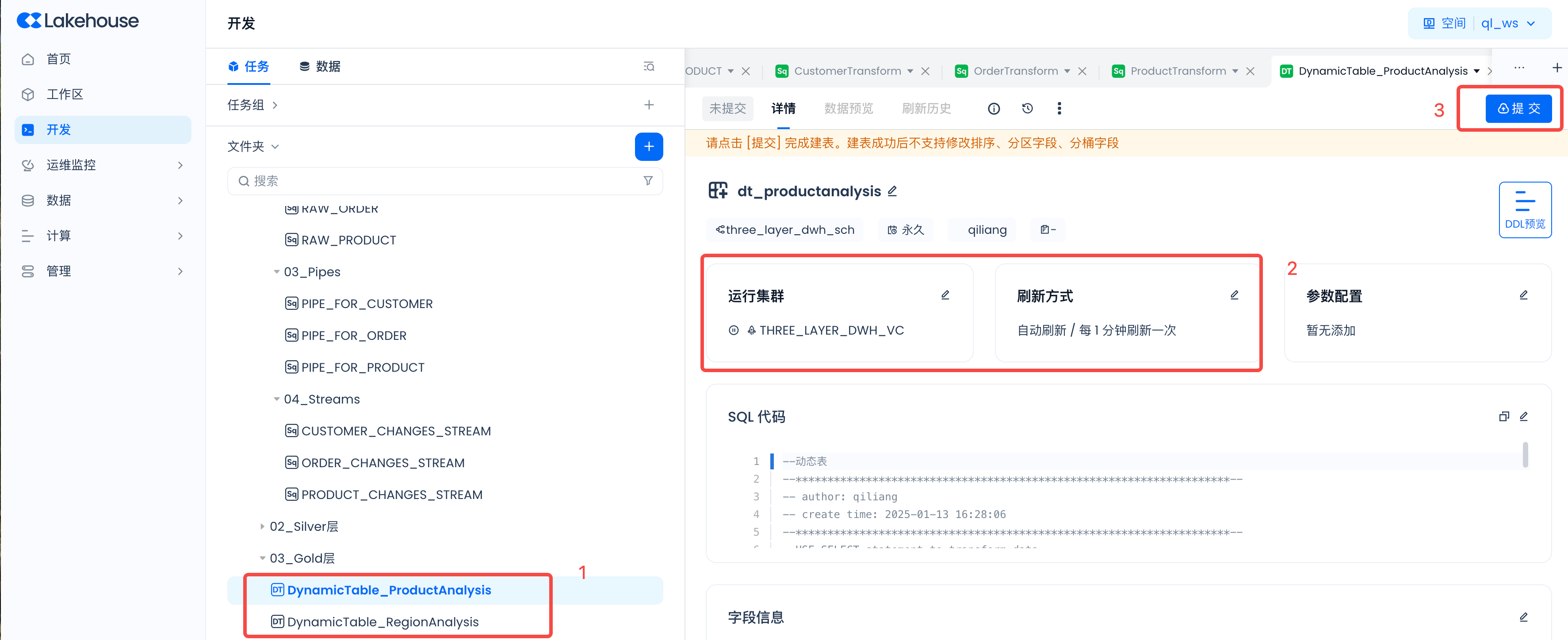
Set the running cluster to "Three_Layer_DWH_VC", the refresh mode to "Auto Refresh", and the refresh interval to "1 minute". Then submit.
Check Object Creation Results
Navigate to Development -> Tasks and create a new SQL task "09_Test_Verification"
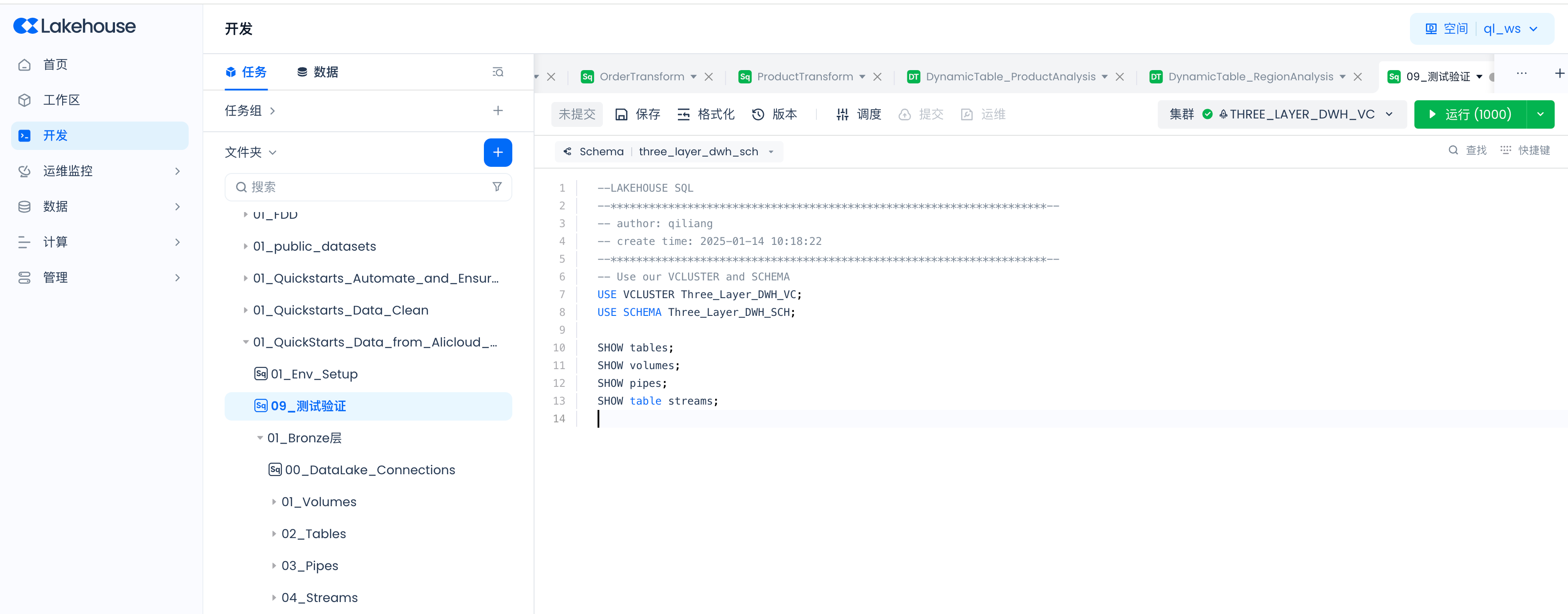
SHOW tables;
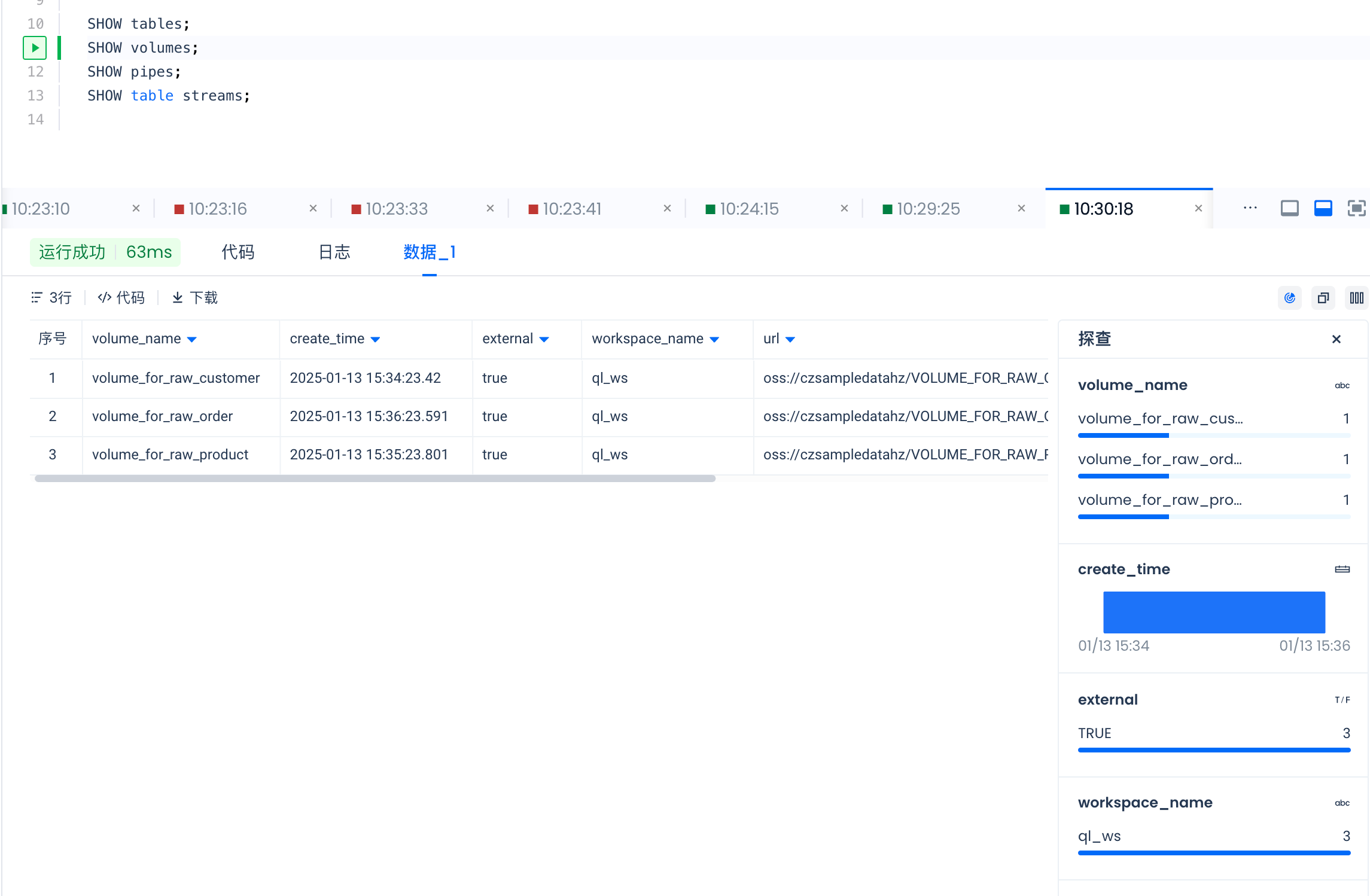
SHOW volumes;
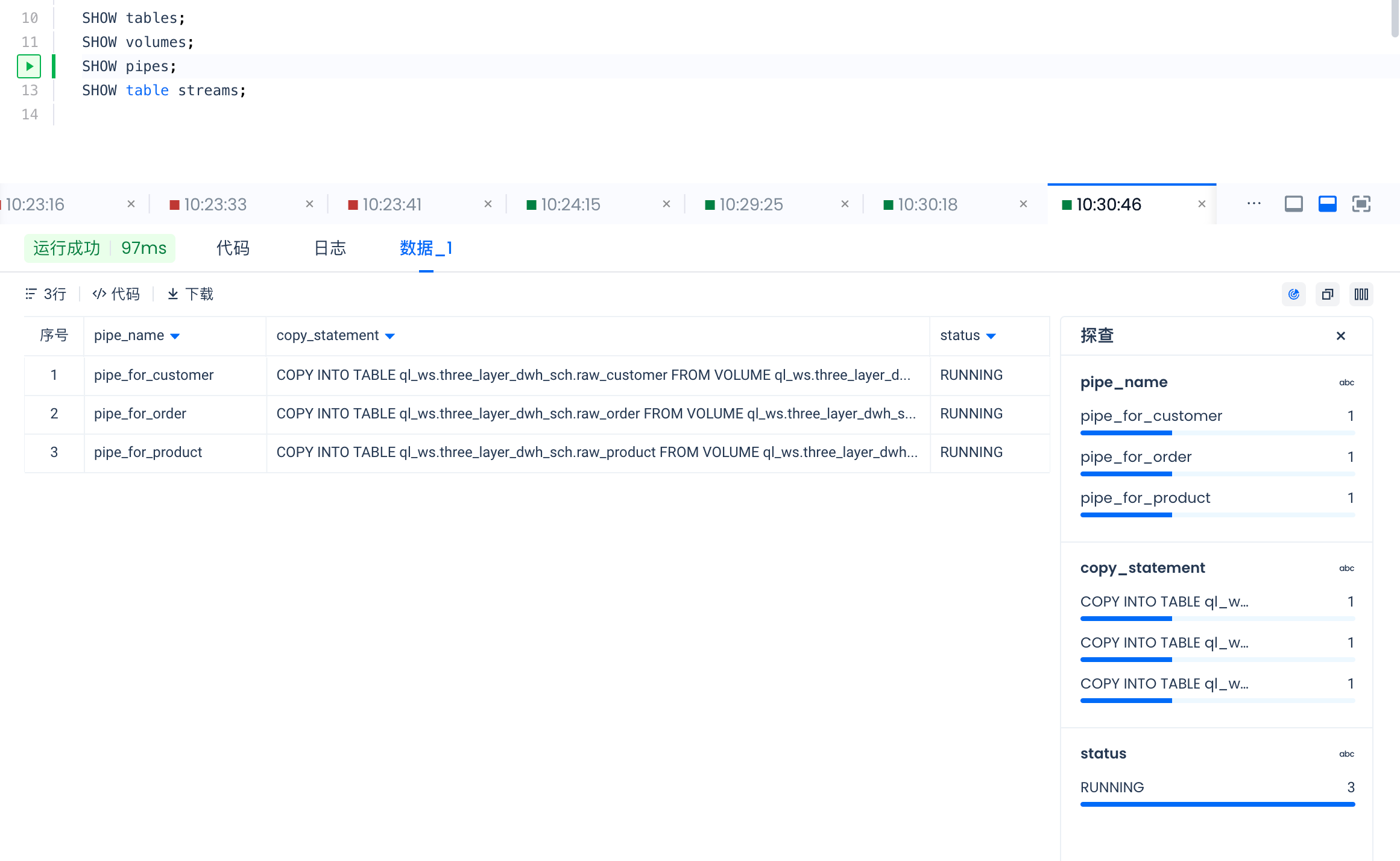
SHOW pipes;
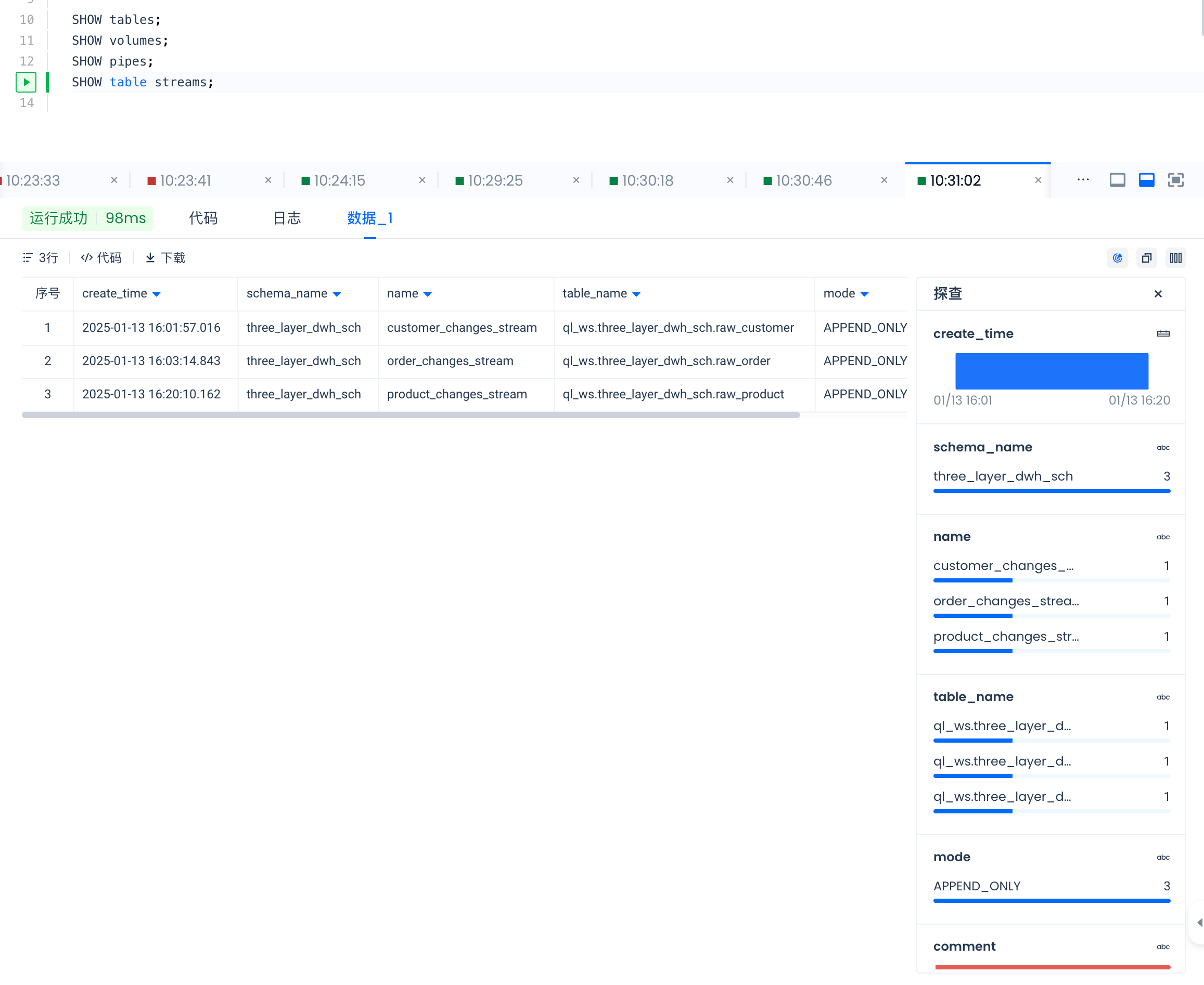
SHOW table streams;
SHOW tables result:
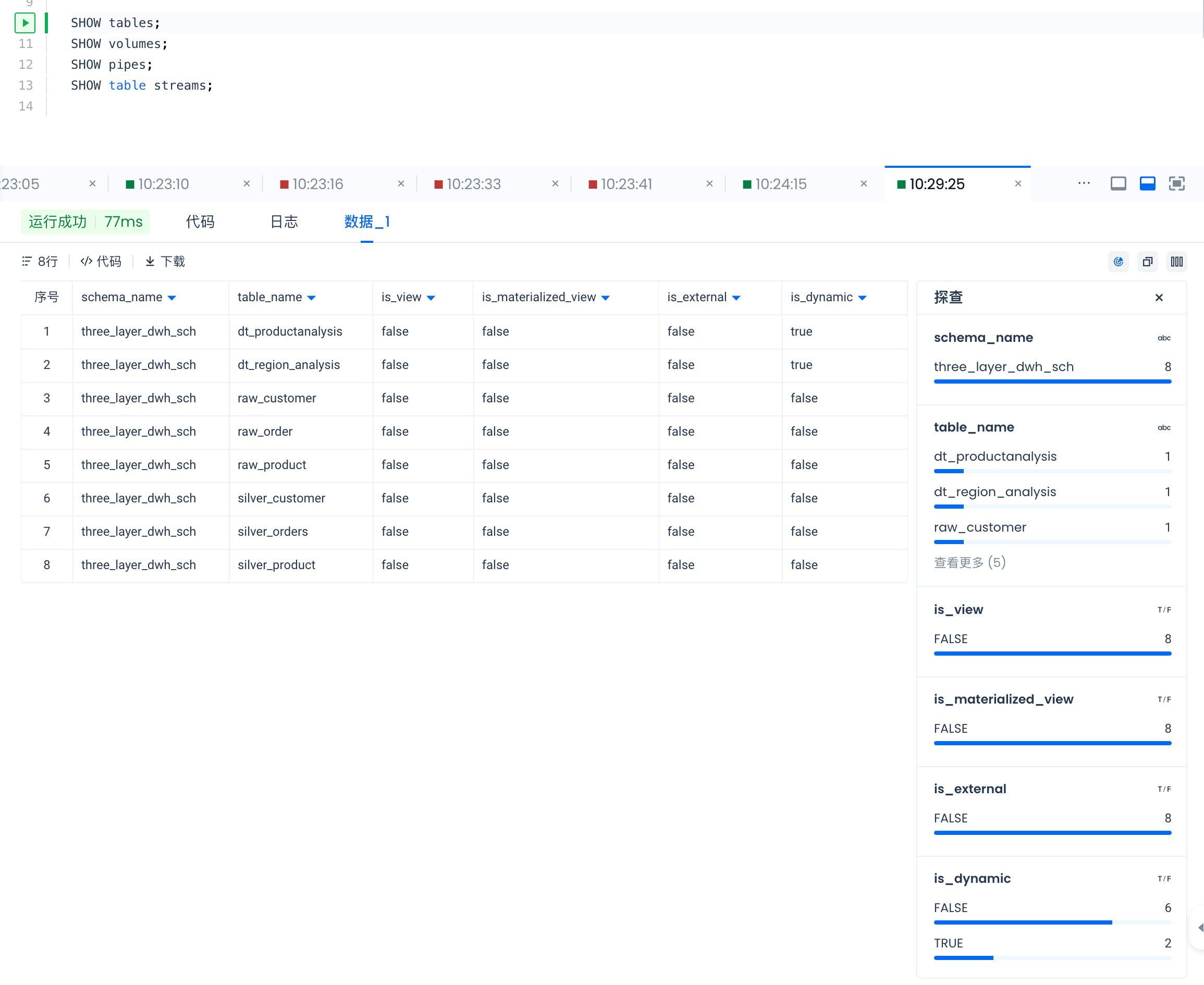
SHOW volumes result:
SHOW pipes result:
SHOW table streams result:
Use the following commands to view detailed information about each object:
DESC TABLE EXTENDED raw_customer;
DESC VOLUME volume_for_raw_customer;
DESC PIPE pipe_for_customer;
DESC TABLE STREAM customer_changes_stream;
DESC TABLE EXTENDED dt_productanalysis;
Generate Test Data and PUT It to the Data Lake
#pip install faker
from faker import Faker
import csv
import uuid
import random
from decimal import Decimal
from datetime import datetime
from singdata.zettapark.session import Session
import json
fake = Faker()
file_path = f'FakeDataset'
Function to create a CSV file, generating content based on the table name:
def create_csv_file(file_path, table_name, record_count):
with open(file_path, 'w', newline='') as csvfile:
if table_name == "raw_customer":
fieldnames = ["customer_id", "name", "email", "country", "customer_type",
"registration_date", "age", "gender", "total_purchases", "ingestion_timestamp"]
writer = csv.DictWriter(csvfile, fieldnames=fieldnames)
writer.writeheader()
for i in range(1, record_count + 1):
writer.writerow(
{
"customer_id": i,
"name": fake.name(),
"email": fake.email(),
"country": fake.country(),
"customer_type": fake.random_element(elements=("Regular", "Premium", "VIP")),
"registration_date": fake.date(),
"age": fake.random_int(min=18, max=120),
"gender": fake.random_element(elements=("Male", "Female", "Other")),
"total_purchases": fake.random_int(min=0, max=1000),
"ingestion_timestamp": fake.date_time_this_year().isoformat()
}
)
elif table_name == "raw_product":
fieldnames = ["product_id", "name", "category", "brand", "price",
"stock_quantity", "rating", "is_active", "ingestion_timestamp"]
writer = csv.DictWriter(csvfile, fieldnames=fieldnames)
writer.writeheader()
for i in range(1, record_count + 1):
writer.writerow(
{
"product_id": i,
"name": fake.word(),
"category": fake.word(),
"brand": fake.company(),
"price": round(fake.random_number(digits=5, fix_len=False), 2),
"stock_quantity": fake.random_int(min=0, max=1000),
"rating": round(fake.random_number(digits=2, fix_len=True) / 10, 1),
"is_active": fake.boolean(),
"ingestion_timestamp": fake.date_time_this_year().isoformat()
}
)
elif table_name == "raw_order":
fieldnames = ["customer_id", "payment_method", "product_id", "quantity",
"store_type", "total_amount", "transaction_date",
"transaction_id", "ingestion_timestamp"]
writer = csv.DictWriter(csvfile, fieldnames=fieldnames)
writer.writeheader()
for _ in range(record_count):
writer.writerow(
{
"customer_id": fake.random_int(min=1, max=100),
"payment_method": fake.random_element(elements=("Credit Card", "PayPal", "Bank Transfer")),
"product_id": fake.random_int(min=1, max=100),
"quantity": fake.random_int(min=1, max=10),
"store_type": fake.random_element(elements=("Online", "Physical")),
"total_amount": round(fake.random_number(digits=5, fix_len=False), 2),
"transaction_date": fake.date(),
"transaction_id": str(uuid.uuid4()),
"ingestion_timestamp": fake.date_time_this_year().isoformat()
}
)
def put_file_into_volume(filename,volumename):
# Read parameters from the config file
with open('security/config-uat-3layer-dwh.json', 'r') as config_file:
config = json.load(config_file)
# Create session
session = Session.builder.configs(config).create()
session.file.put(filename,f"volume://{volumename}/")
session.sql(f"show volume directory {volumename}").show()
session.close()
First call:
current_time = datetime.now().strftime("%Y%m%d%H%M%S")
print(current_time)
if __name__ == '__main__':
# Example calls
create_csv_file(f"{file_path}/customer/raw_customer_{current_time}.csv", "raw_customer", 100)
put_file_into_volume(f"{file_path}/customer/raw_customer_{current_time}.csv","VOLUME_FOR_RAW_CUSTOMER")
create_csv_file(f"{file_path}/product/raw_product_{current_time}.csv", "raw_product", 100)
put_file_into_volume(f"{file_path}/product/raw_product_{current_time}.csv","VOLUME_FOR_RAW_PRODUCT")
create_csv_file(f"{file_path}/order/raw_order_{current_time}.csv", "raw_order", 10000)
put_file_into_volume(f"{file_path}/order/raw_order_{current_time}.csv","VOLUME_FOR_RAW_ORDER")
Second call: generate order data only:
current_time = datetime.now().strftime("%Y%m%d%H%M%S")
print(current_time)
if __name__ == '__main__':
create_csv_file(f"{file_path}/order/raw_order_{current_time}.csv", "raw_order", 100000)
put_file_into_volume(f"{file_path}/order/raw_order_{current_time}.csv","VOLUME_FOR_RAW_ORDER")
The first call generates product, customer, and order data. For the second and subsequent calls, only new order data needs to be generated. You can run the upload multiple times to upload multiple order files.
Note that after files PUT to the Volume are consumed by the Pipe, they are automatically deleted.
References
Connection
External Volume
Pipe
Table Stream
Merge Into
Dynamic Table
