
Connection Object
A Connection is an object in Lakehouse that stores authentication credentials for third-party services, enabling Lakehouse to securely access external data sources (object storage, Kafka, HDFS, AI models, etc.) without exposing plaintext passwords or keys in SQL.
Think of a Connection as Lakehouse's "credential vault" — you store your cloud storage keys, Kafka addresses, and other credentials inside it. When accessing external data, you simply reference the Connection by name, and the system uses the saved credentials automatically.
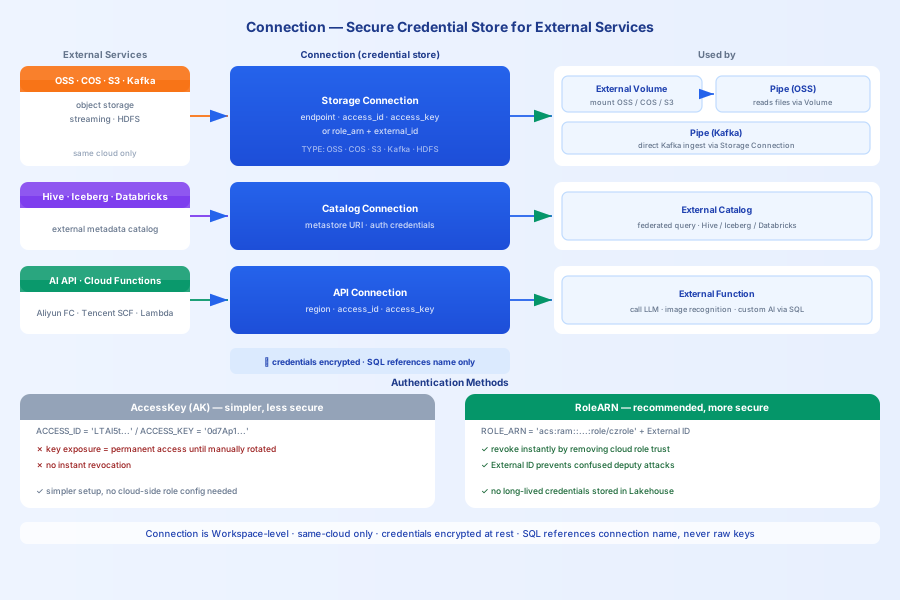
Connection Types
| Type | Purpose | Use Case |
|---|---|---|
| Storage Connection | Connect to object storage (OSS/COS/S3), Kafka, HDFS | Mount external storage to create an External Volume, or ingest Kafka data |
| API Connection | Connect to external API services (AI models, etc.) | Create external functions to call LLMs, image recognition services, etc. |
| Catalog Connection | Connect to external data catalogs (Hive, etc.) | Create an External Catalog for federated queries |
Choosing the Right Connection
| Scenario | Recommended | Reason |
|---|---|---|
| Existing OSS/S3 data you don't want to migrate | Storage Connection + External Volume | Direct mount, zero data copy |
| Real-time data consumption from Kafka | Storage Connection + Pipe | Continuous ingestion of Kafka streaming data |
| Call an AI model (text generation / vectorization) | API Connection + External Function | Call AI services directly from SQL |
| Query a Hive data warehouse | Catalog Connection + External Catalog | Federated query, data stays in place |
Core Mechanisms
Credential security: Keys stored in a Connection are encrypted. SQL statements only reference the Connection name — no plaintext credentials are exposed.
Cross-cloud restriction: Storage Connections do not support cross-cloud-provider creation. For example, a Lakehouse instance running on Alibaba Cloud cannot create a Connection to Tencent Cloud COS.
Role-based authorization (RoleARN): Compared to AK key-based access, RoleARN is more secure — Lakehouse assumes a role in the customer's cloud account to access data. The customer can revoke the role at any time, and the approach supports External ID for an additional layer of verification.
Quick Examples
Create a Storage Connection (AK Method)
Create a Storage Connection (RoleARN Method)
Create an API Connection
Troubleshooting
Issue 1: Cross-cloud Connection creation fails
Problem: A Lakehouse instance on Alibaba Cloud attempts to create a Connection to Tencent Cloud COS.
Symptom: Error: cross-cloud connection not supported.
Solution:
- Storage Connections do not support cross-cloud-provider creation.
- An Alibaba Cloud Lakehouse can only connect to Alibaba Cloud OSS.
- If you need to access multi-cloud data, first export the data from the target cloud storage, then import it into the object storage of the cloud where Lakehouse is running.
Issue 2: RoleARN method missing External ID configuration
Problem: After creating a Connection with RoleARN, accessing external storage returns a permission error.
Symptom: AccessDenied or STS token expired.
Solution:
- After creating the Connection, use
DESC CONNECTIONto retrieve the External ID. - In the cloud role's trust policy, add the External ID to the
sts:ExternalIdcondition. - Confirm that the Lakehouse instance's account ID has been added to the role's trusted principals.
Issue 3: AK key exposure risk
Problem: A Connection was created using the AK key method, but the AccessKey was accidentally leaked.
Symptom: External storage is accessed by unauthorized parties.
Solution:
- Prefer the RoleARN method over AK keys.
- With RoleARN, you can revoke the role's permissions on the cloud side at any time without rotating keys.
- Rotate AccessKeys regularly and restrict key permissions to the minimum required (principle of least privilege).
Cost Considerations
Storage Costs
- A Connection only stores metadata (authentication information), so storage costs are negligible.
Compute Costs
- A Connection itself does not incur compute charges.
- Accessing external data through a Connection may incur data transfer fees from the cloud provider.
- Reading external storage files via an External Volume consumes VCluster CRU.
Lifecycle Management
Create and Drop
Related Documentation
- Create Storage Connection — Complete configuration for OSS/COS/S3/Kafka/HDFS
- Create API Connection — Alibaba Cloud FC / Tencent Cloud SCF / AWS Lambda
- Create Catalog Connection — Hive federated queries
- External Volume — Mount external storage via a Storage Connection
- Connection SQL Reference — Complete syntax reference