
Answer Builder Best Practices
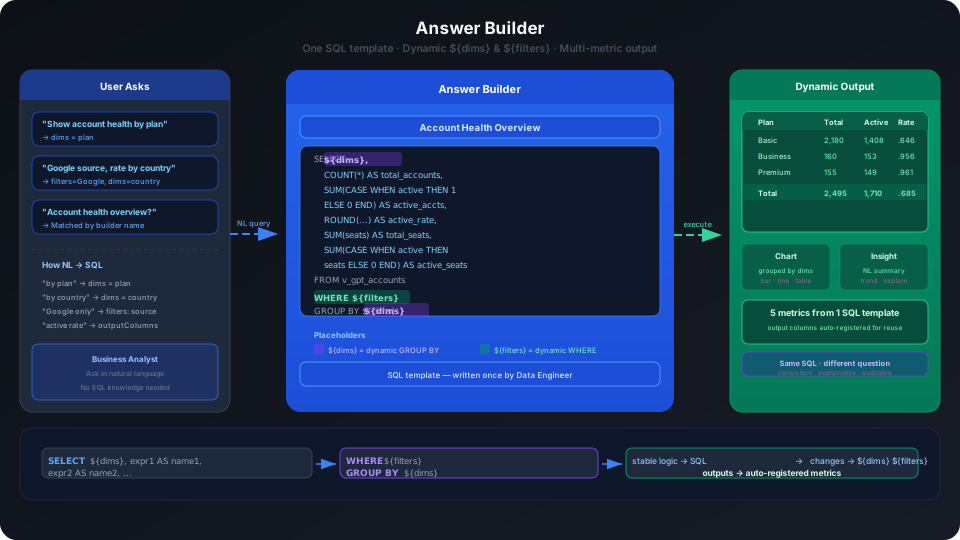
The answer builder is used to encapsulate complex SQL logic into reusable analysis templates for natural language Q&A. It is not a simple SQL-saving tool — it is an executable semantic asset that allows the system to dynamically select dimensions, filters, and output metrics when answering questions.
When an analysis question involves multiple metric combinations, complex filters, cross-field calculations, detail queries, or multi-table joins, the answer builder is generally more appropriate than a standard metric.
Applicable Scenarios
The core value of the answer builder is transforming "complex analysis logic that a model might temporarily generate incorrectly" into "configurable, verifiable, reusable SQL templates". The following scenarios are all good candidates for an answer builder.
| Use Case | Value of Answer Builder | Example |
|---|---|---|
| Locking in complex business definitions | Hard-code CASE WHEN logic, valid data filtering, and status determination to avoid ad hoc inference each time. | Active accounts are consistently counted using active_subscription = TRUE. |
| Outputting multiple related metrics at once | A single SQL returns a set of metrics together, making it easier for the system to interpret and generate charts. | Account count, active accounts, active rate, total seats, active seats. |
| Supporting dynamic dimension analysis | Use ${dims} to let users naturally specify grouping. | "Show account health overview by plan", "View active rate by country". |
| Supporting dynamic filtering | Use ${filters} to let users naturally append filter conditions. | "Only show Google source", "Only show Basic Plan", "Last 30 days". |
| Precise control of output columns | Only return the output fields the user needs during Q&A. | When the user only asks about "active rate and active seats", the full set of metrics is not returned. |
| Avoiding multi-table JOIN errors | Lock the correct JOIN path in the template to reduce the risk of the model temporarily constructing incorrect JOINs. | Combined analysis of order, customer, product, and payment tables. |
| Supporting detail queries | Return row-level details rather than only aggregated metrics. | Transaction details, customer lists, anomalous order lists. |
| Encapsulating derived metrics | Package complex formulas or multi-field calculations as reusable outputs. | Conversion rate, seat active rate, retention rate, average order value. |
| Improving Q&A interpretation quality | Returning multiple related metrics together makes it easier for the system to generate structured analysis and business insights. | Comparing account count, active rate, and active seats simultaneously to determine which plan performs best. |
| Lowering the SQL barrier for users | Users do not need to know table names, JOIN conditions, or field formulas — they just need to ask in business language. | "Show conversion rate and order amount by channel". |
In real-world validation, "account health overview" is a typical answer builder scenario. It places account count, active accounts, active rate, total seats, and active seats in the same SQL template. Users can continue to specify via natural language:
- Group by
plan. - Only show
source = Google. - Only return active rate and active seats.
The system translates these natural language requirements into dims, filters, and outputColumns parameters, calling the same answer builder to complete the analysis. This is a capability that a simple single-metric approach cannot cover.
Core Concepts
The most important elements in an answer builder's SQL template are two placeholders:
| Placeholder | Role | Behavior in Q&A |
|---|---|---|
${filters} | Dynamic filter conditions | When the user says "only Google source", "last 30 days", or "Basic Plan", the system attempts to convert these into filter expressions. |
${dims} | Dynamic grouping dimensions | When the user says "show by plan", "group by country", or "compare by channel", the system attempts to convert these into GROUP BY dimensions. |
In practice, when no filter condition is selected, ${filters} is replaced with 1=1; when no dimension is selected, ${dims} is replaced with 1, so the preview returns an overall result by default.
Page Flow Overview
Creating an answer builder is not a single-step form where you just enter SQL and save. The page actually proceeds through the following flow:
| Step | Page Action | What You Need to Understand |
|---|---|---|
| 1. Write code | Enter the SQL template, click Run Validation | SQL must conform to the underlying data source syntax; ${filters} and ${dims} must be placed in the correct positions. |
| 2. Configure filters and dimensions | Use Add Filter and Add Dimension to select tables and fields | This determines which fields can be used as filter conditions and which can be used as grouping dimensions during Q&A. |
| 3. Match output fields | The system identifies SQL output columns and creates metrics per output column | Each output column becomes a metric that can be called during Q&A — add business-friendly names, aliases, and descriptions. |
| 4. Preview | Run preview and check results | Preview validates whether SQL and field configuration can be executed; it does not fully represent the final natural language Q&A result. |
| 5. Create | Enter the answer builder name, alias, description, and save | After saving, the answer builder appears in the current analytics domain and is enabled by default. |
As a result, after saving, an answer builder often appears in Q&A logs as "executing metric calculation". This is because the system registers the answer builder's output fields as executable SQL metric instances. There is no need for confusion: the "metrics" here are not equivalent to manually created standard aggregation metrics — they are executable outputs generated by the answer builder.
Recommended Design Approach
1. Encapsulate one strongly related set of metrics per builder
The most valuable use of an answer builder is to encapsulate a set of related metrics around one business topic, rather than just saving a simple count.
For example, "account health overview" can simultaneously output:
| Output Field | Business Meaning |
|---|---|
total_accounts | Account count |
active_accounts | Active account count |
active_account_rate | Active rate |
total_seats | Total seats |
active_seats | Active seats |
Users can then ask directly:
The system selects this answer builder, passes dims = plan, and returns a multi-metric table and chart grouped by Plan.
2. Hard-code stable definitions; leave changing conditions to placeholders
SQL should lock in business rules that will not change with the question, while leaving the parts that will change to ${filters} and ${dims}.
Example:
Here, the business definition of active accounts is fixed as active_subscription = TRUE, while users can dynamically specify in Q&A:
| User Question | System Should Dynamically Pass |
|---|---|
| Show account health overview by plan | dims = plan |
| Show account health overview only for Google source | filters: source = Google |
| View active rate by country | dims = country |
3. Explicitly bind filter fields and dimension fields
After the validation run succeeds, the page moves to the "configure filters and dimensions" step.
If the SQL contains ${filters}, click Add Filter to select the tables and fields available for filtering.
If the SQL contains ${dims}, click Add Dimension to select the tables and fields available for grouping.
In practice, the filter field list includes a wider range of fields, such as account_name, id, email, plan, source, seats, created_at, etc.; the dimension field list filters out fields more suited to measures, such as seats, latitude, and longitude, which will not appear as priority dimensions.
This step directly affects whether Q&A can correctly understand expressions like "by plan", "only Google source", or "by country".
4. Understand what ${filters} and ${dims} fields are selectable on the page
In the "configure filters and dimensions" step, the page does not let you manually write fields for ${filters} or ${dims}. Instead, you select the field scope using Add Filter and Add Dimension.
Fields come from the tables used in the SQL template. In practice, clicking Add Filter or Add Dimension first prompts you to select a table; after selecting the table, the system shows the fields available for filtering or grouping.
| Configuration Entry | Field Source | Field Characteristics | Typical Uses |
|---|---|---|---|
| Add Filter | Fields from the SQL tables that can be used as conditions | Broader scope; string, numeric, date, and boolean fields may all appear. | "Only Google source", "Basic Plan", "last 30 days", "active accounts". |
| Add Dimension | Fields from the SQL tables suitable for grouping | More oriented toward categorical, enumerated, date, and boolean dimension fields; some continuous numeric fields may not appear. | "By plan", "by country", "by source channel", "by creation time". |
In practice, the v_gpt_accounts table shows the following in filter fields:
account_nameidemailfirst_namelast_nameplansourceseatscreated_attrial_ends_atcanceled_attrial_convertedactive_subscriptionlegacy_planlatitudelongitudecountry
While the dimension field list mainly displays:
idemailfirst_namelast_nameplansourcecreated_attrial_ends_atcanceled_attrial_convertedactive_subscriptionlegacy_plancountry
As you can see, the filter field scope is generally broader; dimension fields lean toward "groupable" fields. Fields like seats, latitude, and longitude — continuous numeric or geographic coordinate fields — are more suitable as measures, calculated fields, or filter conditions, and may not be appropriate default grouping dimensions.
If you want a field to appear more easily in dimension or filter configurations, first add field information in the table field configuration:
| Field Configuration | Impact on Answer Builder |
|---|---|
| Field type | Helps the system determine whether the field suits categorical, continuous, time, or other types. |
| Field purpose | Helps the system determine whether the field is more suitable as a dimension, filter condition, or measure. |
| Field alias | Helps the system map user natural language phrasing to the field, e.g., mapping "plan type" to plan. |
| Field description | Helps the system understand the business meaning of the field, reducing misuse. |
| Hidden field | Hidden fields should not be prioritized for Q&A and builder use. |
Before configuring an answer builder, it is recommended to review the fields in the tables used by the SQL:
- Fields used for
${filters}should be suited to expressing common user filter conditions. - Fields used for
${dims}should be suitable for grouped display with reasonable cardinality. - Numeric measure fields should not be arbitrarily configured as dimensions, as this may produce large numbers of meaningless groups.
- High-cardinality fields such as ID, email, and name may appear in the dimension list, but are generally not appropriate as default recommendations for business users to group analysis.
- If date fields are used as dimensions, it is best to clarify whether users want analysis by day, week, month, or year to avoid overly fine-grained grouping.
5. Add business-friendly names, aliases, and descriptions to output fields
The answer builder creates a metric for each SQL output field. If only technical field names are kept, Q&A will still function, but results and logs may display names like active_account_rate_metric or active_seats_metric.
It is recommended to add the following before saving:
| Configuration | Recommendation |
|---|---|
| Metric name | Use a stable, readable business name, e.g., "Active Account Count" or "Account Active Rate". |
| Metric alias | Add common user phrasings, e.g., "active rate" or "account active share". |
| Metric description | Clearly describe the calculation definition, applicable scope, and notes. |
| POP expression | Select the appropriate period-over-period algorithm based on the metric type; do not apply absolute growth rate formulas to ratio metrics. |
Field names can remain SQL-readable, but names displayed to users should be as business-friendly as possible.
6. Always validate using preview
Before saving, click Run Validation and Preview.
Findings from practice:
| Action | Result |
|---|---|
SQL missing ${filters} | Validation error: SQL is missing the filter condition parameter. |
SQL contains ${filters} and filter fields are bound | Can proceed to the next step and run preview. |
SQL contains ${dims} and dimension fields are bound | Dims appear in the preview area, usable for dynamic grouping. |
| Multi-output field SQL | The system identifies each output field and creates metrics separately. |
When no filter or dimension is selected, the preview returns an overall result by default. When a user question triggers the builder, the system passes specific dimensions, filter conditions, and output columns based on natural language.
A special note: preview results and Q&A results may differ, and this is usually not an error.
| Observation | Reason |
|---|---|
| Preview returns only one row of totals | No specific dimension selected in preview; ${dims} defaults to 1. |
| Q&A can group by plan, but preview has no grouping | The model passed dims = plan based on "by plan" in the question. |
| Q&A returns only some output columns | The user asked about only some metrics; logs may show the system selected needed outputs via outputColumns. |
| Q&A queries field values before executing the builder | The system needs to confirm enum value casing or actual values, e.g., confirming source = Google. |
7. Use SQL and logs to confirm whether the builder is actually used
Whether an answer builder is used during Q&A should not be judged only by the final text answer — also check SQL Statements and Logs.
In actual validation, a question that hits an answer builder will show information in the logs such as:
- Found a matching answer builder or metric.
- Executing metric calculation with
metricTypeasSQL. - Parameters include
dims,filters, oroutputColumns. - In the SQL,
${filters}and${dims}have been replaced with actual fields and conditions.
For example, when a user asks "show account health overview for Google source only, display active rate and active seats by plan", the logs show:
| Parameter | Meaning |
|---|---|
dims = plan | Group by Plan. |
filters: source = Google | Only Google source. |
outputColumns = active_account_rate, active_seats | Only return active rate and active seats as requested. |
If the logs show no answer builder was hit, and instead a temporary table structure lookup with ad hoc SQL was generated, the builder's name, alias, description, or output metric information may not be clear enough — semantic information needs to be added.
Practical Validation Cases
Case 1: Show Account Health Overview by Plan
User question:
System behavior:
- Found the answer builder "Account Health Overview".
- Recognized that the user wants to group by
plan. - Passed
dims = plan. - Returned multiple metrics at once.
- Automatically generated a table and combo chart with business insights.
In the actual result, the system returned account count, active accounts, active rate, total seats, and active seats for Basic, Business, and Premium plans, and noted that Business Plan has fewer accounts but the best active rate and seat utilization.
Case 2: View the Same Metrics with a Filter Condition
User question:
System behavior:
- First queried the actual values in the
sourcefield to confirm the stored format isGoogle. - Continued using the same answer builder.
- Passed
dims = plan. - Passed
filters: source = Google. - Only selected the user's requested output columns:
active_account_rateandactive_seats.
This demonstrates that the answer builder not only locks in SQL definitions but also allows the system to dynamically select dimensions, filter conditions, and output fields during Q&A.
Integration with Metrics and Knowledge
Answer builders should not be used in isolation.
| Configuration | Role |
|---|---|
| Knowledge | Explains business vocabulary and definitions, e.g., "active accounts refers to accounts where active_subscription = TRUE". |
| Metrics | Locks in individual common aggregation definitions, suitable for simple, high-frequency questions. |
| Answer Builders | Locks in complex SQL templates, suitable for multi-metric, multi-dimension, multi-filter, or detail queries. |
During Q&A, the system first searches knowledge to understand business concepts like "active accounts"; then looks for available metrics and answer builders; if a matching answer builder is found, it prioritizes using its SQL template for calculation.
How to Write Names, Aliases, and Descriptions
Answer builders have several types of names with different meanings — do not mix them up.
| Configuration | Audience | Writing Recommendation |
|---|---|---|
| Answer builder name | System matching and management list | Name by business topic, e.g., "Account Health Overview". |
| Answer builder alias | User natural language matching | Write common user phrasings, e.g., "account health", "account quality", "active overview". |
| Answer builder description | System understanding of applicable scope | Describe which metrics are included, and what dimensions and filters are supported. |
| Output field name | SQL and underlying execution | Can use English technical names, e.g., active_account_rate. |
| Output metric name | Q&A and chart display | Recommended to use business names, e.g., "Account Active Rate". |
| Output metric alias | Different user phrasings | Add expressions like "active rate" or "active share". |
| Output metric description | Metric definition explanation | Describe the formula, e.g., "Active accounts / Total accounts". |
A common mistake is giving the answer builder a clear name but keeping output fields with English technical names. The system will still execute correctly, but the final answers, chart fields, or logs may still show names like active_account_rate_metric. Best practice: the builder name handles "letting the system select the template"; the output metric name handles "letting users understand the results".
Common Issues and Handling Suggestions
| Issue | Possible Cause | Handling Suggestion |
|---|---|---|
| Validation error: SQL missing filter condition parameter | SQL has no ${filters} | Add ${filters} to the WHERE clause and bind filter fields. |
| User says "group by a field" but system doesn't use it | ${dims} not configured or field not bound as a dimension | Add ${dims} and GROUP BY ${dims} to SQL, and select dimension fields in the configuration step. |
| Q&A results show English technical names | Output fields have no business metric names, aliases, or descriptions | Add business-friendly names and aliases before saving. |
| Preview shows only totals with no grouping | No specific dimension passed in preview; ${dims} defaults to 1 | Validate dynamic dimensions via natural language questions after saving, or select a dimension in preview before running. |
| User filter condition not applied | Filter field not bound, or field value casing/enum mismatch | Add field to filter configuration; if necessary, let the system first query actual field values. |
| Multiple builders might match | Builder names, aliases, descriptions are not specific enough | Use clear business topic names and describe applicable questions in the description. |
| Log shows "executing metric calculation" after saving | Answer builder output may be registered as SQL-type metric calls | This is normal behavior; check metricType = SQL, dims, and filters in the logs to confirm whether the builder was called. |
| Unsure what the "Data" tab is for | The Data tab shows data tables in the same data source that can be referenced | Use it to confirm table assets when writing SQL; it is not the answer builder results page. |
| Many output fields — unsure whether to keep all | SQL output fields each create a metric | Only output metrics users will actually query and interpret; irrelevant intermediate fields should not appear in the final SELECT. |
| High-cardinality fields appear in the dimension list | A field being groupable does not mean it is appropriate for business analysis | ID, email, and name fields are generally not recommended as default dimensions unless the question truly requires detail-level analysis. |
Recommended Checklist
Before launching an answer builder, check each item:
- Does the SQL include the necessary
${filters}. - When dynamic grouping is needed, does it include
${dims}andGROUP BY ${dims}. - Do the filter fields cover common user filter conditions.
- Do the dimension fields cover common user breakdown dimensions.
- Do all output fields have business-friendly metric names configured.
- Do output fields have aliases and descriptions.
- Do ratio metrics use appropriate POP expressions.
- Does the preview run result meet expectations.
- Has validation been done using natural language questions.
- Are the builder name and description clear enough for the system to accurately match.
Design Recommendations
The granularity of an answer builder should be designed around "one business analysis topic".
Recommended:
Account Health OverviewOrder Conversion AnalysisChannel Campaign PerformanceCustomer Retention AnalysisTransaction Detail Query
Not recommended:
- Placing completely unrelated metrics in one builder.
- Creating an answer builder for every simple COUNT.
- Writing only SQL without configuring filter fields, dimension fields, and business descriptions.
- Keeping all output fields as English technical names.
A well-designed answer builder should allow users to naturally ask:
rather than requiring users to know underlying table names, field names, and SQL logic.
Related Documentation
- Metrics and Answer Builders — Answer builder creation process and configuration reference
- Configuring Analytics Domains — Creating and configuring data in analytics domains
- Analytics Domain Configuration Tips and FAQ — Lessons learned and FAQ from configuration
- Improving Q&A Accuracy — Overall solution for semantic layer configuration