
Table Stream
Table Stream is the Lakehouse's change data capture (CDC) mechanism. It captures INSERT, UPDATE, and DELETE changes on a table for downstream jobs to consume.
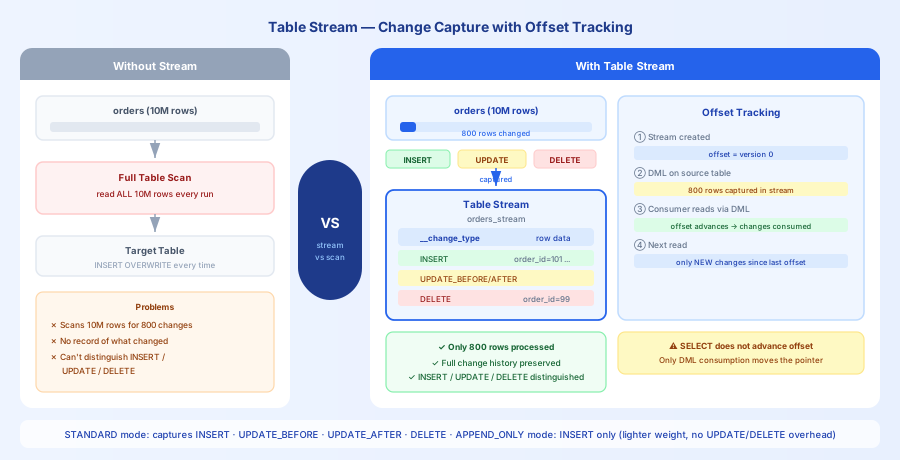
Think of a Table Stream as a "change log subscription" for a table — you subscribe to a table's stream, and each time you consume it via a DML statement, the offset advances automatically. The next read only returns changes that occurred after the last consumption.
Core Concepts
Offset: The stream records the position of the last consumption. After each DML consumption, the offset advances automatically. Running a SELECT alone does not advance the offset.
Change type column: Stream query results include a __change_type metadata column with values INSERT, UPDATE_BEFORE, UPDATE_AFTER, or DELETE.
STANDARD mode: Captures all DML changes (INSERT + UPDATE + DELETE). An UPDATE produces two rows: UPDATE_BEFORE (old value) and UPDATE_AFTER (new value).
APPEND_ONLY mode: Captures only INSERT operations. UPDATE and DELETE are not recorded, making it more lightweight.
Use Cases and Selection Guide
Suitable Scenarios
| Scenario | Reason |
|---|---|
| Incremental ETL processing | Only processes new or changed data from the source table, avoiding full table scans |
| Real-time data sync | Syncs Lakehouse table changes to downstream systems (e.g., Elasticsearch, ClickHouse) |
| Auditing and compliance | Records data change history to meet audit requirements |
Unsuitable Scenarios
| Scenario | Recommended Alternative | Reason |
|---|---|---|
| Continuously importing data from Kafka/OSS | Pipe | Pipe is designed for continuous ingestion from external data sources |
| Automatically maintaining aggregation results | Dynamic Table | Dynamic Tables automatically compute and store results incrementally |
| Syncing an external database CDC into the Lakehouse | Studio real-time sync job | Connects directly to MySQL/PostgreSQL binlog without an intermediate layer |
Quick Example
Creating a Stream and Consuming Changes
Capturing UPDATE and DELETE
Offset Advancement Rules
| Operation | Offset Advances? | Notes |
|---|---|---|
SELECT * FROM stream | No | View only; data remains for the next query |
INSERT INTO ... SELECT ... FROM stream | Yes | Advances after DML consumption |
MERGE INTO ... USING stream ... | Yes | Advances after DML consumption |
| Transaction rollback | No | Data remains; can be re-consumed next time |
Common Issues
Issue 1: WHERE Filter Causes Data Loss
Problem: INSERT INTO target SELECT ... FROM stream WHERE __change_type = 'INSERT' filters out UPDATE/DELETE changes.
Symptom: The filtered UPDATE/DELETE changes are permanently lost and cannot be re-consumed.
Solution:
- The stream's offset advances after DML consumption regardless of the WHERE clause
- If you need selective consumption, first write all changes to an intermediate table, then filter and process from there
Issue 2: Stream Becomes Stale
Problem: The stream has not been consumed for a long time, exceeding the source table's Time Travel retention period.
Symptom: The stream enters a STALE state and can no longer be read.
Solution:
- The stream consumption frequency should be much shorter than the source table's
data_retention_days(default: 1 day) - For important tables, set
data_retention_daysto 7 days or longer
Issue 3: Incorrect Use of APPEND_ONLY Mode
Problem: The source table has UPDATE/DELETE operations, but the stream was created in APPEND_ONLY mode.
Symptom: UPDATE/DELETE changes are not captured, causing downstream data inconsistency.
Solution:
- Use APPEND_ONLY only for append-only scenarios (e.g., log tables) where performance is a priority
- Use STANDARD mode when you need to capture all changes
Cost Implications
Storage Cost
- A stream does not store data itself — it only stores the offset (metadata), so the cost is negligible
- Multiple streams share the same source table's historical versions; the additional cost is minimal
Compute Cost
- Stream queries consume VCluster CRU, proportional to the amount of data queried
- STANDARD mode has higher overhead than APPEND_ONLY mode (all changes must be tracked)
Lifecycle Management
Creating and Dropping
Related Documentation
- Table Stream Overview — Full concepts and principles
- CREATE TABLE STREAM — Complete SQL syntax
- Table Stream Best Practices
- Real-Time Pipeline Selection Guide — Choosing between Pipe, Stream, and Dynamic Table