
File Storage (Volume)
A Volume is a storage object for managing files in Lakehouse, used to store files in various formats such as CSV, Parquet, JSON, images, and more. With a Volume, you can query file contents directly using SQL, upload and download files, or load files into tables.
Think of a Volume as the "file system" of Lakehouse — you can put files in, query them directly, or import them into tables. Unlike external object storage (OSS/S3), a Volume is a storage object natively managed by Lakehouse and requires no additional configuration to use.
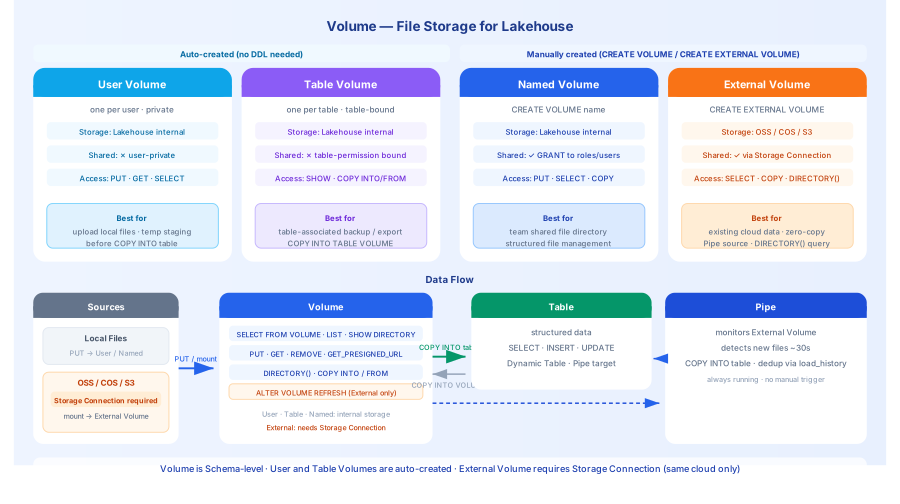
Volume Types
Volumes are divided into two major categories: internal Volumes and external Volumes:
| Type | Category | Creation | Storage Location | Use Case |
|---|---|---|---|---|
| User Volume | Internal | Created automatically | Internal storage | Upload local files, temporarily stage data for processing |
| Table Volume | Internal | Created automatically (one per table) | Internal storage | Store ETL files associated with a specific table |
| Named Volume | Internal | CREATE VOLUME (explicitly created by user) | Internal storage | Team file sharing, user-managed lifecycle |
| External Volume | External | CREATE EXTERNAL VOLUME | External storage (OSS/COS/S3) | Access existing cloud storage data without migration |
Internal Volume data is stored inside Lakehouse and billed according to Lakehouse storage rates. User Volumes and Table Volumes are created automatically by the system; Named Volumes are explicitly created by users who manage their own lifecycle.
External Volume data stays in external object storage without migration — Lakehouse only stores path metadata.
Choosing the Right Volume
| Scenario | Recommended | Reason |
|---|---|---|
| Upload CSV/Parquet from local to Lakehouse | User Volume | Ready to use out of the box, no configuration needed |
| Existing OSS/S3 data you don't want to migrate | External Volume | Direct mount, zero data copy |
| Shared file directory for a team | Named Volume | Configurable sharing permissions |
| ETL intermediate files associated with a table | Table Volume | Bound to table permissions, automatically managed |
Core Mechanisms
User isolation: User Volumes are private to each user and cannot be accessed by others.
Table association: Each table is automatically associated with a Table Volume. Operations on a Table Volume require the corresponding table's permissions.
External mounting: External Volumes mount OSS/COS/S3 via a Storage Connection. Data is not imported into Lakehouse — it is read directly from external storage.
Volume File Protocol
In addition to SQL keyword syntax such as FROM USER VOLUME and FROM VOLUME vol_name, Lakehouse provides a Volume file protocol for referencing files inside a Volume within string parameters. This protocol is primarily used for:
- Specifying code package paths when creating external functions (
CREATE EXTERNAL FUNCTION ... USING FILE/ARCHIVE) session.file.put()/session.file.get()calls in the Zettapark SDK- Configuring Kerberos authentication file paths (
KERBEROS_KRB5_CONFIG_PATH,KERBEROS_KEYTAB_PATH)
Protocol Format Overview
| Volume Type | Protocol Format | Example |
|---|---|---|
| External / Named Volume | volume://[workspace.][schema.]volume_name/path | volume://my_vol/udfs/upper.jar |
| User Volume | volume:user://~/path | volume:user://~/upper.jar |
| Table Volume | volume:table://[workspace.][schema.]table_name/path | volume:table://my_table/data.csv |
Format Details
External / Named Volume
workspace,schema: Optional. When omitted, the current context defaults are used.volume_name: The name of the Volume.path_to_file: The relative path to the file within the Volume.
User Volume
user: Fixed keyword indicating the User Volume protocol.~: Fixed value representing the currently logged-in user.path_to_file: The relative path to the file within the User Volume.
Table Volume
table: Fixed keyword indicating the Table Volume protocol.workspace,schema: Optional. When omitted, the current context defaults are used.table_name: The name of the associated table.path_to_file: The relative path to the file within that table's Table Volume.
SQL Keyword Syntax vs. File Protocol
These two syntaxes serve different purposes and should not be mixed:
| Purpose | Syntax Form | Example |
|---|---|---|
| Operate on Volume files within a SQL statement | Keyword syntax | FROM USER VOLUME, FROM VOLUME vol_name |
| Reference a Volume file path in a string parameter | File protocol | 'volume:user://~/file.jar' |
Keyword syntax is used in SQL commands such as COPY INTO, SELECT FROM VOLUME, PUT, GET, and LIST. The file protocol is used in scenarios that require passing a string path (function definitions, SDK calls, configuration parameters).
Quick Examples
Upload a File and Query It
Import a File into a Table
File Query and Access Functions
In addition to COPY INTO and SELECT FROM VOLUME, Lakehouse provides the following functions and commands for working with files in a Volume:
LIST — List Files
Lists files in a Volume, with support for subdirectory filtering and regex matching. Compared to SHOW VOLUME DIRECTORY, LIST supports regex filtering and is better suited for scripted processing.
For detailed syntax, see: LIST
DIRECTORY() — Query File Metadata
DIRECTORY() is a table function that returns the file directory of a Volume as a virtual table, usable in SELECT statements. It is well suited for combining with GET_PRESIGNED_URL to generate access links in bulk, or for filtering specific files before further processing.
GET_PRESIGNED_URL() — Generate Pre-signed Access Links
Generates a time-limited pre-signed URL for a file in a Volume, allowing external applications (browsers, Remote Functions, AI services, etc.) to access the file directly without exposing storage credentials.
For detailed syntax, see: GET_PRESIGNED_URL
Function Quick Reference
| Function / Command | Purpose | Applicable Volume Types |
|---|---|---|
SHOW VOLUME DIRECTORY | View file list (interactive) | Named / External |
SHOW TABLE VOLUME DIRECTORY | View file list for a table-associated Volume | Table Volume |
SHOW USER VOLUME DIRECTORY | View personal file list | User Volume |
LIST | List files with regex filtering | All |
DIRECTORY() | Query file metadata as a table | External (must be enabled) |
GET_PRESIGNED_URL() | Generate time-limited file access links | All |
Relationship Between Volume and Pipe
When Pipe continuously ingests data from object storage, it relies on a Volume to access files:
- A Volume provides file access capability by mounting external object storage.
- A Pipe provides continuous streaming capability, monitoring a Volume for new files and automatically importing them into a table.
Relationship Between Volume and Table
There is a bidirectional data flow between Volumes and Tables:
FAQ 1: Files uploaded but not visible in queries
Problem: After uploading a file with PUT, running SELECT FROM USER VOLUME returns no data.
Symptom: The file list shows the file as uploaded, but the query returns an empty result.
Solution:
- Files uploaded with
PUTare immediately available, but you must specify the correct filename (case-sensitive). - Use
SHOW USER VOLUME DIRECTORYto confirm the filename and path.
FAQ 2: External Volume file list not updating
Problem: New files were uploaded to OSS, but SELECT FROM DIRECTORY(VOLUME ...) does not show them.
Symptom: External storage has new files, but Volume query results are stale.
Solution:
- External Volumes do not automatically refresh the directory cache by default.
- Manually run
ALTER VOLUME <name> REFRESHto refresh the directory. - Alternatively, enable
DIRECTORY = (ENABLE = TRUE, AUTO_REFRESH = TRUE)at creation time.
FAQ 3: User Volume files cannot be shared
Problem: Files uploaded by user A cannot be accessed by user B.
Symptom: User B runs SELECT FROM USER VOLUME and gets an empty result.
Solution:
- User Volumes are private to each user and cannot be accessed by others.
- To share files, use a Named Volume (
CREATE VOLUME) or an External Volume.
Cost Considerations
Storage Costs
- Files in User Volumes and Table Volumes are stored in Lakehouse's internal object storage and billed based on actual space used.
- Data in External Volumes is stored in external object storage (OSS/COS/S3) and billed at the cloud provider's standard rates.
- After importing files from a User Volume into a table, the files remain in the Volume. Delete them manually if you want to reduce storage costs.
Compute Costs
- Querying Volume files directly (
SELECT FROM VOLUME) consumes VCluster CRU. COPY INTOdata ingestion consumes VCluster CRU, proportional to data volume and format complexity.
Lifecycle Management
Create and Drop
Related Documentation
- Internal Volume Details — Complete operations for User Volume and Table Volume
- External Volume — Mount OSS/COS/S3
- Import Data from Volume into a Table — Complete COPY INTO syntax
- Export Data to a Volume — Export data files