
Compute Resources
Compute resources are the compute layer in Lakehouse's storage-compute separation architecture — data is stored in object storage, and VClusters (Virtual Compute Clusters) provide CPU and memory on demand. Multiple clusters can read from and write to the same data simultaneously without interfering with each other.
Think of a VCluster as an "on-demand compute engine": start it when you need it, stop it when you're done, and pay only for the minutes it actually runs. Unlike traditional databases, compute and storage are completely decoupled here — resizing a cluster requires no data migration, and different teams can use independent clusters to access the same table without competing for resources.
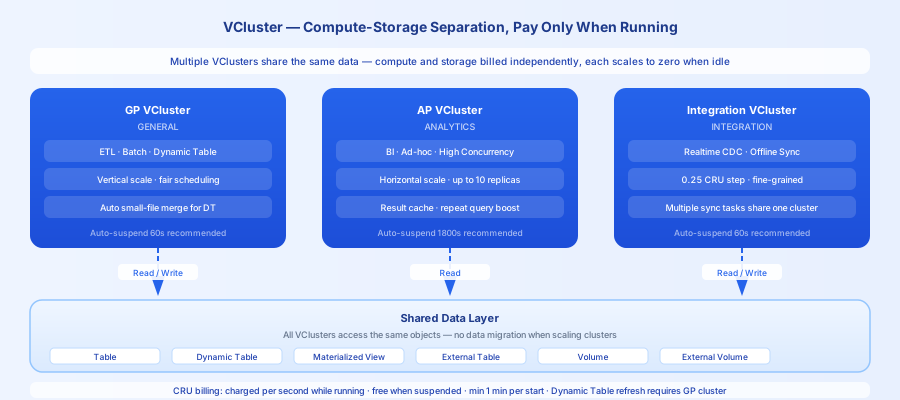
Choosing a Cluster Type
| Type | Use cases | Key characteristics |
|---|---|---|
| General-purpose (GENERAL) | ETL data processing, Dynamic Table refresh, offline batch jobs | Jobs share resources with fair scheduling and elastic scaling. Dynamic Table refresh requires this type (supports automatic small-file compaction). |
| Analytics (ANALYTICS) | BI queries, ad-hoc analysis, high-concurrency queries | Supports horizontal scale-out with multiple instances; result caching accelerates repeated queries. |
| Integration (INTEGRATION) | Real-time / offline data sync jobs | Optimized for integration tasks; multiple sync jobs share a single cluster. |
Selection rules:
- ETL jobs → General-purpose: lower cost, no resource contention with queries.
- BI reports / ad-hoc queries → Analytics: result caching, multi-instance concurrency.
- Data sync jobs → Integration: dedicated resources, no impact on other workloads.
- Dynamic Table refresh → General-purpose: Analytics clusters do not support automatic small-file compaction during refresh.
Core Mechanisms
CRU (Compute Resource Unit): The unit of measurement for compute resources, abstracting away differences between cloud platforms and CPU architectures. Billed by actual runtime; no charges when suspended. Runtimes under 1 minute are billed as 1 minute.
Auto suspend/resume: A cluster can automatically suspend when idle (billing stops) and automatically wake up when a new job is submitted. Recommended settings:
- ETL job clusters: auto-suspend after 60 seconds to release resources quickly.
- BI query clusters: auto-suspend after 1800 seconds (30 minutes) to leverage result caching for repeated queries.
Horizontal scale-out (Analytics only): When concurrent queries exceed the capacity of a single instance, additional replicas start automatically to share the load and scale back down once queries complete.
Quick Example
Common Issues
Issue 1: Dynamic Table using an Analytics cluster
Problem: Dynamic Table refresh is scheduled on an Analytics cluster.
Symptom: The number of data files keeps growing, queries get progressively slower, and small-file count explodes.
Solution: Dynamic Table refresh must use a General-purpose cluster. Analytics clusters do not support automatic small-file compaction during the refresh process.
Issue 2: ETL and BI sharing the same cluster
Problem: Large-batch ETL jobs and BI queries share the same cluster.
Symptom: BI queries queue up and reports are delayed; ETL jobs also slow down because BI queries consume resources.
Solution: Split clusters by workload type — give ETL and BI each their own independent cluster so they don't interfere with each other.
Issue 3: Auto-suspend time too short causes frequent cold starts
Problem: The BI cluster's auto-suspend is set to 60 seconds.
Symptom: Every query has to wait for a cold start (typically 10–30 seconds), resulting in a poor user experience. Additionally, since each start is billed as at least 1 minute, costs actually increase.
Solution: Set the BI cluster's auto-suspend time to 30 minutes or more to take advantage of result caching for repeated queries.
Cost Impact
Compute Cost
- Billed by CRU × runtime; no charges while suspended.
- Larger sizes (more CRUs) cost more per unit time but complete large jobs faster.
- When horizontal scale-out is enabled on an Analytics cluster, the replica count changes dynamically — monitor peak costs.
Storage Cost
- VClusters themselves incur no storage costs; data is stored in object storage.
- The
PRELOAD_TABLESfeature on Analytics clusters preloads data into local SSD cache (temporary storage, no additional charge).
Lifecycle Management
In This Section
| Page | Description |
|---|---|
| VCluster (Compute Cluster) | Cluster type details, size selection, horizontal scale-out mechanism |
Related Documentation
| Document | Description |
|---|---|
| Managing Compute Clusters | Web UI operations and management |
| Horizontal Elastic Scaling | How concurrency scaling works for Analytics clusters |
| Specification Reference | CRU specification code reference table |
| Create Compute Cluster | Complete DDL syntax |