
Data Analytics Agent (Analytics Agent)
Analytics Agent is a built-in enterprise-grade conversational data analytics Agent in Singdata Lakehouse. Business users ask questions in natural language, and the system automatically selects data, generates SQL, and returns tables and charts — no SQL required, no need to know table names. It is not just "querying a database in plain language". Analytics Agent organizes data assets, field semantics, metric definitions, knowledge documents, Answer Builders, permissions, and auditing in Lakehouse, enabling large language models to complete analyses within a controlled enterprise context rather than freely accessing all data.
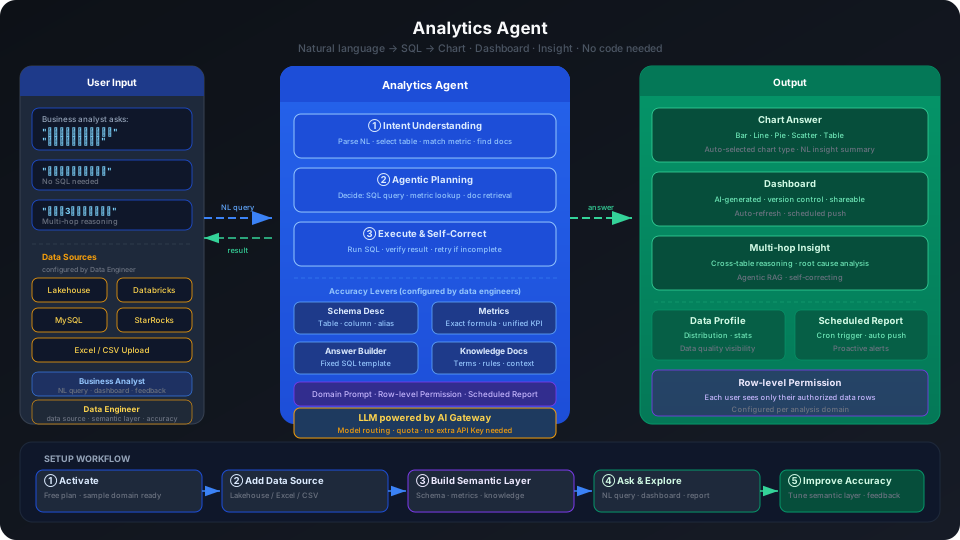
Quick Start
① Activate the service (1 minute)
Find the Analytics Agent product card on the management center homepage and click "Free Activation". New users are recommended to check "Also activate a Lakehouse instance as the default data source" — the system will automatically configure sample data.
② Try with sample data (5 minutes)
Go to the product homepage, find the analysis domain marked "Sample", click "Start Analysis", and ask questions directly:
- "What is the average second-hand housing price by district?"
- "Which district has the highest listing volume?"
③ Connect your own data (completed by data developers)
Add a data source → Create an analysis domain → Configure the semantic layer → Start conversational analysis. → Detailed steps
Supported data sources: Lakehouse, Databricks, MySQL, StarRocks, and Excel/CSV uploads.
When to Use
| Scenario | Suitable? |
|---|---|
| Natural language queries, trend analysis, comparisons | ✅ Core use case |
| Quickly generating AI dashboards | ✅ |
| Multi-department shared access with per-user data and permission isolation | ✅ Analysis domain + row-level permissions |
| Unifying high-frequency metric definitions | ✅ Metrics + knowledge + Answer Builder |
| Precise SQL logic control, complex ETL | ❌ Use Studio SQL tasks |
| Vector search / RAG Q&A | ❌ Use Vector Search + AI Functions |
Core Concepts
Analysis Domain — Define Scope
An analysis domain is the workspace for Q&A and the first layer of governance boundary. A table that is not added to an analysis domain will not participate in Q&A for that domain. It is recommended to create separate analysis domains for different business areas (sales, finance, operations) to avoid putting all tables and users into one large domain.
Semantic Layer — Define Meaning
The semantic layer lives inside the analysis domain and tells the model what the enterprise's data means.
| Configuration | Problem It Solves |
|---|---|
| Field semantics | What this field is called in the business, and whether it suits a dimension or measure |
| Virtual columns | When the underlying data lacks a ready-made field that needs to be derived or concatenated |
| Metrics | Unified calculation definitions for core KPIs |
| Answer Builder | Fixed SQL templates for complex multi-table JOINs |
| Knowledge | Business terms, synonyms, and metric definition explanations |
The relationship between the two: first define the scope with an analysis domain, then configure the semantic layer within the domain to define meaning. A complete trusted chain is: Analysis domain isolation → Semantic layer configuration → Permissions / row-level permissions → NL Q&A → Charts / tables / SQL → Dashboards / scheduled tasks.
→ Usage Guide (all concepts and role responsibilities) · Analysis Domain Planning Guide · Configuration Guide
How It Works
Analytics Agent uses an Agentic RAG architecture, with the LLM actively planning and reasoning within a controlled context:
- Understand intent — Interprets the question and determines which tables to query and which metrics to read
- Active orchestration — Decides whether to execute SQL, read a file, or check a metric definition
- Iterative refinement — Self-corrects when initial results are insufficient, until the answer is complete
All LLMs are managed and controlled by AI Gateway. Analytics Agent does not require a separate model API Key configuration.
Choose Your Path
Analyze Data
Goal: Ask questions, read results, use dashboards
Question Asking Guide — How to ask better questions Reading Analysis Results — Understanding values, tables, and charts Analysis Patterns Guide — Lookup, comparison, trends, rankings Using Data and Exploration — See which tables and fields are in the current domain DataGPT Dashboard User Guide — Save charts, share with your team Handling Feedback — Submit corrections when answers are inaccurate
→ Analyst Guide (complete directory)
Administration and Maintenance
Goal: Configure the semantic layer, manage permissions, review audits
Analysis Domain Planning Guide — Enterprise-level analysis domain division Configure Analysis Domain — Create domains, add tables, configure field semantics Metrics and Answer Builder — Lock in calculation definitions Configure Knowledge — Business terms and metric definitions Answer Builder Best Practices — SQL template design Troubleshoot Q&A Accuracy Issues — Diagnose and fix
→ Configuration Guide (complete directory)
Governance
Goal: Users, roles, permissions, auditing
Governance Overview — Permission layering, domain isolation, and audit loop Manage Permissions — Accounts, roles, domain permissions Configure Row-Level Permissions — Control data visibility per user View Audit Logs — Track configuration changes Bulk Download and Data Export Governance — Download permissions and export auditing
Go Live and Launch
Goal: From PoC to production
From PoC to Production: Adoption Guide — Adoption methodology and common pitfalls Launch Checklist for Analysis Domain — Health check + pre-launch checklist Validate Q&A Quality — Validate configuration with typical questions Analysis Domain Configuration Tips and FAQs — Lessons learned and FAQs
Operations
Message Notifications — Background task status User Settings — Logo, theme, and color scheme
Other
Quick Start · Model Selection and Configuration · AI Gateway · Lakehouse Analytics Agent Quick Tour · Q&A Accuracy Improvement · Web Data Retrieval and Conversational Data Analysis
For suggestions or questions, contact us: Phone 400-6767-862 · Email service@singdata.com