
Object Model Overview
The Singdata Lakehouse object model defines the types, hierarchy, and interactions of all manageable resources in the system. Understanding the object model helps you find the features you need, organize data assets correctly, and design a sound data architecture.
Object Hierarchy
Objects in Lakehouse are organized in the following hierarchy:
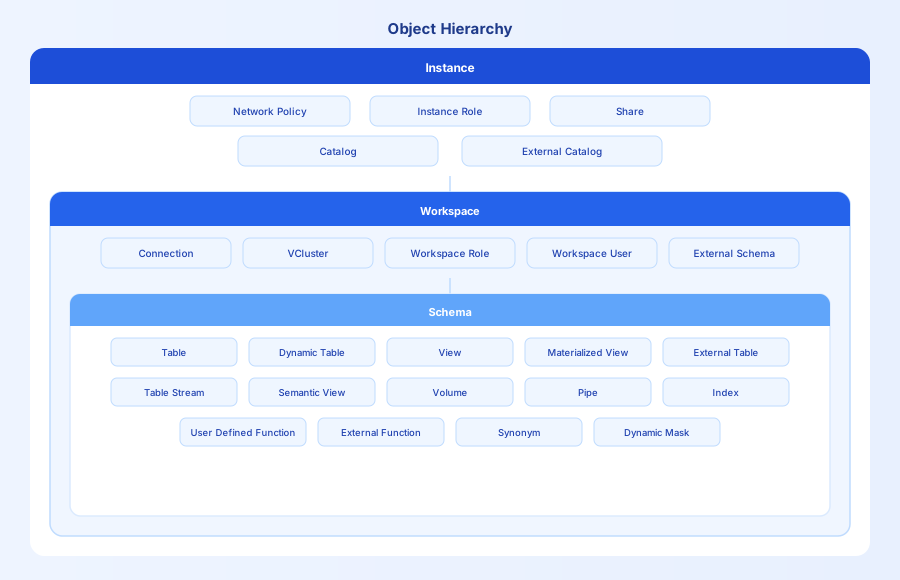
Hierarchy description:
| Level | Description | Contained objects |
|---|---|---|
| Instance | The service instance is the top-level container for all Lakehouse resources, including compute, storage, and metadata | Network Policy, Instance Role, Share, Catalog (three types: Workspace / External Catalog / SHARED) |
| Workspace | A Workspace is a MANAGED-type Catalog that provides both a data layer (Schemas and data objects) and a Studio layer (VCluster, users, job scheduling). Workspaces are isolated from each other by default | Connection, VCluster, Workspace Role, Workspace User, External Schema, Studio jobs (SQL / Python / Shell / sync tasks / workflows), and all subordinate Schemas |
| Schema | A Schema is the namespace for data objects within a Workspace, used for logical grouping and management of tables, views, and other objects | Table, Dynamic Table, View, Volume, Pipe, Table Stream, Index, Function, Synonym, Semantic View |
Object Categories
Objects in Lakehouse are grouped by purpose into the following categories:
Organizational Hierarchy
Organizational hierarchy objects form the resource structure of Lakehouse:
-
Workspace — The native top-level namespace in Lakehouse, providing two layers of capability: a data layer (all Schemas and data objects, using three-part naming
workspace.schema.table) and a Studio layer (independent user system, role-based permissions, VCluster, and job scheduling). Workspaces are isolated from each other by default. Belongs to the Instance level. -
Catalog — The general top-level namespace concept introduced for federated queries. A Workspace is the MANAGED type (full capability). Two additional read-only types exist, neither of which has a Studio layer:
- External Catalog (EXTERNAL) — Maps metadata from external data sources (Hive, Databricks, Iceberg, etc.), enabling direct queries on external data using three-part naming
catalog.schema.tablewithout data migration. Belongs to the Instance level. - SHARED — System-built shared datasets (TPC-H / TPC-DS), read-only. Belongs to the Instance level.
- External Catalog (EXTERNAL) — Maps metadata from external data sources (Hive, Databricks, Iceberg, etc.), enabling direct queries on external data using three-part naming
-
Schema — The logical namespace for data objects within a Workspace, used for layered management (e.g., ods / dwd / ads). Different Schemas within the same Workspace can reference each other. Belongs to the Workspace level.
-
External Schema — Created from an External Catalog, maps a Schema from an external data system into the current Workspace so users can query external data with standard SQL without data migration. Belongs to the Workspace level.
Data Tables
Data tables are the core objects for storing and processing data. All belong to the Schema level:
- Table — A columnar-storage structured data table supporting INSERT / UPDATE / DELETE. The foundational storage unit for all layers of a data warehouse.
- Dynamic Table — Defines transformation logic in SQL; the system automatically refreshes results incrementally. Suitable for building ODS→DWD→ADS data pipelines with less manual scheduling code.
- View — A virtual table that stores no data and is computed dynamically at query time. Useful for encapsulating complex SQL and enforcing column-level access control.
- Materialized View — Pre-computes and physically stores query results. Suitable for frequently executed fixed aggregation queries, trading storage for query speed.
- External Table — Data resides in an external system (Delta Lake, Hudi, Kafka, etc.); Lakehouse manages only the metadata. Suitable when you want to query data in place without migrating it.
- Semantic View — Encapsulates multi-table JOIN and aggregation logic as a business semantic layer. BI tools and AI agents access data through Semantic Views without depending on the underlying table structure.
File Storage
File storage objects belong to the Schema level and are used to manage unstructured data and object storage files:
- Volume — A file storage mount point. Pipes read files from a Volume and write them into tables; External Functions can read model files stored in a Volume.
- Internal Volume — User Volume (personal user space) and Table Volume (table-associated storage), created automatically with the instance.
- External Volume — Mounts an existing object storage bucket (S3 / OSS / COS). Data stays in place; Lakehouse accesses it through a Storage Connection.
Connection Objects
Connection objects belong to the Workspace level and centrally store authentication credentials for third-party services, avoiding hard-coded secrets in SQL:
- Connection — Securely stores authentication information for third-party services. Access is controlled by the Workspace administrator.
- API Connection — Stores invocation credentials for cloud functions, used by External Functions to call services such as Alibaba Cloud FC and Tencent Cloud SCF.
- Storage Connection — Stores access keys for object storage, used by external Volumes and external tables (S3, OSS, COS).
- Catalog Connection — Stores connection information for external metadata services, used by External Catalogs to connect to Hive Metastore and similar systems.
Data Pipelines and Change Capture
Data pipeline objects belong to the Schema level and handle automatic data flow and change tracking:
- Pipe — Continuously monitors a Volume or Kafka topic and automatically writes newly arrived files or messages into a target table. It replaces manual polling scripts for automated file ingestion.
- Table Stream — A cursor object that records incremental changes (INSERT / UPDATE / DELETE) on a table without storing the data itself. Downstream Dynamic Tables or jobs consume the Stream to implement CDC-driven incremental computation.
Indexes
Indexes belong to the Schema level and build auxiliary data structures on tables to accelerate filter conditions without changing the physical storage layout:
- Bloomfilter Index — Suited for equality queries (
=,IN). It uses minimal storage overhead to reduce unnecessary block reads. - Inverted Index — Suited for full-text search and keyword matching, with support for Chinese tokenization.
- Vector Index — Suited for semantic similarity search, supporting ANN (approximate nearest neighbor) acceleration for vector retrieval.
Partitions and Bucketing
Partitions and bucketing belong to the Schema level and determine the physical organization of data. They are specified at table creation time and affect the data scan range at query time:
- Partition — Physically groups data by time or business fields. Queries automatically skip irrelevant partitions, making partitioning a primary optimization technique for large tables.
- Bucketing — Hashes data into buckets by specified columns, co-locating rows with the same key in the same bucket. This improves data locality for JOIN and aggregation workloads.
Functions
Function objects belong to the Schema level:
- User-Defined Functions — Encapsulate reusable computation logic in SQL or code, callable like built-in functions in any query.
- SQL Function — Defined with SQL expressions and executed within the engine. Suitable for encapsulating business rules, calculation formulas, and other pure-SQL logic.
- External Function — Registers an external HTTP service as a SQL function. Suitable for calling LLMs for text processing, vision services for image recognition, and other AI-augmented computation scenarios.
Synonyms
Synonym objects belong to the Schema level:
- Synonym — Creates a local alias for an object in another Schema. When the ADS layer references dimension tables from the DIM layer, synonyms avoid writing the full three-part path (
workspace.schema.table) in every query.
Data Sharing
Data sharing objects belong to the Instance level:
- Share — A Provider instance grants a Consumer instance access to specified tables or views within the same cloud and service region. The Consumer reads the Provider's original data directly — no data copying, no additional storage cost, and no synchronization delay. Cross-cloud or cross-region sharing is not supported.
Studio Objects
Studio objects belong to the Workspace level and form Lakehouse's built-in data development and scheduling environment. They share the same user system and permission controls as the SQL data objects in the same Workspace:
- SQL Job — Write and schedule SQL data processing logic in the Studio IDE, with support for dependency orchestration and time-based triggers.
- Python / Shell Job — Run custom scripts to handle complex logic that SQL cannot cover.
- Data Sync Job — Visually configure real-time CDC sync or offline batch sync for more than 40 data sources without writing code. Runs on an Integration VCluster under the hood.
- Workflow (Composite Task) — Orchestrates multiple jobs into a dependency-aware DAG for unified scheduling and monitoring.
Compute Resources
Compute resource objects belong to the Workspace level:
- VCluster (Compute Cluster) — An elastic compute resource pool that starts and stops on demand with no charges when idle. You can create multiple VClusters in the same Workspace to isolate different workloads.
- General Purpose (GP VC): Suitable for mixed ETL and query workloads.
- Analytics (AP VC): Optimized for large-scale OLAP queries; suitable for BI and ad-hoc analysis.
- Integration (Integration VC): Designed for real-time CDC sync tasks with low-latency writes.
Security Policies
Security policy objects protect data and control access:
- Network Policy — IP-based access control (allowlist / blocklist) that blocks unauthorized sources at the instance entry point. Belongs to the Instance level.
- Dynamic Masking Policy — Dynamically replaces sensitive values in specified columns based on the user's role (e.g., phone numbers displayed as
138****8888). Query results are automatically masked; the underlying data is unchanged. Belongs to the Schema level (bound to table columns).
Identity and Permissions
Users follow a two-tier model: created at the instance level, authorized at the workspace level.
- User — Created in the account console. Belongs to the Instance level. Newly created users have no data permissions by default; they must be added to a Workspace and granted a role before they can access its resources.
- Role — A collection of permissions. Roles simplify permission management by letting you grant permissions in batches.
- Instance Role — An instance-level role that applies across the entire service instance (e.g.,
instance_admin,instance_user). Belongs to the Instance level. - Workspace Role — A workspace-level role that applies only within a specific Workspace (e.g.,
workspace_admin,workspace_analyst,workspace_dev,workspace_sre). Belongs to the Workspace level.
- Instance Role — An instance-level role that applies across the entire service instance (e.g.,
Advanced Table Features
The following are configurable features at the table level, not independent object types:
- Time Travel — Access historical versions of a table to recover from accidental deletions or modifications. Use
TIMESTAMP AS OFto query data at any historical point in time. - Data Lifecycle Management — Set expiration policies for tables or partitions to automatically reclaim expired data and control storage costs.
Typical Architecture Patterns
Multi-Cloud · Multi-Region · Multi-Instance
Regardless of cloud provider or region, every Lakehouse instance provides consistent SQL syntax, object model, APIs, and permission system. Teams can switch deployment environments without rewriting code.
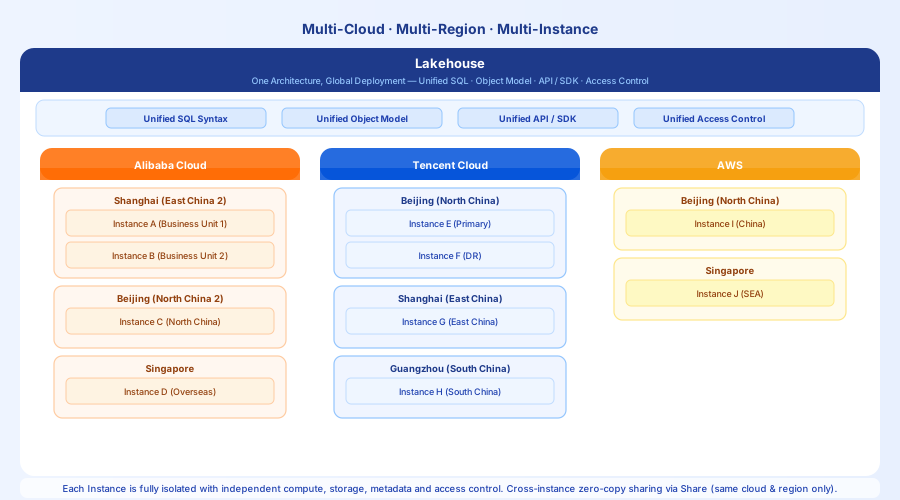
Each supported region for each cloud provider can host one or more Lakehouse instances. Instances are isolated from each other, each with its own compute, storage, metadata, and access controls.
Currently supported cloud providers and regions:
| Cloud Provider | Region |
|---|---|
| AWS | North China (Beijing), Singapore |
| Alibaba Cloud | East China 2 (Shanghai), North China 2 (Beijing), Singapore |
| Tencent Cloud | North China (Beijing), East China (Shanghai), South China (Guangzhou) |
Use cases: Multi-region disaster recovery, independent instances for overseas operations, compliance requirements for data residency.
Multiple Workspaces in One Instance — Business Line Isolation
A single instance can host multiple Workspaces. Different business lines use independent Workspaces to isolate users, permissions, compute clusters, and data objects. Workspaces are not accessible to each other by default; cross-Workspace access requires explicit authorization.
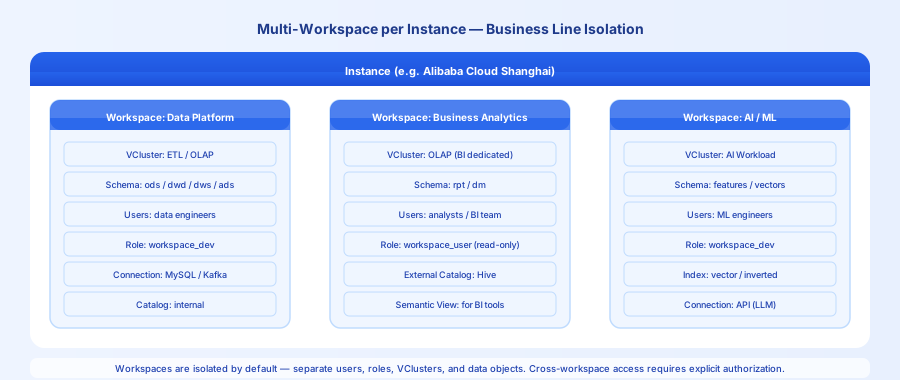
This pattern focuses on isolation: ETL jobs from the data platform team do not affect BI query performance; experiments by the algorithm team cannot accidentally modify production data; data permissions across business lines remain independent.
Typical division:
- Data Platform Workspace: Managed by data engineers, runs ETL and CDC sync jobs, holds write permissions.
- Business Analytics Workspace: For analysts and BI teams, read-only access, connected to BI tools, uses a dedicated Analytics VCluster.
- AI / ML Workspace: For algorithm engineers, runs vector search and LLM inference jobs, and uses a dedicated VCluster for AI workloads.
Multiple Schemas in One Workspace — Data Warehouse Layering
Within a single Workspace, Schemas implement data warehouse layering. Each layer's data objects are managed independently, and layers are connected through Dynamic Tables that automatically refresh incrementally. For Singdata Lakehouse, the recommended pattern is to use Schemas for layers and Dynamic Tables for automatic pipeline execution instead of manual scheduling.
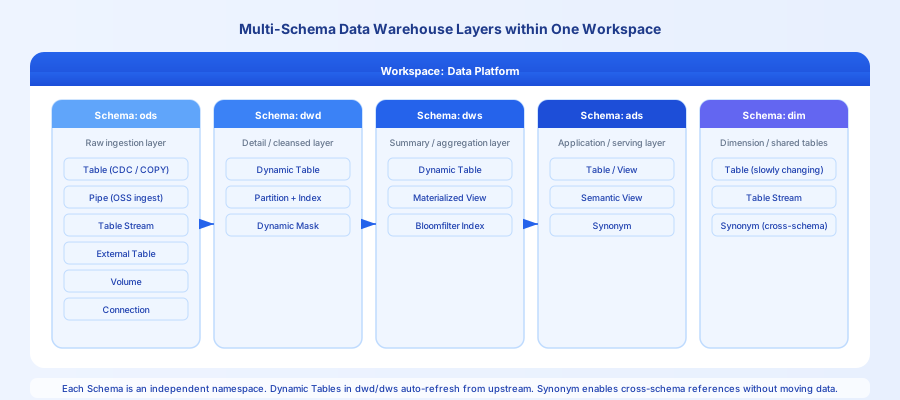
Standard layers:
| Schema | Role | Primary objects |
|---|---|---|
ods | Raw data layer, source-aligned storage | Table, Pipe, Table Stream, External Table |
dwd | Detail data layer, cleansed and transformed | Dynamic Table, Partition, Dynamic Masking |
dws | Summary data layer, aggregated metrics | Dynamic Table, Materialized View, Bloomfilter Index |
ads | Application data layer, externally exposed | Table, View, Semantic View, Synonym |
dim | Dimension layer, reused across layers | Table (slowly changing dimensions), Table Stream, Synonym |
Zero-Copy Cross-Instance Data Sharing Within the Same Cloud and Region
Using the Share object, a Provider instance can share tables or views in real time with a Consumer instance in the same cloud and service region. The Consumer queries the Provider's original data directly — no copying, no additional storage cost, and no synchronization delay.
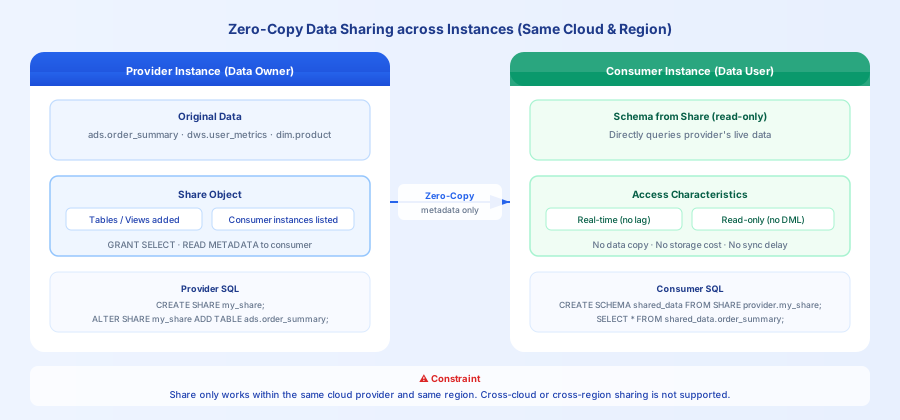
This pattern is suitable for sharing data across subsidiaries within a corporate group, or for data service providers that expose datasets to customers. The Consumer has read-only access and cannot modify the Provider's data; the Provider can revoke authorization at any time.
Constraint: Only cross-instance sharing within the same cloud provider and service region is supported. Cross-cloud or cross-region sharing is not supported.
Operation flow:
Object Relationship Quick Reference
| Scenario | Objects involved |
|---|---|
| Data ingestion (files) | Volume → Pipe → Table |
| Data ingestion (database CDC) | Connection → Real-time sync job (Studio) → Table |
| Data processing (incremental) | Table → Dynamic Table → Table |
| Data processing (CDC consumption) | Table → Table Stream → Dynamic Table (or job) → Table |
| Federated query (in-place acceleration, no data migration) | External Catalog / External Schema → Query — Implementation guide |
| Data sharing | Share → Cross-instance access within the same cloud and region (cross-cloud/cross-region not supported) |
| Query acceleration | Materialized View / Index / Partition → Table |
| AI-augmented analytics | Vector Index + Inverted Index + Semantic View |